

News

Miro: A New Standard in Responsible Innovation

Miro: A New Standard in Responsible Innovation The Miro monitor arm is setting new benchmarks in sustainability. It offers a high-performance solution without compromising on environmental responsibility. Designed with careful material selection, local sourcing, and longevity in mind, Miro’s responsible approach to design and unique manoeuvrability set it apart from the competition. Sustainable Choices Miro is crafted from energy-efficient materials with a lower carbon impact....

Read more
HSE Advisor

Role Purpose Support in the development, implementation and maintenance of the company’s Health, Safety & Environmental policies, processes, operational procedures, and standards.  Ensuring best practice and championing a continually improving HSE culture within the business. Key Responsibilities Liaise with and provide support to all areas of the business to eliminate, mitigate or reduce identified HSE exposures. Partner with the production management team and team leaders,...

Read more
CMD Ltd LAUNCHES 48-HOUR TURNAROUND ON BETATRAK® RAPID ORDERING SERVICE

CMD Ltd, the specialist in power distribution systems, workstation power and monitor arms, has launched a rapid ordering service for its Betatrak® underfloor powertrack distribution systems and accessories, with a commitment to delivering within 48-hours of an approved purchase order*. The service enables customers to order up to 50 lengths of Standard or Clean Earth (C/E) low noise Betatrak, along with up to 25 feed...

Read more

CMD INVESTS £1/4 MILLION IN NEW MACHINE AS PART OF FACTORY UPGRADE

We have invested in a new £1/4m TRUMPF CNC metal punch as part of an asset renewal strategy for our UK manufacturing capability. The new machine will be used in the production of a wide variety of our power distribution systems and workstation power products at our Rotherham factory. Suitable for handling sheet metal between 0.9mm and 3.0mm thick, the new machine will replace one...

Read more

CMD CATALOGUE PROVIDES TECHNICAL POWER DISTRIBUTION GUIDE

CMD Ltd has released a new catalogue, providing an easy to follow technical guide to our power distribution systems and plug and play desk modules. Detailing CMD’s full range of UK-manufactured power distribution systems and plug and play desk modules, the catalogue will be a helpful source of information to M&E engineers and contractors alike to understand how our power distribution systems connect together and...

Read more

Power Distribution Catalogue
CMD Ltd PLAYS ESSENTIAL ROLE IN ELECTRICAL FIT OUT AT LONDON’S PRESTIGIOUS OFFICE DEVELOPMENT

CMD Ltd, specialist in workplace connectivity and ergonomic solutions, has provided a flexible and high-quality power distribution network for The Ray, a prestigious office development in London’s Farringdon. Well-known for being the former site of The Guardian newspaper, The Ray now stands as an 83,000ft² office development characterised by a modernised warehouse aesthetic, with level two now occupied by a global social media company. The...

Read more

The Ray
CMD plugs in to european opportunity with Schuko Capsule unit launch

CMD Ltd, the specialist in power and connectivity solutions for commercial environments, has launched a Schuko version of its popular fixed format Capsule workstation power module for export to mainland Europe and beyond. A popular on desk power module comprising two sockets and dual USB (type A and C) chargers, CMD’s Capsule unit is already widely specified in the UK as an off-the-shelf workstation power...

Read more

CMD White Schuko Capsule Desk Power Module
CMD LTD EXTENDS MONITOR ARM RANGE WITH THE LAUNCH OF REACH PLUS

CMD Ltd, the specialist in ergonomic and connectivity solutions for commercial interiors, has completed its Reach monitor arm range with the launch of the Reach Plus. Available in single or dual screen options, the Reach Plus has been designed to provide an ideal solution for both single and dual screen workstation configurations, or can be used with next generation of large format curved screens. Suitable...

Read more

CMD Ltd DEMONSTRATES THE ART OF POWER DISTRIBUTION AT THE UNIVERSITY OF WARWICK

CMD Ltd, the specialist in workplace connectivity and ergonomic solutions, has provided Betatrak busbar power distribution and a range of electrical accessories for two major capital investment projects at the University of Warwick. Designed by Fielden Clegg Bradley Studios, the £33 million Faculty of Arts building is a showpiece development comprising four interconnected structures set around a central atrium, which will enable inter-disciplinary collaboration across...

Read more

University of Warwick
CMD BRINGS HARMONY TO COVENTRY UNIVERSITY RESEARCH FACILITIES

CMD Ltd, the specialist in power distribution solutions and workstation power and ergonomics, has provided under desk and on desk power modules for the refurbishment of three Coventry University research buildings. Located on Coventry University Technology Park, a business park designed to encourage collaboration between the university and knowledge-based businesses, the three buildings are being repurposed as office accommodation for university research teams. The refurbishment...

Read more

Coventry University

What is a USB Connector and How Does It Work?

In the world of electronics, the USB Connector plays a crucial role. According to a recent report by Grand View Research, the USB connector market is projected to reach $26.6 billion by 2027. This growth highlights the connector's importance in connecting devices seamlessly. Renowned expert Dr. Emily Chen states, "USB connectors are essential for data transfer and power supply, enabling communication between devices."

Modern devices rely heavily on USB connectors. They facilitate everything from charging smartphones to connecting printers and external hard drives. The versatility of these connectors is remarkable, yet there's room for improvement in durability and data transfer rates. Current standards may not meet the high-speed requirements of future technologies.

Consumer feedback often points to frustrations with compatibility. Users want universal solutions that transcend device differences. Innovations in the USB connector industry must address these concerns. As the technology landscape evolves, the necessity of reliable and adaptable USB connectors becomes even more apparent.

What is a USB Connector and How Does It Work?

What is a USB Connector?

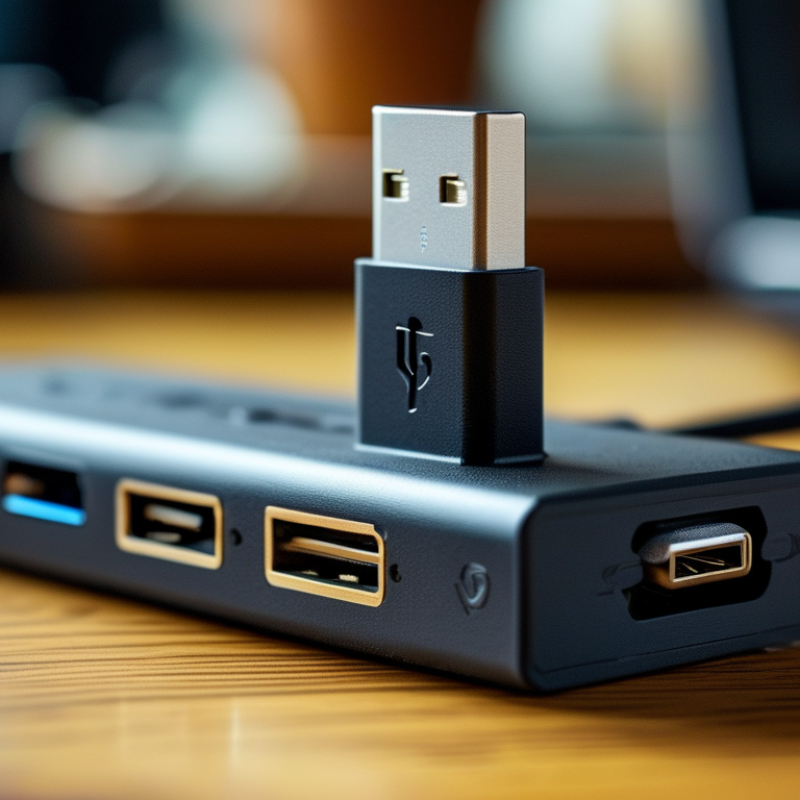
A USB connector is a common interface used in many electronic devices. It allows for data transfer and charging. You can find these connectors on computers, phones, and tablets. They are designed to be versatile and user-friendly. The standard USB connector has evolved over time, resulting in various types.

USB connectors come in different shapes and sizes. The most common types are USB-A, USB-B, and USB-C. USB-A is the larger version, often seen on computers. USB-B is mostly used for printers and other devices. USB-C is becoming increasingly popular due to its reversible design and faster data transfer capabilities. Using a USB connector typically involves plug-and-play functionality, which makes connecting devices simple.

While USB connectors are generally reliable, issues can arise. Sometimes, connections may be loose, leading to intermittent problems. Users might also struggle with compatibility between different USB types. It's crucial to check the specifications of devices before connecting them. Understanding the fundamentals of USB connectors can help users troubleshoot and make the most of their technology.

The Evolution of USB Connectors: A Brief History

The evolution of USB connectors has been remarkable since their inception in the mid-1990s. Initially, USB 1.0 and 1.1 offered basic data transfer speeds of 1.5 Mbps and 12 Mbps, respectively. This marked a significant improvement over the slow serial or parallel ports of the time. According to the USB Implementers Forum, USB technology has enabled seamless connectivity across devices, boosting its popularity.

In 2000, USB 2.0 emerged, offering speeds of up to 480 Mbps. This era saw a vast increase in the adoption of USB connectors across various gadgets, including cameras and printers. An estimated 3 billion USB devices shipped globally in 2019 alone, highlighting the vast reliance on this technology. By 2014, USB 3.0, with speeds of up to 5 Gbps, further transformed user experiences. Yet, the shift from traditional USB to USB-C continues to spark debate. While USB-C promises versatility, some users struggle with adapter compatibility issues.

Each new version of USB aimed to enhance functionality and speed, yet challenges remain. The fundamental question persists: Are we truly ready to adopt the latest in USB technology? As industry standards evolve, achieving universal acceptance remains a complex challenge.

Types of USB Connectors and Their Uses

USB connectors are vital for connecting devices. They come in various types, each serving specific functions. The most common types include USB-A, USB-B, USB-C, and Micro USB. USB-A is the standard rectangular connector, widely used in computers and chargers. According to industry reports, it accounted for around 60% of all USB connections in 2022.

USB-B connectors are primarily used in printers and large devices. They have a distinctive square shape but can be bulky for some applications. In recent years, USB-C has gained popularity, particularly with mobile devices and laptops. Research indicates that USB-C usage grew by 150% from 2020 to 2023, due to its fast data transfer rates and reversible design.

Micro USB was once the standard for smartphones but is gradually losing ground to USB-C. Many users face difficulties when distinguishing between these connectors. Recognizing the correct type for a device can reduce frustration. As technology advances, the evolution of USB connectors will likely continue, leading to potential confusion about compatibility and usage. Understanding these types is crucial for efficient device connectivity.

How USB Connectors Function in Data Transmission

USB connectors play a crucial role in data transmission, allowing devices to communicate efficiently. When you connect a USB device to a computer, the connector establishes a physical and electrical link. This link facilitates both power transfer and data exchange.

The transmission process begins when a device is plugged in. The host sends signals to recognize the connected device. This recognition is quick, often taking just a few seconds. Once the device is detected, data can flow back and forth. The USB protocol manages how data is packaged and sent. It ensures that information arrives intact and in the correct sequence.

While USB connectors are generally reliable, issues can arise. Loose connections can disrupt data transfer. Additionally, cables can wear out over time, leading to connectivity problems. These factors require users to be mindful about their devices and cables. Understanding these nuances can enhance your experience with USB technology.

Common Issues and Troubleshooting with USB Connectors

USB connectors remain a staple in modern technology, yet many users face issues regularly. Common problems include loose connections and failure to recognize devices. According to a recent industry report, approximately 25% of users experience connectivity issues with USB ports at least once a month. Such frequent challenges highlight the importance of understanding and troubleshooting USB connectors effectively.

One major difficulty arises from physical wear. Over time, USB ports can become damaged from repeated plugging and unplugging. This damage may lead to intermittent connections, causing frustration. Additionally, dirt and dust accumulation can hinder connectivity. Cleaning these ports carefully can often restore functionality. However, users sometimes overlook basic maintenance, leading to escalating issues.

Another significant concern is compatibility. Not all USB connectors are created equal. Users often mix different types or standards, which can create confusion. Industry data suggests that inadequate compatibility can account for nearly 30% of USB-related issues. It's essential to know the specific type of connector in use and ensure compatibility with the devices involved. Understanding these potential issues can help users navigate the complexities of USB technology more effectively, yet many still struggle with basic troubleshooting practices.

Article Source: