

News

Miro: A New Standard in Responsible Innovation

Miro: A New Standard in Responsible Innovation The Miro monitor arm is setting new benchmarks in sustainability. It offers a high-performance solution without compromising on environmental responsibility. Designed with careful material selection, local sourcing, and longevity in mind, Miro’s responsible approach to design and unique manoeuvrability set it apart from the competition. Sustainable Choices Miro is crafted from energy-efficient materials with a lower carbon impact....

Read more
HSE Advisor

Role Purpose Support in the development, implementation and maintenance of the company’s Health, Safety & Environmental policies, processes, operational procedures, and standards.  Ensuring best practice and championing a continually improving HSE culture within the business. Key Responsibilities Liaise with and provide support to all areas of the business to eliminate, mitigate or reduce identified HSE exposures. Partner with the production management team and team leaders,...

Read more
CMD Ltd LAUNCHES 48-HOUR TURNAROUND ON BETATRAK® RAPID ORDERING SERVICE

CMD Ltd, the specialist in power distribution systems, workstation power and monitor arms, has launched a rapid ordering service for its Betatrak® underfloor powertrack distribution systems and accessories, with a commitment to delivering within 48-hours of an approved purchase order*. The service enables customers to order up to 50 lengths of Standard or Clean Earth (C/E) low noise Betatrak, along with up to 25 feed...

Read more

CMD INVESTS £1/4 MILLION IN NEW MACHINE AS PART OF FACTORY UPGRADE

We have invested in a new £1/4m TRUMPF CNC metal punch as part of an asset renewal strategy for our UK manufacturing capability. The new machine will be used in the production of a wide variety of our power distribution systems and workstation power products at our Rotherham factory. Suitable for handling sheet metal between 0.9mm and 3.0mm thick, the new machine will replace one...

Read more

CMD CATALOGUE PROVIDES TECHNICAL POWER DISTRIBUTION GUIDE

CMD Ltd has released a new catalogue, providing an easy to follow technical guide to our power distribution systems and plug and play desk modules. Detailing CMD’s full range of UK-manufactured power distribution systems and plug and play desk modules, the catalogue will be a helpful source of information to M&E engineers and contractors alike to understand how our power distribution systems connect together and...

Read more

Power Distribution Catalogue
CMD Ltd PLAYS ESSENTIAL ROLE IN ELECTRICAL FIT OUT AT LONDON’S PRESTIGIOUS OFFICE DEVELOPMENT

CMD Ltd, specialist in workplace connectivity and ergonomic solutions, has provided a flexible and high-quality power distribution network for The Ray, a prestigious office development in London’s Farringdon. Well-known for being the former site of The Guardian newspaper, The Ray now stands as an 83,000ft² office development characterised by a modernised warehouse aesthetic, with level two now occupied by a global social media company. The...

Read more

The Ray
CMD plugs in to european opportunity with Schuko Capsule unit launch

CMD Ltd, the specialist in power and connectivity solutions for commercial environments, has launched a Schuko version of its popular fixed format Capsule workstation power module for export to mainland Europe and beyond. A popular on desk power module comprising two sockets and dual USB (type A and C) chargers, CMD’s Capsule unit is already widely specified in the UK as an off-the-shelf workstation power...

Read more

CMD White Schuko Capsule Desk Power Module
CMD LTD EXTENDS MONITOR ARM RANGE WITH THE LAUNCH OF REACH PLUS

CMD Ltd, the specialist in ergonomic and connectivity solutions for commercial interiors, has completed its Reach monitor arm range with the launch of the Reach Plus. Available in single or dual screen options, the Reach Plus has been designed to provide an ideal solution for both single and dual screen workstation configurations, or can be used with next generation of large format curved screens. Suitable...

Read more

CMD Ltd DEMONSTRATES THE ART OF POWER DISTRIBUTION AT THE UNIVERSITY OF WARWICK

CMD Ltd, the specialist in workplace connectivity and ergonomic solutions, has provided Betatrak busbar power distribution and a range of electrical accessories for two major capital investment projects at the University of Warwick. Designed by Fielden Clegg Bradley Studios, the £33 million Faculty of Arts building is a showpiece development comprising four interconnected structures set around a central atrium, which will enable inter-disciplinary collaboration across...

Read more

University of Warwick
CMD BRINGS HARMONY TO COVENTRY UNIVERSITY RESEARCH FACILITIES

CMD Ltd, the specialist in power distribution solutions and workstation power and ergonomics, has provided under desk and on desk power modules for the refurbishment of three Coventry University research buildings. Located on Coventry University Technology Park, a business park designed to encourage collaboration between the university and knowledge-based businesses, the three buildings are being repurposed as office accommodation for university research teams. The refurbishment...

Read more

Coventry University

7 Smart Lectern Buying Tips for Global Buyers

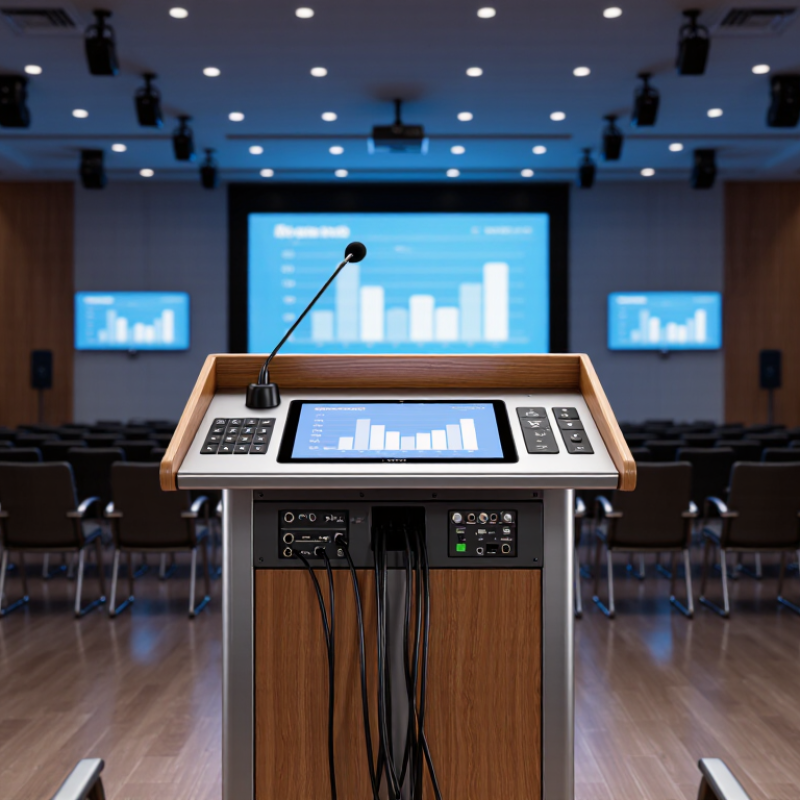
Global buyers are no longer choosing a lectern as simple furniture. They are selecting a control point for presentations, hybrid meetings, teaching, and public communication. AVIXA’s 2024 Industry Outlook valued the global professional AV industry at approximately US$306 billion in 2023, reflecting strong demand for connected workplace and learning technologies. A Smart Lectern belongs within this larger shift.

The buying decision is more complex than screen size or microphone count. Buyers must examine processor performance, camera compatibility, wireless sharing, network security, accessibility, power standards, and regional service support. An attractive touchscreen may become frustrating if menus respond slowly or replacement parts take months to arrive. Small details matter. Cable routing matters. Fan noise matters. Desk height matters.

UNESCO’s 2023 Global Education Monitoring Report also stresses that technology delivers value only when it fits its educational and organizational context. That warning applies to conference venues and training rooms too. Experienced AV integrators typically evaluate the room first, then match the lectern to audience size, lighting, acoustics, and operating habits. This guide presents seven practical Smart Lectern buying tips for global buyers, using evidence from industry research and real procurement considerations. It also questions a common assumption: more automation does not always mean better usability. No product fits every market. Import duties, data policies, language support, and local technicians can change the total cost significantly. A careful buyer looks beyond the product brochure and tests the complete experience before approving an international purchase.

7 Smart Lectern Buying Tips for Global Buyers

Define Your Presentation Needs and Smart Lectern Use Cases

7 Smart Lectern Buying Tips for Global Buyers

Before comparing models, define how your presenters actually work. A university lecture hall may need dual displays, annotation, and lecture capture. A corporate training room may need quick wireless sharing and simple camera control. Government or healthcare spaces may require stricter access controls and documented data handling. Write down the room size, audience distance, content types, and presenter skill levels.

Measure the lectern area carefully. A bright 15-inch touchscreen can be useful, but it may feel crowded beside documents or a microphone. Check whether presenters need HDMI, USB-C, network access, or assistive listening connections. Test the screen from the back row. Small labels become frustrating during a live session. Provide adjustable height when different users share the room. Accessibility is practical, not decorative.

Think beyond the demonstration. Ask about software updates, operator training, replacement parts, and local technical support. Regional power standards and language settings also affect daily use. In my experience, the simplest interface often performs best under pressure. Yet I once underestimated cable management, and the installation looked untidy within weeks. That mistake changed my checklist. Leave service space, document every connection, and test the complete workflow with a real presentation. A smart lectern should reduce decisions, not create new ones.

Compare Core Features, Connectivity, and Control Systems

Global buyers should compare a lectern’s core features before judging its appearance. Check the height range, writing surface, microphone support, and screen size. A stable frame matters in busy classrooms, conference halls, and government venues. Look for rounded edges, quiet adjustment motors, and cable channels that stay accessible. Small details often affect daily reliability.

Tip 1: Test connectivity with your actual equipment. A useful lectern may include HDMI, USB, audio input, network access, and wireless presentation support. However, connector types and power standards differ between countries. Confirm voltage compatibility and regional safety certifications before ordering. Ask for a wiring diagram, not only a feature list. One overlooked port can create an expensive installation problem.

Tip 2: Compare control systems through real tasks. The operator should adjust lighting, display input, microphone volume, and screen position from one clear interface. Physical buttons can help during fast presentations, while touch panels offer broader control. Test both if possible. I have found that advanced interfaces sometimes confuse occasional users. Simple labels usually perform better than impressive menus. Also inspect remote management, password protection, and software update procedures. These features support professional operation, but they require trained staff and regular review.

Evaluate Ergonomics, Materials, Mobility, and Accessibility

7 Smart Lectern Buying Tips for Global Buyers

Evaluate Ergonomics, Materials, Mobility, and Accessibility

A lectern should support the speaker, not force awkward posture. Set the reading surface near elbow height, with enough depth for notes and a laptop. A 10–15-degree angle can reduce neck bending during long presentations. Test the front edge carefully; sharp corners become noticeable after an hour.

The World Health Organization’s Global Status Report on Physical Activity 2022 found that 31% of adults worldwide were insufficiently active in 2022. Standing presentations cannot solve inactivity, but adjustable height and comfortable foot clearance encourage better movement.

Material selection affects durability, maintenance, and environmental impact. Powder-coated steel offers strong frame protection, while sealed wood surfaces tolerate frequent cleaning when properly finished. Ask suppliers for recycled content, material safety documentation, and credible environmental product declarations. Specifications can sound impressive. They still need verification. Prefer replaceable casters, accessible cable channels, and fasteners that local technicians can service.

Mobility must not weaken stability. Locking casters should hold on smooth floors, while a broad base reduces tipping during repositioning.

Accessibility requires more than a ramp-friendly design. The WHO’s Global Report on Health Equity for Persons with Disabilities estimates that 1.3 billion people experience significant disability.

Check knee clearance, reachable controls, visual contrast, and microphone access from seated positions. A design may pass a checklist yet feel inconvenient in practice. Invite diverse users to test it before purchase.

Check Global Compatibility, Safety Standards, and Local Support

Global buyers should treat a lectern as site equipment, not simply furniture. Confirm the local voltage, frequency, plug type, and power socket before comparing features. A unit designed for one market may need costly electrical changes elsewhere. Check its dimensions against doorways, lifts, and stage layouts. Small details matter.

Safety documentation deserves careful attention. Request test reports for electrical safety, electromagnetic compatibility, grounding, and material performance. Applicable requirements may include IEC standards or regional certification rules, but certificates must match the exact model. Do not rely on a supplier’s general statement. Inspect cable routing, locking wheels, sharp edges, heat ventilation, and emergency power access. It should feel stable when a speaker leans on the writing surface. Sadly, attractive finishes can hide weak construction.

Connectivity is the third practical test. Confirm microphone inputs, display connections, wireless options, and language settings for local users. Ask whether replacement cables and control parts are stocked nearby. Local support should include installation guidance, fault response times, spare-part availability, and clear warranty terms. In procurement reviews, I have seen projects delayed because one small adapter was unavailable. That mistake is easy to repeat. Request a sample video call, a service contact, and a written maintenance schedule before payment. Good support is measurable, not merely promised.

7 Smart Lectern Buying Tips for Global Buyers

Check global compatibility, safety standards, and local support before selecting a smart lectern. The chart compares nominal mains voltage and frequency in representative global markets.

A lectern intended for international deployment should support the target market’s nominal voltage and frequency, include suitable plugs and power supplies, and meet applicable electrical and electromagnetic requirements. Buyers should also verify local certification, installation conditions, spare-parts availability, warranty coverage, software language support, network compatibility, and after-sales service.

Reference basis: IEC 60038 nominal supply voltages and commonly published national electrical specifications. Values shown are nominal country-level values; local conditions and regulatory requirements may differ.

Assess Total Cost, Warranty Coverage, and Supplier Reliability

For global buyers, a lectern’s price is only the starting point. Calculate the total cost before comparing suppliers. Include freight, import duties, assembly, software licenses, training, spare parts, and local installation. A low quote can become expensive after delivery. Ask for a five-year cost sheet. It should show electricity use, maintenance intervals, and replacement prices. Small items matter. A missing cable or mounting bracket can delay an event.

Warranty coverage deserves a line-by-line review. Check which components are covered, including screens, microphones, control panels, and power systems. Confirm the coverage period and whether labor, shipping, and onsite service are included. Ask how claims are handled across borders. Get response times in writing. A warranty excluding frequent-use damage may provide less protection than expected. Also clarify software updates and discontinued parts. The promise sounds reassuring until a critical component fails.

Supplier reliability is harder to measure than price. Request references from institutions with similar operating conditions. Review production capacity, quality checks, export experience, and technical support hours. A clear service contact matters during a live presentation. Ask for sample documents, packing photos, and a realistic delivery schedule. Keep records. I would not rely on polished emails alone. Support instructions should be usable by local technicians. No checklist is perfect. Leave room for currency changes and delayed approvals. That caution may feel excessive, but rushed purchasing often costs more.

7 Smart Lectern Buying Tips for Global Buyers - Assess Total Cost, Warranty Coverage, and Supplier Reliability
Tip Buying Dimension Practical Benchmark or Data Point What to Verify Before Purchase Risk Priority
1 Calculate Total Cost of Ownership Compare the purchase price with freight, import duty, installation, training, software subscriptions, replacement parts, and energy use over a planned 5-year service period. Request a line-item quotation showing product cost, packaging, shipping terms, taxes, commissioning, and recurring fees separately. High
2 Check Warranty Coverage A practical minimum for commercial AV equipment is a 12-month warranty. Longer coverage may be preferable for permanently installed equipment or multi-site projects. Confirm the warranty start date, covered components, labor coverage, exclusions, response time, return procedure, and whether international shipping is included. High
3 Evaluate Supplier Reliability Assess operating history, export experience, production capacity, quality-control procedures, and the supplier's ability to provide technical support in your region. Ask for verifiable customer references, factory or warehouse evidence, quality certificates where relevant, production lead times, and a documented escalation process. High
4 Confirm International Compatibility Power systems commonly differ by market, including approximately 100–127 V or 220–240 V AC and 50 or 60 Hz frequencies. Plug formats and local electrical requirements also vary. Verify input voltage, frequency, plug type, electrical certifications required in the destination market, language options, and compatibility with local AV infrastructure. High
5 Review Functional Specifications Assess the built-in display, microphone inputs, speakers, camera connectivity, network ports, USB interfaces, cable management, lighting, and control-system integration. Match every required function to a written specification. Request a live demonstration or test unit for high-volume, education, government, or conference applications. High
6 Measure Ergonomics and Accessibility Check working height, viewing angle, writing surface, operator legroom, mobility, stability, ventilation, and access to controls. Adjustable or accessible designs may reduce installation limitations. Compare product drawings with the room layout. Confirm dimensions, load capacity, wheel locks, surface height, accessible operating areas, and safe cable routing. Medium
7 Plan Spare Parts and Serviceability Frequently replaceable items may include microphones, control panels, power modules, casters, cables, adapters, and display components. Availability can affect project downtime. Request a spare-parts list, expected availability period, service manuals, repair procedures, stock locations, technician training options, and estimated replacement lead times. High
Buyer’s evaluation rule: Select the lectern that offers the best balance of verified functionality, long-term serviceability, compliance, warranty protection, and predictable delivered cost—not simply the lowest initial price.