

News

Miro: A New Standard in Responsible Innovation

Miro: A New Standard in Responsible Innovation The Miro monitor arm is setting new benchmarks in sustainability. It offers a high-performance solution without compromising on environmental responsibility. Designed with careful material selection, local sourcing, and longevity in mind, Miro’s responsible approach to design and unique manoeuvrability set it apart from the competition. Sustainable Choices Miro is crafted from energy-efficient materials with a lower carbon impact....

Read more
HSE Advisor

Role Purpose Support in the development, implementation and maintenance of the company’s Health, Safety & Environmental policies, processes, operational procedures, and standards.  Ensuring best practice and championing a continually improving HSE culture within the business. Key Responsibilities Liaise with and provide support to all areas of the business to eliminate, mitigate or reduce identified HSE exposures. Partner with the production management team and team leaders,...

Read more
CMD Ltd LAUNCHES 48-HOUR TURNAROUND ON BETATRAK® RAPID ORDERING SERVICE

CMD Ltd, the specialist in power distribution systems, workstation power and monitor arms, has launched a rapid ordering service for its Betatrak® underfloor powertrack distribution systems and accessories, with a commitment to delivering within 48-hours of an approved purchase order*. The service enables customers to order up to 50 lengths of Standard or Clean Earth (C/E) low noise Betatrak, along with up to 25 feed...

Read more

CMD INVESTS £1/4 MILLION IN NEW MACHINE AS PART OF FACTORY UPGRADE

We have invested in a new £1/4m TRUMPF CNC metal punch as part of an asset renewal strategy for our UK manufacturing capability. The new machine will be used in the production of a wide variety of our power distribution systems and workstation power products at our Rotherham factory. Suitable for handling sheet metal between 0.9mm and 3.0mm thick, the new machine will replace one...

Read more

CMD CATALOGUE PROVIDES TECHNICAL POWER DISTRIBUTION GUIDE

CMD Ltd has released a new catalogue, providing an easy to follow technical guide to our power distribution systems and plug and play desk modules. Detailing CMD’s full range of UK-manufactured power distribution systems and plug and play desk modules, the catalogue will be a helpful source of information to M&E engineers and contractors alike to understand how our power distribution systems connect together and...

Read more

Power Distribution Catalogue
CMD Ltd PLAYS ESSENTIAL ROLE IN ELECTRICAL FIT OUT AT LONDON’S PRESTIGIOUS OFFICE DEVELOPMENT

CMD Ltd, specialist in workplace connectivity and ergonomic solutions, has provided a flexible and high-quality power distribution network for The Ray, a prestigious office development in London’s Farringdon. Well-known for being the former site of The Guardian newspaper, The Ray now stands as an 83,000ft² office development characterised by a modernised warehouse aesthetic, with level two now occupied by a global social media company. The...

Read more

The Ray
CMD plugs in to european opportunity with Schuko Capsule unit launch

CMD Ltd, the specialist in power and connectivity solutions for commercial environments, has launched a Schuko version of its popular fixed format Capsule workstation power module for export to mainland Europe and beyond. A popular on desk power module comprising two sockets and dual USB (type A and C) chargers, CMD’s Capsule unit is already widely specified in the UK as an off-the-shelf workstation power...

Read more

CMD White Schuko Capsule Desk Power Module
CMD LTD EXTENDS MONITOR ARM RANGE WITH THE LAUNCH OF REACH PLUS

CMD Ltd, the specialist in ergonomic and connectivity solutions for commercial interiors, has completed its Reach monitor arm range with the launch of the Reach Plus. Available in single or dual screen options, the Reach Plus has been designed to provide an ideal solution for both single and dual screen workstation configurations, or can be used with next generation of large format curved screens. Suitable...

Read more

CMD Ltd DEMONSTRATES THE ART OF POWER DISTRIBUTION AT THE UNIVERSITY OF WARWICK

CMD Ltd, the specialist in workplace connectivity and ergonomic solutions, has provided Betatrak busbar power distribution and a range of electrical accessories for two major capital investment projects at the University of Warwick. Designed by Fielden Clegg Bradley Studios, the £33 million Faculty of Arts building is a showpiece development comprising four interconnected structures set around a central atrium, which will enable inter-disciplinary collaboration across...

Read more

University of Warwick
CMD BRINGS HARMONY TO COVENTRY UNIVERSITY RESEARCH FACILITIES

CMD Ltd, the specialist in power distribution solutions and workstation power and ergonomics, has provided under desk and on desk power modules for the refurbishment of three Coventry University research buildings. Located on Coventry University Technology Park, a business park designed to encourage collaboration between the university and knowledge-based businesses, the three buildings are being repurposed as office accommodation for university research teams. The refurbishment...

Read more

Coventry University

What is a Cpu Thermal Pad and How Does It Work?

In the world of computing, the Cpu Thermal Pad plays a crucial role in maintaining optimal temperature levels. Expert Mark Johnson, a thermal management engineer, once stated, "A quality thermal pad can determine the lifespan of your CPU." This highlights the importance of proper thermal management in electronics.

Cpu Thermal Pads are designed to fill the microscopic gaps between components, improving heat transfer efficiency. Many users overlook this aspect of their devices. However, using a poorly designed pad can lead to overheating and potential failure. Thermal pads come in various materials and thicknesses, which can significantly affect performance.

Selecting the right Cpu Thermal Pad is not straightforward. Each application has specific requirements that must be met. While some pads are flexible, others are firm. Finding the best choice takes research and understanding. By considering factors like thermal conductivity and compatibility, one can avoid costly mistakes. Striking a balance between performance and reliability is key in this area.

What is a Cpu Thermal Pad and How Does It Work?

What is a CPU Thermal Pad?

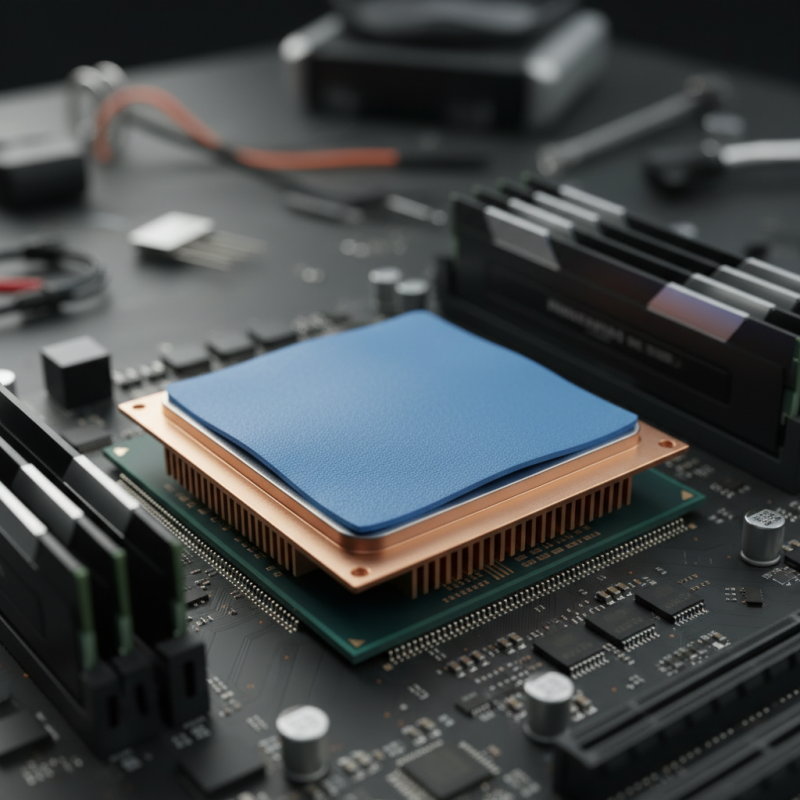
A CPU thermal pad is a crucial component for managing heat in computing devices. It serves as a thermal interface between the CPU and its cooler. When a CPU operates, it generates significant heat, which must be dissipated to maintain optimal performance. The thermal pad helps facilitate better heat transfer, ensuring the CPU remains within safe operating temperatures.

These pads are typically made of silicone or other thermal conductive materials. Their unique design creates a thin layer that fills microscopic gaps on the surfaces of both the CPU and cooler. This contact enhances thermal conductivity. A thermal pad can degrade over time, losing efficiency. Users may notice increased temperatures if the pad is old or improperly applied.

Applying a thermal pad requires careful handling. It’s essential to clean the surfaces thoroughly before installation. A poorly applied pad can lead to overheating, resulting in performance issues. While these pads are generally easy to use, misplaced alignment or insufficient contact can cause problems. Adequate pressure must be applied during installation to ensure effective heat transfer.

The Purpose of Thermal Pads in CPU Cooling

Thermal pads play a crucial role in CPU cooling. They are designed to fill the microscopic gaps between a CPU and a heat sink. This gap can trap air, which is an inefficient conductor of heat. A thermal pad enhances heat transfer by providing a more conductive medium.

When a CPU operates, it generates heat. Excessive heat can lead to performance issues or even damage components. This is where thermal pads become essential. They allow for a more efficient dissipation of heat. A well-functioning thermal pad can maintain optimal temperatures during intensive tasks. However, not all thermal pads perform alike. The effectiveness can depend on the material and thickness.

Many enthusiasts overlook thermal pads during setup. They often opt for thermal paste instead. While paste is also effective, pads offer convenience and ease of application. However, they may not always adhere well over time. Users might need to replace them periodically for consistent performance. It's vital to monitor CPU temperatures regularly to ensure your cooling solution remains effective.

How Thermal Pads Transfer Heat Away from the CPU

A CPU thermal pad is a crucial component for effective heat management in computers. It acts as a interface between the CPU and the cooler. This pad plays a significant role in ensuring that excess heat generated during operation is dissipated efficiently. When a CPU runs, it produces a lot of heat. If this heat is not managed well, it can lead to overheating and hardware failure.

Thermal pads use a specific material that enhances thermal conductivity. They are designed to fill in microscopic gaps between surfaces, creating a better thermal interface. This allows heat to transfer away from the CPU quickly. The efficiency of this process can significantly impact the performance of the device. A poor thermal connection can result in higher temperatures, ultimately affecting performance. Not all thermal pads are created equal; some may not provide sufficient conductivity or durability.

While thermal pads are effective, they can also wear out over time. Factors like heat cycles and pressure can degrade their material. Regularly checking the condition of the thermal pad can prevent overheating issues. Users often overlook this aspect. Being proactive about maintenance can prolong the life of the CPU. Ignoring the thermal pad’s condition is a common mistake that can have serious consequences.

CPU Thermal Pads Heat Transfer Efficiency

This chart represents the heat transfer efficiency of various thermal pads used in CPUs. The values show how effectively each thermal pad can transfer heat, which is crucial for optimal CPU performance and longevity. Higher efficiency values indicate better thermal management, which is essential in preventing overheating and ensuring stable operation.

Types of Thermal Pads and Their Applications

Thermal pads play a crucial role in managing CPU temperatures. They ensure efficient heat transfer between components. There are various types of thermal pads, each designed for specific applications. Two common types are silicone-based pads and ceramic-based pads.

Silicone thermal pads are widely used. They offer good flexibility and excellent thermal conductivity. These pads can conform to uneven surfaces, filling gaps effectively. They are ideal for CPUs and GPUs, where space is often limited. Ceramic thermal pads, on the other hand, provide superior thermal performance. They are suitable for high-performance applications. They are less compressible but perform well under high temperatures.

**Tip:** Always ensure a clean surface before applying a thermal pad. Dust or residues can reduce efficiency. A thermal pad should cover the entire surface of the CPU for optimal heat transfer.

When choosing a thermal pad, consider the thickness and hardness. A thicker pad may fill gaps better, but it can hinder heat transfer if too soft. Balancing thickness with performance is critical.

**Tip:** Monitor the temperature regularly after installation. Unexpected high temperatures may indicate poor thermal contact. Adjustments may be necessary to ensure effective cooling.

What is a Cpu Thermal Pad and How Does It Work? - Types of Thermal Pads and Their Applications

Type of Thermal Pad Material Thermal Conductivity (W/mK) Common Applications
Silicone-Based Thermal Pad Silicone 1.0-3.0 CPU, GPU, Power Modules
Graphite Thermal Pad Graphite 10-20 High-performance GPUs, VRMs
Thermal Interface Material (TIM) Phase Change Material 4-8 PCBs, CPU coolers
Polymer Thermal Pad Polymer Compound 2-5 Consumer Electronics

Installing and Maintaining CPU Thermal Pads

Installing and maintaining CPU thermal pads is a crucial task for optimizing heat transfer between the CPU and the cooler. A thermal pad is designed to fill air gaps, ensuring better contact and efficient heat dissipation. Proper installation starts with cleaning both surfaces thoroughly. Dust or residue can compromise thermal conductivity. Be gentle; excessive force could damage components.

After installation, regular inspections are essential. Over time, thermal pads can degrade. Check for signs of wear, such as cracks or discoloration. These signals indicate it's time for a replacement. Improper removal can be tricky. Slowly peel the pad off to avoid leaving residue. Use isopropyl alcohol to clean the surfaces afterward.

Sometimes, users may overlook the importance of thermal pads, focusing solely on fans or coolers. However, neglecting this component can lead to overheating and reduced CPU lifespan. A well-maintained thermal pad ensures your CPU runs efficiently. Regular maintenance is key to extending the lifespan of your hardware. Keep an eye on temperatures; they tell you a lot about your cooling system’s efficiency.