What Are Commercial Smart Locks and How Do They Work?
commercial smart locks are electronic access devices designed for offices, hotels, warehouses, clinics, and other business premises. They replace or support traditional keys with mobile credentials, PINs, access cards, or biometric verification. A manager can unlock a glass office door remotely, while an audit trail records who entered and when.
Most systems combine a motorized lock, an electronic reader, sensors, and management software. When an approved credential is presented, the reader checks its permissions. The lock then releases the latch, often within a second. Cloud-connected models can update access rules across several locations. Local systems may continue working during an internet outage. That difference matters.
Commercial smart locks can also limit entry by time, department, or individual user. For example, a contractor might receive access between 9:00 and 11:00 a.m. The system can revoke that permission without collecting a physical key. Reliable installations still require careful planning, secure configuration, battery monitoring, and professional maintenance. Technology is not magic. A weak password, poor network design, or forgotten backup credential can create avoidable problems. Even accurate systems may record events imperfectly when clocks, sensors, or integrations fail.
This guide explains how commercial smart locks operate, what components support them, and where their practical limits appear. It also considers cybersecurity, privacy, emergency access, compatibility, and daily management. These details help property owners compare solutions with clearer expectations. A lock should improve control without making ordinary entry frustrating. That balance deserves attention.
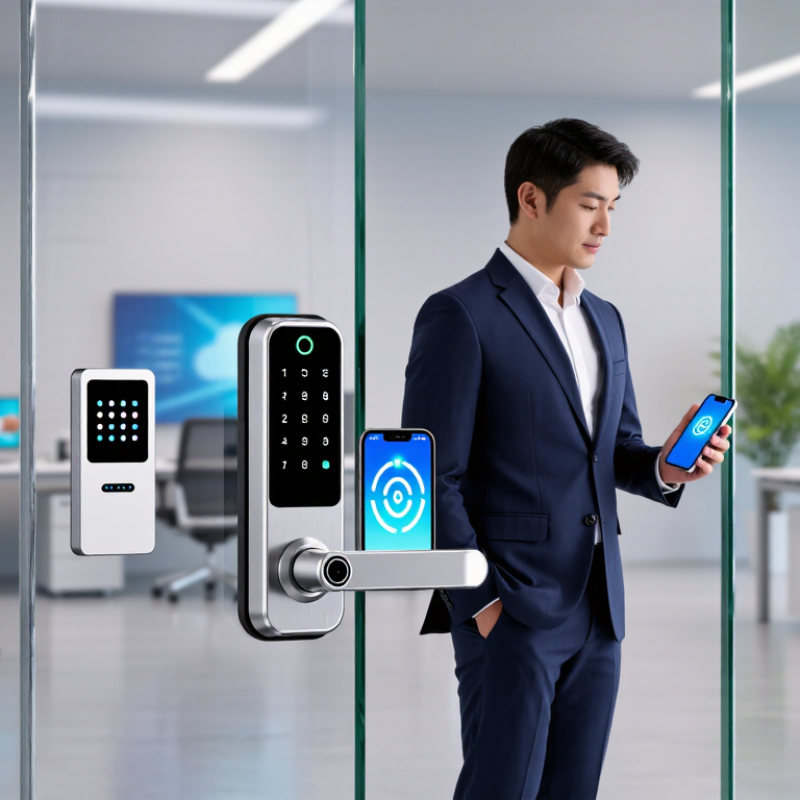
What Are Commercial Smart Locks?
Commercial smart locks are electronic access devices designed for offices, warehouses, hotels, clinics, and other managed buildings. Unlike a traditional lock, they verify digital credentials before releasing the door. These credentials may include a PIN, mobile pass, RFID card, fingerprint, or temporary code.
A typical system combines an electronic lock, access reader, control software, and activity log. When an employee presents a credential, the reader sends encrypted data to the controller. The controller checks permissions, then activates a motor or solenoid.
Many systems continue operating during an internet outage by storing approved credentials locally. That detail matters in a busy loading area.
The scale is growing. Fortune Business Insights reported that the global smart lock market was valued at about USD 2.11 billion in 2023 and projected continued growth through 2032. MarketsandMarkets also identifies commercial buildings as a major application area, driven by access management and connected security systems. These figures describe the wider market, not every workplace.
In practice, commercial smart locks help administrators issue access by role, time, and location. A cleaner might enter only during scheduled hours. A contractor’s code can expire automatically. Logs can show which credential opened a door and when, although logs are not perfect proof of a person’s identity. Shared credentials remain a weak point. Poor installation, dead batteries, or unclear emergency procedures can reduce security. Experienced facility teams therefore test offline access, review permissions, and keep a physical maintenance plan. The technology is useful, but it still needs careful human oversight.
Key Components and Access Technologies
Commercial smart locks combine mechanical security with electronic access control. Their main parts include a reinforced lock body, an electric motor, a controller, a power source, and an access reader. The reader may scan a card, mobile credential, PIN, fingerprint, or temporary code. Inside, the controller checks the credential before moving the motor. Power matters. A small battery may support daily operation, while wired power suits busy entrances.
Access technology determines how staff enter and how managers control permissions. Radio-frequency cards work well for shared offices, but lost cards require immediate deactivation. Mobile credentials use encrypted communication between a phone and the lock. Some systems connect through Bluetooth, Wi-Fi, or a separate gateway. A gateway can send events to management software, such as entry time, user identity, and forced-door alerts. These records help investigate unusual activity without relying only on memory.
From a practical installation view, the door frame matters as much as the lock. Misalignment can drain batteries and prevent the bolt from extending smoothly. No system is perfect. Network outages, forgotten PINs, and weak administrative settings still create problems. For this reason, reliable systems often support local verification, emergency power, mechanical override procedures, and permission levels. Managers should test these features during quiet hours, not during a crowded morning. The best design is not always the most advanced one. It is the one staff can use correctly every day.
How Commercial Smart Locks Operate
What Are Commercial Smart Locks and How Do They Work?
How Commercial Smart Locks Operate
A commercial smart lock replaces a traditional key with a verified digital credential. That credential may be a mobile phone, access card, keypad code, or biometric template. When a user presents it, the reader sends encrypted data to a local controller. The controller checks permissions, schedules, and door status. If access is approved, a motor releases the latch within seconds.
Many systems connect to cloud software through wired networks, Wi-Fi, or cellular gateways. Administrators can create access rules remotely and review time-stamped entry records. Local memory usually keeps doors operating during short network interruptions. Battery-powered locks also monitor voltage and report low-power warnings. Small details matter. A dead battery can defeat an elegant system.
Security depends on more than encryption. Credentials need expiration dates, role-based permissions, and prompt removal after staff changes. The 2024 Verizon Data Breach Investigations Report found that human involvement appeared in 68% of breaches, showing why poor access practices remain dangerous. NIST guidance also emphasizes strong authentication and careful lifecycle management. Commercial smart locks can improve accountability, but they are not magic. Mechanical overrides, emergency procedures, and offline operation still require testing. In practice, installers should test a locked door, a failed network, and a nearly empty battery before relying on the system. That step is often skipped.
Common Types of Commercial Smart Locks
Commercial smart locks are electronic access systems designed for offices, warehouses, hotels, clinics, and shared facilities. They replace or support traditional keys with digital credentials. Most models connect a reader, locking mechanism, controller, and management platform. When a user presents valid credentials, the system checks permissions before releasing the lock. Events can then appear in an access log.
Keypad locks use personal codes entered on a small, weather-resistant panel. They work well for staff rooms and low-turnover areas, but shared codes can weaken accountability. RFID and NFC locks read cards, tags, or mobile credentials. Administrators can disable lost credentials without changing every lock. This is practical, although damaged readers or forgotten cards still create delays.
Biometric locks identify fingerprints, facial features, or other physical characteristics. They can reduce card sharing, but accuracy may change with dirt, gloves, lighting, or wet fingers. Mobile-enabled locks use Bluetooth or another wireless connection. Some support remote permissions, temporary access, and real-time alerts through a secure network. Offline operation matters when the internet fails.
Many commercial systems combine two methods, such as a card and PIN. This adds control but may slow busy entrances. In my experience, the best choice depends on door traffic, indoor conditions, emergency procedures, and staff habits. A technically advanced lock can still fail operationally if users find it confusing. Managers should test battery warnings, manual override procedures, audit records, and permission changes before wider installation.
Benefits, Limitations, and Security Considerations
Commercial smart locks replace traditional keys with electronic access control. They usually combine a locking motor, a credential reader, and management software. Credentials may include PINs, mobile signals, cards, or biometric checks. When an employee presents valid access, the reader verifies permission and releases the bolt. The system records the event, including the user, time, and door location.
Their strongest benefit is control. A manager can remove a former employee’s access without collecting a key. Temporary permissions can help contractors enter only during scheduled hours. Entry records may also clarify who opened a storage room at 9:15 a.m. However, installation can be costly, especially for older doors. Internet outages, depleted batteries, and software errors can interrupt normal access. A physical backup method remains sensible. It is not a luxury.
Security depends on more than the lock itself. Administrators should use strong passwords, separate user accounts, and multi-factor authentication where available. Access logs need regular review, not passive storage. Firmware updates matter because neglected devices can retain known weaknesses. Staff training matters too; sharing a PIN can defeat expensive hardware. Privacy requires careful handling of entry records, since detailed movement histories can expose sensitive workplace patterns. No system is flawless. A smart lock may improve accountability while creating new technical and privacy risks. That trade-off deserves testing before installation, not after an emergency.
Commercial Smart Locks: Typical Battery Life by Connectivity Mode
Connectivity affects operating life. Bluetooth Low Energy typically uses the least power because access can be managed locally, while Wi-Fi models generally consume more energy because they maintain a network connection. Hardwired commercial locks avoid routine battery replacement but depend on building power and backup systems. Actual performance varies with traffic, signal strength, temperature, and access frequency.









