News

Miro: A New Standard in Responsible Innovation

Miro: A New Standard in Responsible Innovation The Miro monitor arm is setting new benchmarks in sustainability. It offers a high-performance solution without compromising on environmental responsibility. Designed with careful material selection, local sourcing, and longevity in mind, Miro’s responsible approach to design and unique manoeuvrability set it apart from the competition. Sustainable Choices Miro is crafted from energy-efficient materials with a lower carbon impact....

Read more
HSE Advisor

Role Purpose Support in the development, implementation and maintenance of the company’s Health, Safety & Environmental policies, processes, operational procedures, and standards.  Ensuring best practice and championing a continually improving HSE culture within the business. Key Responsibilities Liaise with and provide support to all areas of the business to eliminate, mitigate or reduce identified HSE exposures. Partner with the production management team and team leaders,...

Read more
CMD Ltd LAUNCHES 48-HOUR TURNAROUND ON BETATRAK® RAPID ORDERING SERVICE

CMD Ltd, the specialist in power distribution systems, workstation power and monitor arms, has launched a rapid ordering service for its Betatrak® underfloor powertrack distribution systems and accessories, with a commitment to delivering within 48-hours of an approved purchase order*. The service enables customers to order up to 50 lengths of Standard or Clean Earth (C/E) low noise Betatrak, along with up to 25 feed...

Read more

CMD INVESTS £1/4 MILLION IN NEW MACHINE AS PART OF FACTORY UPGRADE

We have invested in a new £1/4m TRUMPF CNC metal punch as part of an asset renewal strategy for our UK manufacturing capability. The new machine will be used in the production of a wide variety of our power distribution systems and workstation power products at our Rotherham factory. Suitable for handling sheet metal between 0.9mm and 3.0mm thick, the new machine will replace one...

Read more

CMD CATALOGUE PROVIDES TECHNICAL POWER DISTRIBUTION GUIDE

CMD Ltd has released a new catalogue, providing an easy to follow technical guide to our power distribution systems and plug and play desk modules. Detailing CMD’s full range of UK-manufactured power distribution systems and plug and play desk modules, the catalogue will be a helpful source of information to M&E engineers and contractors alike to understand how our power distribution systems connect together and...

Read more

Power Distribution Catalogue
CMD Ltd PLAYS ESSENTIAL ROLE IN ELECTRICAL FIT OUT AT LONDON’S PRESTIGIOUS OFFICE DEVELOPMENT

CMD Ltd, specialist in workplace connectivity and ergonomic solutions, has provided a flexible and high-quality power distribution network for The Ray, a prestigious office development in London’s Farringdon. Well-known for being the former site of The Guardian newspaper, The Ray now stands as an 83,000ft² office development characterised by a modernised warehouse aesthetic, with level two now occupied by a global social media company. The...

Read more

The Ray
CMD plugs in to european opportunity with Schuko Capsule unit launch

CMD Ltd, the specialist in power and connectivity solutions for commercial environments, has launched a Schuko version of its popular fixed format Capsule workstation power module for export to mainland Europe and beyond. A popular on desk power module comprising two sockets and dual USB (type A and C) chargers, CMD’s Capsule unit is already widely specified in the UK as an off-the-shelf workstation power...

Read more

CMD White Schuko Capsule Desk Power Module
CMD LTD EXTENDS MONITOR ARM RANGE WITH THE LAUNCH OF REACH PLUS

CMD Ltd, the specialist in ergonomic and connectivity solutions for commercial interiors, has completed its Reach monitor arm range with the launch of the Reach Plus. Available in single or dual screen options, the Reach Plus has been designed to provide an ideal solution for both single and dual screen workstation configurations, or can be used with next generation of large format curved screens. Suitable...

Read more

CMD Ltd DEMONSTRATES THE ART OF POWER DISTRIBUTION AT THE UNIVERSITY OF WARWICK

CMD Ltd, the specialist in workplace connectivity and ergonomic solutions, has provided Betatrak busbar power distribution and a range of electrical accessories for two major capital investment projects at the University of Warwick. Designed by Fielden Clegg Bradley Studios, the £33 million Faculty of Arts building is a showpiece development comprising four interconnected structures set around a central atrium, which will enable inter-disciplinary collaboration across...

Read more

University of Warwick
CMD BRINGS HARMONY TO COVENTRY UNIVERSITY RESEARCH FACILITIES

CMD Ltd, the specialist in power distribution solutions and workstation power and ergonomics, has provided under desk and on desk power modules for the refurbishment of three Coventry University research buildings. Located on Coventry University Technology Park, a business park designed to encourage collaboration between the university and knowledge-based businesses, the three buildings are being repurposed as office accommodation for university research teams. The refurbishment...

Read more

Coventry University

How to Choose In Desk Power Modules for Global Buyers?

Choosing in desk power modules for global projects requires more than comparing prices and socket shapes. Buyers must assess voltage compatibility, plug configurations, USB performance, safety features, and installation conditions. A module used in a hotel desk may face different demands from one installed in a shared office. Small details matter. Cable length matters.

Experienced purchasers usually begin with the destination market, not the product catalog. Check the region’s electrical requirements and consult qualified compliance professionals before ordering. Ask suppliers for test reports, material specifications, warranty terms, and production records. Reliable documentation reduces uncertainty, especially when one design serves several countries. It also helps purchasing teams avoid costly changes after installation.

Practical testing is equally important. Place a sample in a real desk cutout. Connect a laptop, phone, and monitor at the same time. Observe heat, charging speed, cable movement, and access around the sockets. A smooth-looking module can still feel awkward under daily use. That happened in one project I reviewed; the ports met the specification, but the recessed position made larger adapters difficult to insert.

The best in desk power modules balance safety, usability, appearance, and long-term service. Buyers should compare suppliers by evidence, not confident claims. No single model fits every market. That is worth remembering. A thoughtful selection process may take longer, yet it can protect the installation budget and the user experience. Experiences vary, so specifications should be verified rather than assumed.

How to Choose In Desk Power Modules for Global Buyers?

Define In-Desk Power Modules and Their Main Functions

How to Choose In-Desk Power Modules for Global Buyers?

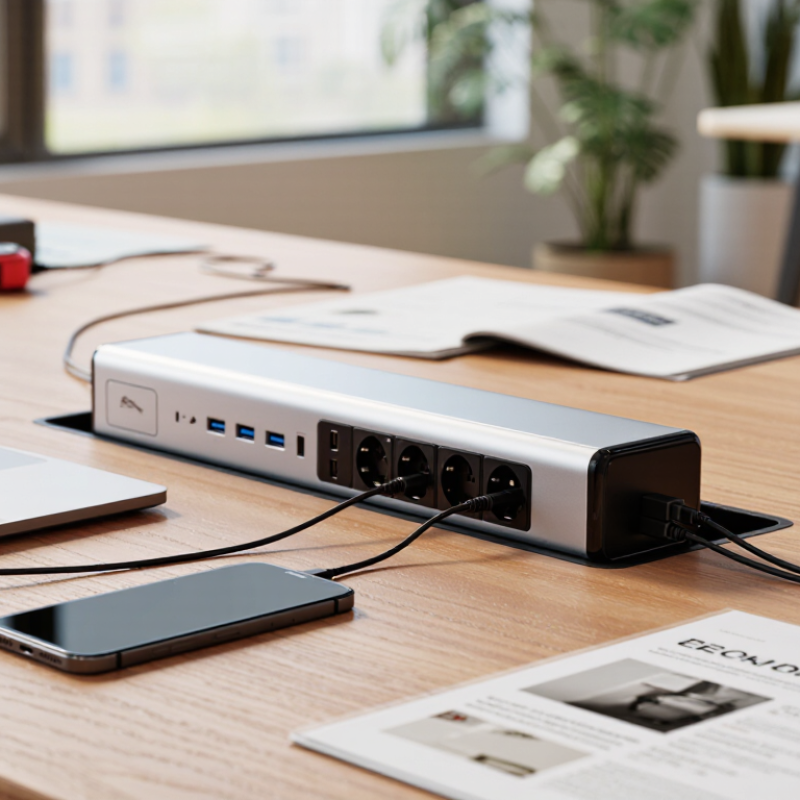
In-desk power modules are compact units installed into work surfaces. They provide convenient access to electrical outlets, USB charging, data ports, and cable routing. Some models also include switches, wireless charging, or replaceable socket inserts. Their main function is simple: bring power closer to the user without leaving loose extension cords across the desk.

That matters. The UNEP Global Status Report for Buildings and Construction 2024 states that buildings and construction consume about 32% of global energy. A well-designed module cannot transform office energy performance alone. However, it can support controlled access, reduce cable clutter, and simplify equipment disconnection. Buyers should check rated voltage, frequency, socket format, grounding, overload protection, and regional certification. IEC 62368-1 is relevant for many information and communication technology products, but compliance requirements still vary by market.

The practical choice depends on the desk and the user. A conference table may need several outlets and data connections. A small workstation may only require one outlet and USB-C charging. I would not select a module by appearance alone. A tidy desk does not prove a safe installation. Check heat clearance, mounting depth, replacement access, and cable strain relief. Small details matter. Product documentation should state test methods, operating limits, and supported configurations. One weakness in many buying checklists is ignoring future maintenance; ports fail, layouts change, and a sealed unit may create unnecessary replacement waste.

How to Choose In-Desk Power Modules for Global Buyers?

Define In-Desk Power Modules and Their Main Functions

In-desk power modules integrate electrical outlets and may also include USB charging, data connectivity, wireless charging, and cable-management features. For global projects, the first selection factor is compatibility with the local nominal mains voltage.

The chart shows typical nominal supply voltages used in major markets. Always verify the local plug configuration, frequency, wiring requirements, and applicable safety certifications before installation. Reference: IEC 60038 nominal supply voltage conventions and commonly used national electrical standards.

Identify Power, Data, and Connectivity Requirements

How to Choose In Desk Power Modules for Global Buyers?

Identify Power, Data, and Connectivity Requirements

Choosing an in desk power module starts with the equipment used at each workstation. List laptops, monitors, chargers, lamps, and shared devices. Measure their combined wattage, not just the typical load. Leave practical capacity for future equipment. Measure twice.

Global projects add another layer. Voltage, frequency, plug configuration, and electrical certification can differ by destination. Confirm local requirements with a qualified electrical professional before ordering. A module suited to one office may not fit another safely. This step is easy to underestimate.

Data and connectivity also need careful planning. Decide whether users need USB-C charging, standard USB ports, network access, display connections, or audio links. Check cable lengths and connector clearance beneath the desk. Short cables create daily frustration. I have seen beautifully installed modules become inconvenient because connectors faced the wrong direction. That mistake was avoidable.

Review the expected power delivery for each charging port. A phone and a laptop may require very different outputs. Confirm whether data ports support the required transfer speed and network standard. Physical access matters too. Users should connect devices without bending cables or moving furniture. Dust, spills, and frequent handling should influence the enclosure and maintenance plan. Product documentation should state ratings clearly, but documents can contain gaps. Ask precise questions, request test evidence, and compare the installation environment with real user behavior.

Compare Module Types, Installation Methods, and Configurations

Choosing an in-desk power module starts with the work surface, not the outlet count. Flip-up units keep power hidden when the desk is clear. Pop-up modules suit meeting tables, but moving parts need regular care. Clamp-on units install quickly and avoid cutting the tabletop. However, they may look less integrated on thin desks. Grommet modules provide a clean finish through a drilled opening. They demand accurate measurements before installation. A neat module can still disappoint when cable space is ignored.

Installation methods affect durability, appearance, and replacement work. Surface-mounted units simplify retrofitting, while recessed units offer a smoother professional finish. For global buyers, check voltage, plug format, grounding, and local certification requirements. Configurations may include AC outlets, USB-C charging, data ports, or wireless charging. Higher port counts are not always better. Too many ports can increase heat, clutter, and maintenance needs. A balanced layout usually serves users better. Still, actual device demand may change within a year.

Tips: Measure the tabletop thickness and cable route before ordering. Confirm whether the module fits existing desks or requires drilling. Leave clearance for large adapters. Choose replaceable components where possible. Test sample units with real chargers and laptops. Do not rely only on product drawings; they may omit cable bend space. A perfect configuration is rare, so review installation feedback and revise the specification before mass purchasing.

How to Choose In Desk Power Modules for Global Buyers? - Compare Module Types, Installation Methods, and Configurations

Module Type Typical Power Function Common Installation Method Typical Configuration Best Use Case Main Advantages Key Limitations
Pop-Up Module AC outlets, USB charging, and optional data ports Cut-out installation through the desktop; retractable housing remains flush when closed 1–3 AC outlets plus USB-A, USB-C, HDMI, or network ports Meeting rooms, boardrooms, training tables, and shared workspaces Clean appearance, protected ports, and improved desk usability Requires accurate cut-out dimensions and sufficient clearance below the desk
Flip-Up Module AC power and connectivity access from a hinged desktop panel Surface cut-out with a hinged or tilting cover 1–2 AC outlets with USB charging, data, or audiovisual connections Conference tables and desks requiring frequent cable access Convenient access and a relatively compact desktop footprint The open cover occupies some desktop space and may collect dust over time
Clamp-On Module AC outlets, USB charging, and selected data connections Clamps to the rear or side edge of the desk without cutting the desktop 1–2 AC outlets plus USB-A or USB-C charging ports Leased offices, temporary workstations, and retrofit projects Fast installation, low modification cost, and easy relocation Needs a compatible desk edge and may reduce usable rear-edge space
Under-Desk Module Power distribution with cable-management support Mounted beneath the desktop using brackets, screws, or adhesive hardware Multiple AC outlets with optional USB charging and cable routing Open-plan offices and desks where a flush desktop finish is preferred Keeps the desktop clear and supports organized cable routing Ports are less visible and may be less convenient for visitors
Grommet Module Power and charging through a compact circular or rectangular opening Installed in an existing or newly drilled cable-grommet opening 1 AC outlet with USB-A, USB-C, or cable-pass-through options Individual desks, hot-desking areas, and compact workstations Small footprint, simple appearance, and efficient cable access Limited space for multiple connectors and larger power supplies
Desktop Power Track Flexible power distribution along a linear track Surface-mounted, recessed, or integrated into a desk system Moveable power adapters with optional USB and data modules Modular desks, collaborative tables, and frequently reconfigured spaces Allows outlet positions to be adjusted as layouts change Higher system complexity and greater attention to compatibility are required
Wireless Charging Module Contactless charging for compatible mobile devices Recessed or surface-mounted below or within a designated charging area Wireless charging pad with one or more AC or USB outlets Reception desks, hospitality areas, and executive workstations Reduces cable clutter and provides convenient short-term charging Charging performance depends on device alignment, case thickness, and heat management
Global Buyer Checklist: Confirm the destination-market plug and voltage requirements, rated current, applicable electrical certification, USB-C power output, desktop thickness range, cut-out dimensions, mounting clearance, cable length, replacement-part availability, and installation requirements before ordering.

Check Global Safety Standards, Certifications, and Plug Compatibility

How to Choose In Desk Power Modules for Global Buyers?

Global buyers should treat safety compliance as a market-specific requirement, not a universal approval. Check the voltage, frequency, earthing method, and applicable standards for each destination. IEC requirements may guide design, while regional marks confirm local conformity. Depending on the market, documentation may include CE, UKCA, UL or cUL, SAA, or RCM evidence. A certificate alone is not enough. Verify its scope, test date, product model, and issuing laboratory.

Plug compatibility needs equal attention. Type A and B plugs are common in North America, while Type G, Type I, and Schuko-style outlets serve other regions. The module must match local socket geometry and current ratings. It should also accept the buyer’s plug without looseness, heat, or forced insertion. Fit matters. Some projects use interchangeable socket plates, but mixing unapproved plates can weaken protection. Confirm shutters, grounding contacts, cable exits, and overload protection before ordering.

In procurement reviews, small label details often reveal larger risks. Look for clear voltage markings, current limits, wiring diagrams, and traceable test reports. Check whether the power module is designed for recessed furniture installation and whether its materials resist heat and flame. Ask the supplier how production units are inspected, not only how prototypes were tested. I have seen specifications that looked complete but omitted frequency ratings. That omission can delay installation. Recheck everything.

Evaluate Quality, Customization, Cost, and Supplier Reliability

How to Choose In Desk Power Modules for Global Buyers?

Evaluate Quality, Customization, Cost, and Supplier Reliability

Quality should begin with evidence, not attractive product photos. Check electrical safety testing, temperature rise, socket durability, grounding, and overload protection. IEC 60884-1 and IEC 62368-1 offer useful reference points for applicable products. The ISO Survey 2022 recorded more than 1.2 million ISO 9001 certificates worldwide. Certification helps, but it does not replace factory audits or sample testing. Ask for recent test reports, production records, and corrective-action examples. Small details matter, such as loose wiring or a switch that feels inconsistent.

Customization must fit the installation, not merely the buyer’s catalogue. Confirm cutout dimensions, cable length, plug standards, USB output, mounting depth, and surface finish. Request a working prototype before mass production. A poor fit creates hidden labor costs. It happens more often than expected.

Cost comparison should include tooling, certification, packaging, freight, installation, and warranty handling. The cheapest quotation can become expensive after redesigns. UNCTAD reports that maritime shipping carries over 80% of global merchandise trade by volume, so transport disruption deserves attention. Review lead times, backup components, inspection procedures, and communication speed. Evaluate supplier reliability through on-time delivery records and reference checks. A realistic supplier should explain limitations clearly. Perfect promises deserve skepticism. Even experienced buyers can overlook regional plug changes or customs paperwork. That weakness should be documented before signing.