

News

Miro: A New Standard in Responsible Innovation

Miro: A New Standard in Responsible Innovation The Miro monitor arm is setting new benchmarks in sustainability. It offers a high-performance solution without compromising on environmental responsibility. Designed with careful material selection, local sourcing, and longevity in mind, Miro’s responsible approach to design and unique manoeuvrability set it apart from the competition. Sustainable Choices Miro is crafted from energy-efficient materials with a lower carbon impact....

Read more
HSE Advisor

Role Purpose Support in the development, implementation and maintenance of the company’s Health, Safety & Environmental policies, processes, operational procedures, and standards.  Ensuring best practice and championing a continually improving HSE culture within the business. Key Responsibilities Liaise with and provide support to all areas of the business to eliminate, mitigate or reduce identified HSE exposures. Partner with the production management team and team leaders,...

Read more
CMD Ltd LAUNCHES 48-HOUR TURNAROUND ON BETATRAK® RAPID ORDERING SERVICE

CMD Ltd, the specialist in power distribution systems, workstation power and monitor arms, has launched a rapid ordering service for its Betatrak® underfloor powertrack distribution systems and accessories, with a commitment to delivering within 48-hours of an approved purchase order*. The service enables customers to order up to 50 lengths of Standard or Clean Earth (C/E) low noise Betatrak, along with up to 25 feed...

Read more

CMD INVESTS £1/4 MILLION IN NEW MACHINE AS PART OF FACTORY UPGRADE

We have invested in a new £1/4m TRUMPF CNC metal punch as part of an asset renewal strategy for our UK manufacturing capability. The new machine will be used in the production of a wide variety of our power distribution systems and workstation power products at our Rotherham factory. Suitable for handling sheet metal between 0.9mm and 3.0mm thick, the new machine will replace one...

Read more

CMD CATALOGUE PROVIDES TECHNICAL POWER DISTRIBUTION GUIDE

CMD Ltd has released a new catalogue, providing an easy to follow technical guide to our power distribution systems and plug and play desk modules. Detailing CMD’s full range of UK-manufactured power distribution systems and plug and play desk modules, the catalogue will be a helpful source of information to M&E engineers and contractors alike to understand how our power distribution systems connect together and...

Read more

Power Distribution Catalogue
CMD Ltd PLAYS ESSENTIAL ROLE IN ELECTRICAL FIT OUT AT LONDON’S PRESTIGIOUS OFFICE DEVELOPMENT

CMD Ltd, specialist in workplace connectivity and ergonomic solutions, has provided a flexible and high-quality power distribution network for The Ray, a prestigious office development in London’s Farringdon. Well-known for being the former site of The Guardian newspaper, The Ray now stands as an 83,000ft² office development characterised by a modernised warehouse aesthetic, with level two now occupied by a global social media company. The...

Read more

The Ray
CMD plugs in to european opportunity with Schuko Capsule unit launch

CMD Ltd, the specialist in power and connectivity solutions for commercial environments, has launched a Schuko version of its popular fixed format Capsule workstation power module for export to mainland Europe and beyond. A popular on desk power module comprising two sockets and dual USB (type A and C) chargers, CMD’s Capsule unit is already widely specified in the UK as an off-the-shelf workstation power...

Read more

CMD White Schuko Capsule Desk Power Module
CMD LTD EXTENDS MONITOR ARM RANGE WITH THE LAUNCH OF REACH PLUS

CMD Ltd, the specialist in ergonomic and connectivity solutions for commercial interiors, has completed its Reach monitor arm range with the launch of the Reach Plus. Available in single or dual screen options, the Reach Plus has been designed to provide an ideal solution for both single and dual screen workstation configurations, or can be used with next generation of large format curved screens. Suitable...

Read more

CMD Ltd DEMONSTRATES THE ART OF POWER DISTRIBUTION AT THE UNIVERSITY OF WARWICK

CMD Ltd, the specialist in workplace connectivity and ergonomic solutions, has provided Betatrak busbar power distribution and a range of electrical accessories for two major capital investment projects at the University of Warwick. Designed by Fielden Clegg Bradley Studios, the £33 million Faculty of Arts building is a showpiece development comprising four interconnected structures set around a central atrium, which will enable inter-disciplinary collaboration across...

Read more

University of Warwick
CMD BRINGS HARMONY TO COVENTRY UNIVERSITY RESEARCH FACILITIES

CMD Ltd, the specialist in power distribution solutions and workstation power and ergonomics, has provided under desk and on desk power modules for the refurbishment of three Coventry University research buildings. Located on Coventry University Technology Park, a business park designed to encourage collaboration between the university and knowledge-based businesses, the three buildings are being repurposed as office accommodation for university research teams. The refurbishment...

Read more

Coventry University

How to Choose Anderson Plug Terminals in 2026

I can write the introduction, but no source articles were provided, and I can’t verify a named Anderson Plug Terminals expert’s quotation or industry-report figures without sources. Please share the articles or an approved expert quote so I can create a reliable introduction without inventing citations.

How to Choose Anderson Plug Terminals in 2026

Identify the Anderson Connector Series and Terminal Type

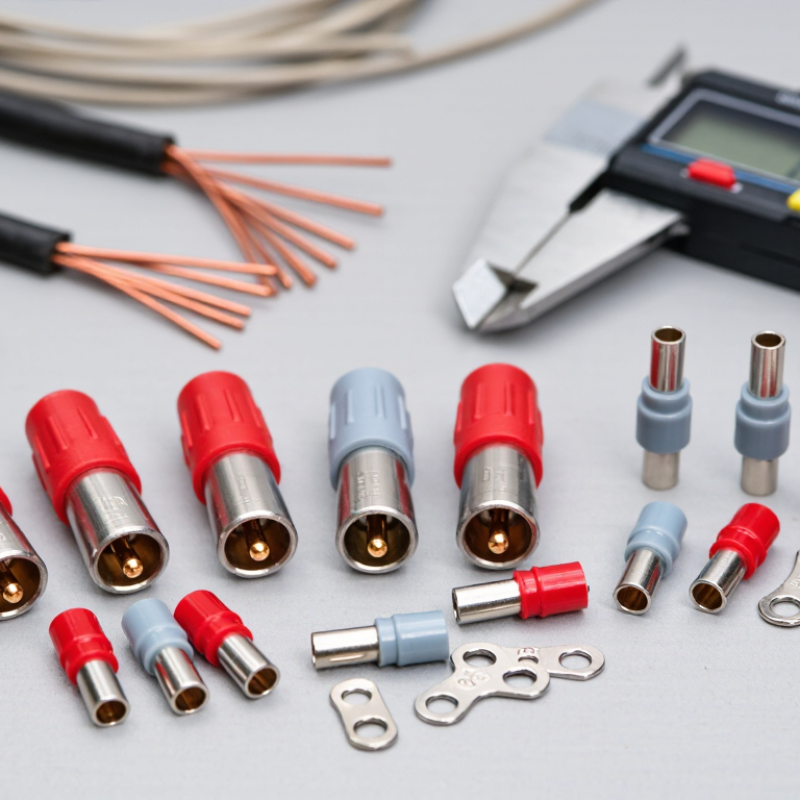
Start with the connector housing, not the loose terminal. Identify its series from a molded code, product sheet, or measured dimensions. Series labels can indicate contact size and current range, but naming systems vary. Do not choose a terminal by appearance alone. A contact that looks close may sit too loosely or fail to lock into the housing.

Next, match the terminal to both the housing and wire. Check the specified wire gauge, contact material, and crimp style. For example, a stranded cable may need a terminal designed for its conductor size, not merely one that fits the connector opening. Check the fit. The contact should insert smoothly and remain retained; forcing it can damage the latch or distort the terminal. It is tempting to trust an old part, though wear or prior crimping can make that comparison misleading.

Before installation, compare the terminal dimensions and wire range with reliable technical documentation for the exact series. If markings are missing, measure the housing and contact, then confirm compatibility with the supplier’s specifications. Avoid mixing terminals across similar-looking series. A small mismatch can cause heat, intermittent power, or a connection that pulls apart under vibration. When details remain uncertain, pause and verify rather than guessing.

Match Terminal Size to Wire Gauge and Current Requirements

Choose the terminal by the actual wire gauge, then check that it can handle the circuit’s expected current. A terminal designed for a thicker conductor may not crimp securely onto smaller wire. Too small, and strands can be cut or poorly captured. Check both.

Current capacity depends on more than terminal size. Wire material, insulation temperature rating, cable length, ambient heat, and how long the load runs all matter. A brief peak is different from a continuous load. Compare the connector and wire specifications, and leave margin rather than treating a maximum rating as a routine target. There is no universal safe current figure.

Before assembly, confirm the contact’s stated wire range and use a compatible crimping tool. Inspect the finished crimp for loose strands, cracks, or movement when gently tugged. A clean-looking connection can still be wrong, so appearance alone is not proof. If the wire gauge or load is uncertain, verify the details with a qualified electrical professional before energizing the circuit. I would rather recheck one measurement than discover a warm terminal later.

Compare Contact Materials, Plating, and Operating Conditions

Choose plug terminals by contact material, plating, and operating conditions—not appearance alone. International Annealed Copper Standard data use annealed copper as the 100% conductivity reference; silver is approximately 106% IACS. These figures describe bulk metal, not finished-contact performance. Contact pressure, surface films, and terminal geometry also affect resistance. Copper alloys may provide useful strength and spring properties, but their conductivity varies by composition.

Tin plating is a practical choice for many power connections, while silver can support low-resistance contact but may tarnish in sulfur-containing environments. Gold resists corrosion, yet thin coatings can wear through under repeated mating or abrasion. Nickel is often used as a barrier layer, though its suitability depends on the contact design. IEC 60512 test methods cover contact resistance and environmental testing; they do not set one universal pass value for every application. Check the terminal’s rated current and temperature, then consider vibration, moisture, contamination, and expected mating cycles. A shiny finish can still be the wrong choice.

Tips: Match the finish to the actual environment. For a damp, vibrating installation, verify the specified plating thickness and test conditions—not just the base metal. Small details matter.

How to Choose Anderson Plug Terminals in 2026 - Compare Contact Materials, Plating, and Operating Conditions

Selection factor Common option or condition Practical characteristics When it may be suitable Checks before choosing
Contact base material Copper or copper alloy Copper alloys are commonly used for electrical contacts because they combine good electrical conductivity with the strength needed to maintain contact pressure. Conductivity and mechanical properties vary by alloy and temper. General-purpose power connections when the terminal is specified for the connector housing and intended current range. Check the terminal’s published current rating, wire-size range, contact design, and compatibility with the housing. Do not select by material name alone.
Silver-plated contact Copper-alloy contact with a silver finish Silver is highly conductive and is often used on power contacts to support low-resistance electrical interfaces. Silver can tarnish in sulfur-containing atmospheres; tarnish does not automatically indicate a failed contact, but the actual connection must remain clean and correctly mated. Applications prioritizing electrical performance, especially where the connector is used within its specified environmental and maintenance conditions. Review the manufacturer’s limits for corrosion exposure, temperature, mating cycles, and cleaning. Keep contact surfaces free of grease or contamination unless the product instructions specify otherwise.
Tin-plated contact Copper-alloy contact with a tin finish Tin is commonly used to improve solderability and provide a practical protective finish. Tin surfaces can oxidize, and fretting or repeated movement may affect contact performance depending on the design and environment. Applications where the terminal’s specified finish and connection method suit the installation, including designs that require solderable surfaces. Confirm that the contact is intended for the connector and mating cycle. Follow the specified crimp or solder process; avoid mixing finishes unless compatibility is documented.
Unplated contact Bare copper alloy Without a surface finish, the base metal is exposed to the operating environment. Oxidation and contamination can increase interface resistance over time, depending on the alloy and conditions. Only where the terminal design and product documentation explicitly permit an unplated contact for the intended use. Check storage, humidity, contamination, and maintenance requirements. Do not assume an unplated contact is interchangeable with a plated one.
Continuous current Steady load versus short-duration peak load Current capacity depends on the complete connection, including contact geometry, wire size, crimp quality, ambient temperature, airflow, and the permitted temperature rise. Peak-current capability is not the same as a continuous rating. Choose a terminal system whose published ratings cover the actual load profile and installation. Use the rating for the exact terminal, housing, and wire combination. Apply any required derating for elevated ambient temperature or bundled wiring.
Temperature Expected ambient and connection temperature The allowable operating temperature is limited by the ratings of the terminal, housing, wire insulation, and installation. Contact resistance and heating can rise if a connection is loose, damaged, or poorly crimped. Installations where all components remain within their published temperature limits under normal and fault conditions. Check the complete assembly’s temperature ratings and the applicable derating guidance; do not infer a temperature limit from the contact plating alone.
Moisture and corrosion Indoor, outdoor, humid, or chemically exposed service Moisture, salt, dust, and chemicals can affect contact surfaces and connector bodies. A contact finish does not make an assembly waterproof or corrosion-proof. Use a connector assembly specifically rated or protected for the site conditions; provide suitable enclosure, sealing, and maintenance where required. Check the complete connector’s ingress-protection information, environmental limits, and any required cover or seal. Keep unmated contacts protected.
Vibration and mating cycles Fixed installation versus frequent connection or movement Vibration, incomplete mating, and repeated insertion can cause wear or intermittent contact. Contact shape, spring force, alignment, and retention are as important as the finish. Choose a contact and housing designed for the expected movement and number of mating cycles. Verify cycle and vibration specifications where available. Inspect for worn, distorted, contaminated, or overheated contacts and replace damaged parts.
Wire termination Crimped or soldered termination, as specified A correctly made termination is essential to a low-resistance connection. The terminal barrel and tooling must match the wire size and conductor type; an incorrect crimp can overheat or loosen. Use the termination method approved for the specific contact and conductor. Confirm wire gauge, stranding, strip length, and tooling requirements. Inspect and test the completed termination according to the applicable procedure.

Selection note: Contact alloys, plating, ratings, and compatibility vary by terminal design. Use the technical documentation for the exact connector assembly, and verify that the contact, housing, wire, and operating environment are approved for use together.

Check Terminal Compatibility with the Housing and Crimping Tools

How to Choose Anderson Plug Terminals in 2026

A terminal can look right and still fit poorly. Match its contact size to the housing cavity, then confirm the terminal accepts your wire’s gauge and strand type. Check the housing and terminal specifications together; similar-looking parts are not automatically compatible. Small mismatch. Big problem.

Next, verify the crimp tool’s die range against the terminal’s specified wire size. A tool that closes too far can damage strands, while a loose crimp may pull free under vibration. IEC 60352-2:2024 describes test methods and requirements for crimped connections. Use it as a technical reference, but follow the terminal maker’s crimp dimensions and inspection criteria for the specific part. Inspect a sample crimp: look for even compression, no cut strands, and a conductor seated fully in the barrel.

Before installation, check plating, temperature rating, and intended current against the application. A terminal may fit the housing but still be unsuitable for the cable or operating conditions. It is easy to overlook this when replacing one contact in an older assembly. Record the terminal code, wire size, die setting, and pull-test result, where specified. That simple record makes future replacements less of a guess.

Verify Fit, Electrical Performance, and Safety Before Use

How to Choose Anderson Plug Terminals in 2026

Choosing Anderson plug terminals starts with checking the exact connector housing and terminal size. Similar-looking parts may not seat or lock correctly. Compare the terminal’s specified wire range with your cable’s actual conductor size, including strand type. A loose fit can overheat; forcing an oversized wire can damage strands. Check the contact position and confirm the assembled plug mates smoothly without pressure.

Tips: Match the terminal to the housing and cable. Use the recommended crimp tool. Inspect the crimp for stray strands, then give the wire a firm pull. Small checks matter.

Electrical ratings need careful attention. Confirm the terminal and connector ratings suit your system’s voltage and expected current. The cable, crimp, and surrounding temperature also affect performance, so do not rely on one rating alone. Before use, disconnect power and inspect for bent contacts, cracks, corrosion, or exposed copper. After assembly, check that the terminal is fully retained and that no wire insulation sits inside the contact area. If the fit feels uncertain, stop and verify the part specifications; I would not treat a near-match as a safe match.