

News

Miro: A New Standard in Responsible Innovation

Miro: A New Standard in Responsible Innovation The Miro monitor arm is setting new benchmarks in sustainability. It offers a high-performance solution without compromising on environmental responsibility. Designed with careful material selection, local sourcing, and longevity in mind, Miro’s responsible approach to design and unique manoeuvrability set it apart from the competition. Sustainable Choices Miro is crafted from energy-efficient materials with a lower carbon impact....

Read more
HSE Advisor

Role Purpose Support in the development, implementation and maintenance of the company’s Health, Safety & Environmental policies, processes, operational procedures, and standards.  Ensuring best practice and championing a continually improving HSE culture within the business. Key Responsibilities Liaise with and provide support to all areas of the business to eliminate, mitigate or reduce identified HSE exposures. Partner with the production management team and team leaders,...

Read more
CMD Ltd LAUNCHES 48-HOUR TURNAROUND ON BETATRAK® RAPID ORDERING SERVICE

CMD Ltd, the specialist in power distribution systems, workstation power and monitor arms, has launched a rapid ordering service for its Betatrak® underfloor powertrack distribution systems and accessories, with a commitment to delivering within 48-hours of an approved purchase order*. The service enables customers to order up to 50 lengths of Standard or Clean Earth (C/E) low noise Betatrak, along with up to 25 feed...

Read more

CMD INVESTS £1/4 MILLION IN NEW MACHINE AS PART OF FACTORY UPGRADE

We have invested in a new £1/4m TRUMPF CNC metal punch as part of an asset renewal strategy for our UK manufacturing capability. The new machine will be used in the production of a wide variety of our power distribution systems and workstation power products at our Rotherham factory. Suitable for handling sheet metal between 0.9mm and 3.0mm thick, the new machine will replace one...

Read more

CMD CATALOGUE PROVIDES TECHNICAL POWER DISTRIBUTION GUIDE

CMD Ltd has released a new catalogue, providing an easy to follow technical guide to our power distribution systems and plug and play desk modules. Detailing CMD’s full range of UK-manufactured power distribution systems and plug and play desk modules, the catalogue will be a helpful source of information to M&E engineers and contractors alike to understand how our power distribution systems connect together and...

Read more

Power Distribution Catalogue
CMD Ltd PLAYS ESSENTIAL ROLE IN ELECTRICAL FIT OUT AT LONDON’S PRESTIGIOUS OFFICE DEVELOPMENT

CMD Ltd, specialist in workplace connectivity and ergonomic solutions, has provided a flexible and high-quality power distribution network for The Ray, a prestigious office development in London’s Farringdon. Well-known for being the former site of The Guardian newspaper, The Ray now stands as an 83,000ft² office development characterised by a modernised warehouse aesthetic, with level two now occupied by a global social media company. The...

Read more

The Ray
CMD plugs in to european opportunity with Schuko Capsule unit launch

CMD Ltd, the specialist in power and connectivity solutions for commercial environments, has launched a Schuko version of its popular fixed format Capsule workstation power module for export to mainland Europe and beyond. A popular on desk power module comprising two sockets and dual USB (type A and C) chargers, CMD’s Capsule unit is already widely specified in the UK as an off-the-shelf workstation power...

Read more

CMD White Schuko Capsule Desk Power Module
CMD LTD EXTENDS MONITOR ARM RANGE WITH THE LAUNCH OF REACH PLUS

CMD Ltd, the specialist in ergonomic and connectivity solutions for commercial interiors, has completed its Reach monitor arm range with the launch of the Reach Plus. Available in single or dual screen options, the Reach Plus has been designed to provide an ideal solution for both single and dual screen workstation configurations, or can be used with next generation of large format curved screens. Suitable...

Read more

CMD Ltd DEMONSTRATES THE ART OF POWER DISTRIBUTION AT THE UNIVERSITY OF WARWICK

CMD Ltd, the specialist in workplace connectivity and ergonomic solutions, has provided Betatrak busbar power distribution and a range of electrical accessories for two major capital investment projects at the University of Warwick. Designed by Fielden Clegg Bradley Studios, the £33 million Faculty of Arts building is a showpiece development comprising four interconnected structures set around a central atrium, which will enable inter-disciplinary collaboration across...

Read more

University of Warwick
CMD BRINGS HARMONY TO COVENTRY UNIVERSITY RESEARCH FACILITIES

CMD Ltd, the specialist in power distribution solutions and workstation power and ergonomics, has provided under desk and on desk power modules for the refurbishment of three Coventry University research buildings. Located on Coventry University Technology Park, a business park designed to encourage collaboration between the university and knowledge-based businesses, the three buildings are being repurposed as office accommodation for university research teams. The refurbishment...

Read more

Coventry University

How to Choose an Inspection Machine for Printing?

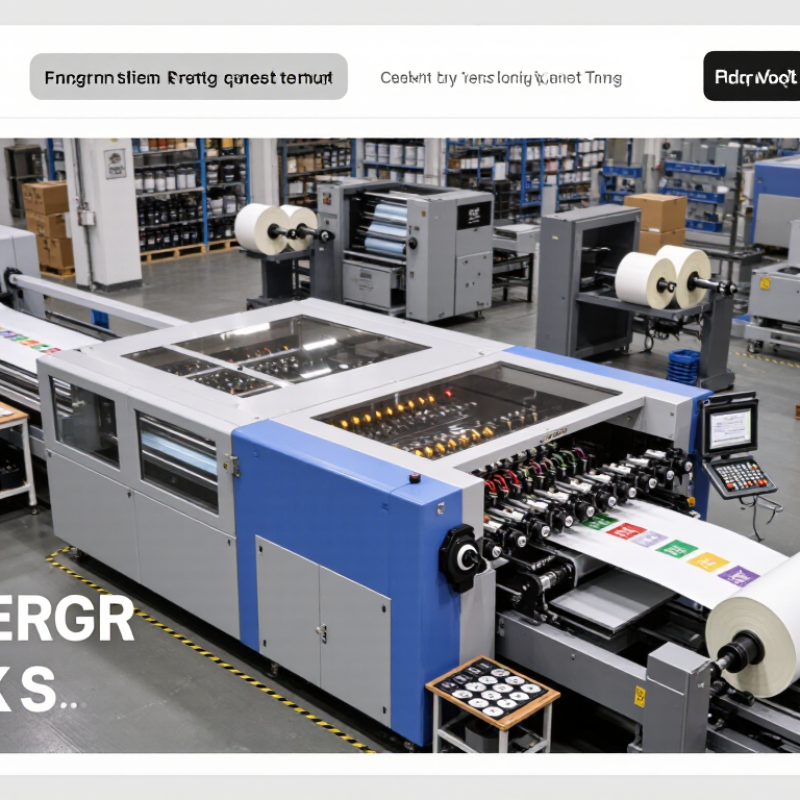
Choosing an Inspection Machine For Printing is a production decision, not merely a camera purchase. It affects waste, customer complaints, uptime, and brand trust. Smithers’ The Future of Global Printing to 2028 identifies packaging and labels as important growth areas, where shorter runs and variable designs increase inspection pressure. More jobs now pass quickly through the press. Small errors become expensive.

An effective machine must match the real production environment. Check web width, line speed, substrate reflectivity, print contrast, and the smallest defect requiring detection. Resolution matters, but lighting matters just as much. A glossy film may hide pinholes under uneven illumination. A textured label can create false alarms. Experienced converters also examine splice detection, barcode verification, color comparison, and automatic reject systems. The goal is practical control. Not impressive specifications.

Industry research supports this wider view. PMMI’s packaging automation reports emphasize integration, data visibility, and flexible equipment as major priorities for manufacturers. Therefore, the inspection system should communicate with the press, rewinder, ERP, and quality records. It should provide searchable images, defect maps, and clear operator alerts. According to ISO 9001 quality-management principles, evidence and repeatable processes are essential. Yet no machine is perfect. A supplier’s demonstration may use ideal samples, while your factory has dust, vibration, changing inks, and rushed operators. Ask for a live trial using actual rolls and known defects. Compare false rejects, missed defects, setup time, and maintenance effort. The cheapest quote can become the costliest choice. This guide explains how to test those details before investment, while leaving room for one uncomfortable truth: inspection improves decisions, but it cannot repair a weak printing process.

How to Choose an Inspection Machine for Printing?

Define the Inspection Goals and Quality Requirements

Choosing an inspection machine for printing should begin with a clear definition of the inspection goal. Are you detecting missing text, color variation, registration errors, scratches, or surface contamination? Defects are not equal. A small barcode error may stop shipment, while a minor shade difference may require customer approval. List each defect by type, size, location, and acceptable frequency.

Quality requirements must reflect the real production process. Measure what matters. Record the substrate, ink behavior, print speed, web width, resolution, and lighting conditions. A machine that performs well on coated paper may struggle with reflective film or textured stock. Define the smallest defect that must be detected, then compare it with the camera resolution and inspection tolerance. Include reference samples, approved limits, and a clear response when an error appears.

Experience on the production floor is essential. Operators should test sample rolls, repeat defects, and difficult colors before equipment selection. Ask for measurable results, not broad claims. Verification should include detection accuracy, false-rejection rates, setup time, and data traceability. A perfect specification rarely survives actual production. I have seen teams overvalue image resolution while ignoring unstable web tension. That mistake can create false alarms and operator fatigue. Quality engineers should review the inspection rules with production staff, because practical knowledge often exposes gaps in a formal checklist.

How to Choose an Inspection Machine for Printing? - Define the Inspection Goals and Quality Requirements

Inspection Goal Typical Printing Defect Quality Requirement Recommended Inspection Method Typical Resolution Production Considerations Priority Acceptance Guidance
Print Registration Misalignment between colors, text, images, or die-cut marks Color-to-color registration commonly controlled within approximately ±0.10–0.25 mm, depending on the product High-speed line-scan camera inspection with registration-mark tracking 0.05–0.15 mm per pixel Use synchronized lighting and stable web transport to reduce vibration-related measurement errors High Set limits according to artwork tolerance and downstream cutting or folding requirements
Color Consistency Uneven ink density, color shift, banding, or incorrect spot color Define color tolerance using approved samples or instrument-based values such as ΔE; the acceptable value depends on the substrate and application Area-scan or line-scan vision combined with calibrated illumination and color measurement Color measurement is more important than pixel size Control illumination geometry, substrate whiteness, gloss, and viewing conditions High Use the same measurement method for the reference sample and production material
Text and Barcode Readability Missing characters, blurred text, broken bars, low contrast, or unreadable codes All critical text and codes must match the approved artwork and pass the selected barcode or OCR standard OCR, OCV, barcode verification, and pattern matching Commonly 0.05–0.20 mm per pixel Inspection speed must support the line rate without reducing exposure quality or decoding reliability High Verify code type, minimum module size, contrast, quiet zone, and required grading level
Surface Defects Pinholes, spots, streaks, scratches, ink splashes, and coating marks Defect size limits should be defined by area, length, width, location, and visual impact Full-width line-scan inspection with defect detection and image classification Smallest detectable defect should be covered by at least 2–3 pixels Lighting direction and contrast are critical for detecting transparent, glossy, or low-contrast defects High Classify defects as critical, major, or minor to avoid rejecting acceptable material
Missing or Extra Print Missing image elements, duplicated graphics, incorrect labels, or unprinted areas Every critical design element must be present in the correct position and sequence Reference-image comparison, template matching, and print-to-print verification 0.10–0.30 mm per pixel for most graphical checks Use job-specific recipes and controlled artwork versions to prevent setup errors High Use registration tolerance and region-of-interest masks for variable or noncritical areas
Variable Data Verification Wrong sequential number, incorrect expiration date, mismatched batch code, or repeated data Variable information must correspond to the production order and remain readable throughout the run OCR/OCV, barcode reading, database comparison, and sequence checking Based on character height and code module size Data communication, traceability, and secure recipe management are required High Define actions for unreadable, duplicated, missing, or out-of-sequence data
Web Break and Material Damage Web tears, wrinkles, creases, edge damage, holes, or splice-related defects Material must remain continuous and suitable for converting, rewinding, folding, or filling Web monitoring camera, edge tracking, and defect detection Depends on web width and smallest critical damage Inspection should be linked to alarms, line stopping, or automatic defect marking Medium Set separate limits for production-stopping defects and defects requiring later removal
Coating and Varnish Coverage Coating voids, uneven gloss, overprint varnish miss, or incomplete coverage Coverage must meet the approved visual standard and functional requirements such as scuff resistance Contrast-based vision inspection, gloss measurement, or combined surface inspection Typically 0.10–0.30 mm per pixel Use suitable illumination for transparent coatings and reflective substrates Medium Test representative samples because visual contrast may change with substrate and finish
Cut, Fold, and Finishing Alignment Incorrect cut position, fold displacement, perforation offset, or die-cut registration error Alignment tolerance is determined by package dimensions, artwork, and converting equipment capability Mark detection, edge measurement, dimensional gauging, and registration inspection Approximately 0.05–0.20 mm per pixel Inspect at the stage where the relevant marks and edges are visible and stable High Measure both absolute position and repeatability over the full production roll or batch
Production Traceability Unidentified defects, missing inspection records, or inability to locate defective material Each detected defect should be linked to time, position, job, roll, batch, and inspection result Inspection software with defect mapping, event logging, and report generation Not applicable Storage capacity, data export, user permissions, and integration with production systems should be evaluated Medium Define retention time and data format before selecting the inspection machine
Inspection Coverage Uninspected web edges, gaps between images, unstable camera zones, or blind spots The inspected width and area must cover all customer-critical regions at the operating speed Full-width camera arrangement with calibrated field of view and coverage verification Select resolution based on the smallest critical defect Confirm maximum web width, minimum repeat length, line speed, and available installation space High Request a coverage test using actual substrate, inks, finishes, and production speed
False-Reject Control Acceptable products rejected because of glare, substrate variation, dust, or harmless print variation Detection sensitivity must be balanced with an agreed false-reject rate and defect escape risk Recipe-based thresholds, adaptive inspection, defect classification, and operator review tools Depends on defect type and contrast Use sample libraries containing both acceptable variation and confirmed defects Medium Validate the system with known good and known defective samples before production approval

Compare Inspection Machine Types and Detection Technologies

How to Choose an Inspection Machine for Printing?

Choosing an inspection machine starts with the printing process, not the equipment catalogue. Web inspection systems suit continuous rolls running at high speed. Sheet-fed machines work better when every sheet needs registration and surface checks. Offline systems can examine samples without slowing production, but they may miss defects between samples. That limitation matters.

Detection technology should match the defect. Line-scan cameras capture narrow strips across moving webs. They are effective for pinholes, streaks, missing print, and colour variation. Area-scan cameras inspect individual sheets and support detailed position checks. Optical character recognition verifies text, while barcode reading confirms variable data. Multispectral lighting can reveal subtle colour or coating differences that normal light misses. Artificial intelligence may classify complex defects, but it still needs good training images and clear acceptance rules.

In practice, I would test the machine using real production material. Include wrinkles, dust, weak contrast, and intentional print changes. Measure detection accuracy, false rejects, inspection width, and response time. Ask how operators review images after an alarm. A system that detects every mark may still waste good sheets. A system with fewer alarms may hide serious variation. The difficult part is defining what truly matters. Some early choices are wrong after installation. Production trials, documented tolerances, and regular calibration make the final decision more reliable.

Evaluate Material, Print Format, and Production Line Compatibility

How to Choose an Inspection Machine for Printing?

The material should guide your inspection machine choice. Paper, film, foil, and coated stock behave differently during production. Paper dust can weaken image contrast and create false alarms. Glossy film may reflect light into the camera. Transparent film needs controlled backlighting for reliable defect detection. Metallic inks can confuse standard lighting systems. Request trials using your actual materials, inks, finishes, and production speeds. Small details matter.

Print format also affects inspection accuracy. A narrow label requires different optics from a wide flexible package. Check the maximum web width, repeat length, print registration, and image resolution. The machine should detect missing text, color shifts, streaks, and smudges at the smallest acceptable size. Define these limits before comparing equipment. Otherwise, impressive demonstrations may hide practical gaps. I have seen teams choose high resolution, then struggle with slow processing and excessive false rejects.

Production line compatibility deserves equal attention. Confirm the available installation space, conveyor height, web direction, and line speed. The inspection system should communicate with the press or finishing line through reliable signals. Its reject mechanism must remove defective products without disturbing good ones. Ask how calibration records, user permissions, and inspection reports are managed. A trial should run long enough to expose heat, vibration, dust, and material changes. No setup is perfect. Record every failure, including operator mistakes, and review whether the machine or workflow caused them. A qualified technician can then adjust lighting, thresholds, and maintenance intervals before full production.

Assess Accuracy, Speed, Software, and Ease of Operation

How to Choose an Inspection Machine for Printing?

Assess Accuracy, Speed, Software, and Ease of Operation

Choosing an inspection machine starts with accuracy, not impressive specifications. Test it with your actual printed materials, including fine text, uneven ink, and small registration errors. Ask how often the system needs calibration. A reliable machine should detect defects consistently across long production runs. Review sample reports, not only demonstration videos. In my experience, lighting changes can expose weaknesses quickly.

Speed matters when the press runs continuously. Compare inspection speed with your real line speed and product width. A machine that slows production may create hidden costs. However, maximum speed is not always useful. Check whether accuracy drops at higher speeds. Software should show clear defect images, adjustable tolerance settings, and searchable production records. Operators should identify a problem without opening several confusing menus.

Ease of operation affects daily results. Look for a simple interface, quick setup, and readable alerts. New operators should learn basic functions within a short training session. Maintenance access also deserves attention. Dust, ink residue, and vibration can affect performance over time. No inspection setup is perfect. Even experienced teams may set tolerances too tightly and create unnecessary rejects. Leave room for review. Before buying, let operators test the machine during a normal shift. Their feedback may reveal practical problems that technical documents miss.

Calculate Total Cost, Maintenance Needs, and Long-Term Value

How to Choose an Inspection Machine for Printing?

A printing inspection machine should be judged by total cost, not purchase price. Include the camera system, lighting, software, installation, operator training, calibration, spare parts, energy, and production downtime. A low-priced unit may require expensive integration. It may also reject good products when print designs change.

Deloitte’s predictive maintenance report indicates that data-led maintenance can reduce maintenance costs by 10–40% and downtime by 25–30%. These figures are not guaranteed for every printing line. Still, they show why service planning matters. Ask for annual maintenance hours, replacement-part prices, software fees, and response times. Calculate the cost of one hour of stopped production. Then compare it with the machine’s expected false-rejection rate and missed-defect risk. Small percentages become expensive at high volumes.

Tips: Build a five-year spreadsheet. Add installation, training, inspections, upgrades, and disposal. Test real samples, including weak contrast, wrinkles, dust, and registration errors. Request evidence from independent factory trials, not only demonstration footage. Measure payback using avoided waste and recovered uptime. My first cost model ignored changeover time, and the result looked better than reality. That mistake is easy to repeat. Choose a system that operators can adjust safely, maintain locally, and understand under pressure. Long-term value comes from stable inspection performance, not impressive specifications alone.