

News

Miro: A New Standard in Responsible Innovation

Miro: A New Standard in Responsible Innovation The Miro monitor arm is setting new benchmarks in sustainability. It offers a high-performance solution without compromising on environmental responsibility. Designed with careful material selection, local sourcing, and longevity in mind, Miro’s responsible approach to design and unique manoeuvrability set it apart from the competition. Sustainable Choices Miro is crafted from energy-efficient materials with a lower carbon impact....

Read more
HSE Advisor

Role Purpose Support in the development, implementation and maintenance of the company’s Health, Safety & Environmental policies, processes, operational procedures, and standards.  Ensuring best practice and championing a continually improving HSE culture within the business. Key Responsibilities Liaise with and provide support to all areas of the business to eliminate, mitigate or reduce identified HSE exposures. Partner with the production management team and team leaders,...

Read more
CMD Ltd LAUNCHES 48-HOUR TURNAROUND ON BETATRAK® RAPID ORDERING SERVICE

CMD Ltd, the specialist in power distribution systems, workstation power and monitor arms, has launched a rapid ordering service for its Betatrak® underfloor powertrack distribution systems and accessories, with a commitment to delivering within 48-hours of an approved purchase order*. The service enables customers to order up to 50 lengths of Standard or Clean Earth (C/E) low noise Betatrak, along with up to 25 feed...

Read more

CMD INVESTS £1/4 MILLION IN NEW MACHINE AS PART OF FACTORY UPGRADE

We have invested in a new £1/4m TRUMPF CNC metal punch as part of an asset renewal strategy for our UK manufacturing capability. The new machine will be used in the production of a wide variety of our power distribution systems and workstation power products at our Rotherham factory. Suitable for handling sheet metal between 0.9mm and 3.0mm thick, the new machine will replace one...

Read more

CMD CATALOGUE PROVIDES TECHNICAL POWER DISTRIBUTION GUIDE

CMD Ltd has released a new catalogue, providing an easy to follow technical guide to our power distribution systems and plug and play desk modules. Detailing CMD’s full range of UK-manufactured power distribution systems and plug and play desk modules, the catalogue will be a helpful source of information to M&E engineers and contractors alike to understand how our power distribution systems connect together and...

Read more

Power Distribution Catalogue
CMD Ltd PLAYS ESSENTIAL ROLE IN ELECTRICAL FIT OUT AT LONDON’S PRESTIGIOUS OFFICE DEVELOPMENT

CMD Ltd, specialist in workplace connectivity and ergonomic solutions, has provided a flexible and high-quality power distribution network for The Ray, a prestigious office development in London’s Farringdon. Well-known for being the former site of The Guardian newspaper, The Ray now stands as an 83,000ft² office development characterised by a modernised warehouse aesthetic, with level two now occupied by a global social media company. The...

Read more

The Ray
CMD plugs in to european opportunity with Schuko Capsule unit launch

CMD Ltd, the specialist in power and connectivity solutions for commercial environments, has launched a Schuko version of its popular fixed format Capsule workstation power module for export to mainland Europe and beyond. A popular on desk power module comprising two sockets and dual USB (type A and C) chargers, CMD’s Capsule unit is already widely specified in the UK as an off-the-shelf workstation power...

Read more

CMD White Schuko Capsule Desk Power Module
CMD LTD EXTENDS MONITOR ARM RANGE WITH THE LAUNCH OF REACH PLUS

CMD Ltd, the specialist in ergonomic and connectivity solutions for commercial interiors, has completed its Reach monitor arm range with the launch of the Reach Plus. Available in single or dual screen options, the Reach Plus has been designed to provide an ideal solution for both single and dual screen workstation configurations, or can be used with next generation of large format curved screens. Suitable...

Read more

CMD Ltd DEMONSTRATES THE ART OF POWER DISTRIBUTION AT THE UNIVERSITY OF WARWICK

CMD Ltd, the specialist in workplace connectivity and ergonomic solutions, has provided Betatrak busbar power distribution and a range of electrical accessories for two major capital investment projects at the University of Warwick. Designed by Fielden Clegg Bradley Studios, the £33 million Faculty of Arts building is a showpiece development comprising four interconnected structures set around a central atrium, which will enable inter-disciplinary collaboration across...

Read more

University of Warwick
CMD BRINGS HARMONY TO COVENTRY UNIVERSITY RESEARCH FACILITIES

CMD Ltd, the specialist in power distribution solutions and workstation power and ergonomics, has provided under desk and on desk power modules for the refurbishment of three Coventry University research buildings. Located on Coventry University Technology Park, a business park designed to encourage collaboration between the university and knowledge-based businesses, the three buildings are being repurposed as office accommodation for university research teams. The refurbishment...

Read more

Coventry University

Why Choose a DIY Drone Camera Gimbal for Aerial Imaging?

Why Choose a DIY Drone Camera Gimbal for Aerial Imaging?

A Drone Camera Gimbal Diy project can transform ordinary aerial footage into smoother, more purposeful imagery. It gives builders direct control over camera balance, vibration isolation, and movement limits. You can adjust each part.

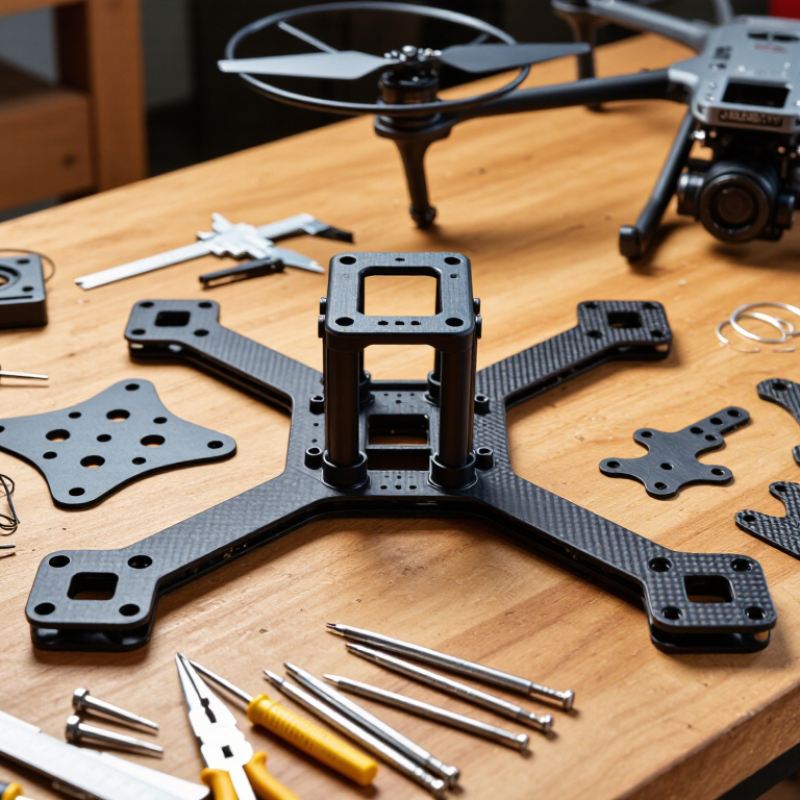
Instead of accepting a fixed commercial design, you can match the gimbal to your aircraft, lens, and shooting style. A lightweight frame may use carbon-fiber plates, small brushless motors, and silicone dampers. A heavier camera needs stronger brackets and more precise tuning. Small errors matter. An unbalanced camera can make motors heat quickly and produce shaky horizons.

DIY aerial robotics educator David Windestål offers a useful principle: “A stable platform comes before clever features.” That idea applies directly to homemade gimbals. Build stability first, then add remote control, follow modes, or automated leveling. His practical approach reflects years of testing flight hardware, not just assembling parts from a diagram.

The learning process also exposes weaknesses. My first design might look neat but still vibrate during sharp turns. That failure is valuable. It encourages better measurements, cleaner wiring, and careful bench testing before flight. Safety remains essential, especially around rotating propellers and expensive cameras.

A well-planned Drone Camera Gimbal Diy setup can improve image quality while teaching mechanical design, electronics, and flight behavior. It may not outperform a professional unit immediately. However, it can become more suitable for a specific aircraft and creative goal. The best results come from patient calibration, realistic expectations, and a willingness to rebuild imperfect parts.

Why Choose a DIY Drone Camera Gimbal for Aerial Imaging?

What a DIY Drone Camera Gimbal Is and How It Works

Why Choose a DIY Drone Camera Gimbal for Aerial Imaging?

A DIY drone camera gimbal is a small mechanical platform that keeps a camera steady during flight. It usually uses brushless motors, an inertial measurement unit, and a flight controller. The IMU detects pitch, roll, and yaw changes, then sends correction signals to the motors. This process happens many times each second. The camera stays aimed, even when the aircraft tilts in wind.

The design is practical because each part can be adjusted or replaced. A builder may set motor strength, damping, camera angle, and vibration isolation for a specific payload. My first frame looked stable on a workbench, but aerial footage showed small waves and sudden horizon shifts. The problem was not the camera. It was an unbalanced arm and weak filtering. Small mistakes matter.

The FAA’s 2024 Aerospace Forecast reported more than 800,000 registered civil drones in the United States. That growing fleet increases demand for reliable imaging equipment. A 2024 MarketsandMarkets report also forecasts double-digit growth for the drone camera market through 2029. These figures support careful experimentation, not careless assembly. A gimbal should be tested with low-altitude, controlled flights and recorded vibration data. It may remain imperfect. That is useful. Each flight can reveal resonance, motor delay, or excessive weight. A simple design often teaches more than a sealed system.

Why Choose a DIY Drone Camera Gimbal for Aerial Imaging? - What a DIY Drone Camera Gimbal Is and How It Works

Data Dimension Typical DIY Gimbal Specification How It Works Aerial Imaging Benefit
Primary Purpose Stabilize a lightweight camera during flight The mount counteracts aircraft movement so the camera remains aimed at the target Produces smoother photographs and video than a rigid camera mount
Stabilization Axes Usually 1–3 axes: pitch, roll, and optional yaw Each axis uses a motor and control loop to correct rotational movement Three-axis designs provide better control for changing flight directions and wind conditions
Sensing Method Gyroscope and accelerometer; optional magnetometer An inertial measurement unit detects angular movement and acceleration Allows rapid correction before motion becomes visible in the footage
Control System Microcontroller with proportional–integral–derivative control The controller compares the desired angle with the measured angle and adjusts motor output Improves holding accuracy while reducing overshoot and unwanted vibration
Camera Payload Common DIY range: approximately 100–500 g Motor torque must be sufficient to move and hold the camera and mounting hardware Supports compact action cameras, small digital cameras, or sensors when correctly balanced
Mechanical Frame Aluminum, carbon-fiber plate, 3D-printed polymer, or a mixed structure The frame supports the camera and isolates it from the drone body A custom frame can be adapted to the camera shape and available mounting points
Motor Type Small brushless or geared servo motors Motors apply controlled torque to rotate the camera around each stabilized axis Enables fast, repeatable corrections without requiring manual adjustment in flight
Operating Voltage Common electronics range: 5–12 V, depending on the motor and controller A regulated power circuit supplies the voltage required by the controller and motors Compatible power design helps prevent resets, overheating, and unstable movement
Camera Tilt Range Often about −90° to +30° on the pitch axis The pitch motor changes the viewing angle from downward-looking to forward-looking positions Supports ground inspection, landscape imaging, and forward-flight recording
Response Speed Designed for corrections within milliseconds to tens of milliseconds The sensor-controller-motor loop repeatedly updates the camera position during flight Faster response reduces blur caused by small, sudden aircraft movements
Vibration Isolation Silicone dampers, rubber balls, foam, or flexible mounts Soft materials reduce high-frequency vibration transferred from motors and propellers Helps minimize rolling-shutter artifacts, micro-jitters, and visible image shake
Balancing Requirement Camera center of gravity should be close to each rotation axis A balanced payload reduces the continuous torque required from the motors Improves efficiency, reduces motor heat, and increases stabilization accuracy
Typical Added Mass Approximately 80–250 g for a compact DIY assembly The added mass includes the frame, motors, controller, dampers, and wiring Lower mass generally preserves flight time and leaves more payload capacity
Power Consumption Varies with payload, motor size, correction frequency, and supply voltage Motors draw more current when correcting large angles or holding an unbalanced camera Efficient construction can extend flight time compared with an oversized mount
Remote Control Function Optional pitch command through a radio receiver or flight controller Pilot input changes the target angle while stabilization remains active Allows the operator to frame subjects without physically moving the drone
Main DIY Advantages Custom fit, repairability, adjustable settings, and component-level control The builder can select the frame, sensors, motors, firmware, and mounting geometry Useful for prototypes, educational projects, specialized cameras, and experimental payloads
Key Design Trade-Off Higher stability may increase mass, cost, power use, and tuning effort Performance depends on mechanical stiffness, balancing, sensor quality, and controller tuning A properly tuned lightweight system offers a practical balance between image quality and flight endurance

Note: The specifications above are representative engineering ranges for lightweight DIY aerial-imaging projects. Actual results depend on the selected camera, motors, power system, frame geometry, payload balance, and flight conditions.

Key Components Needed for Building a DIY Gimbal

Why Choose a DIY Drone Camera Gimbal for Aerial Imaging?

A DIY drone camera gimbal gives builders direct control over stability, weight, and repairability. The need is growing. The AUVSI Economic Report found that commercial drones could support more than 100,000 American jobs within the first decade of integration. Better imaging hardware remains central to that growth. A custom gimbal can also suit a small mapping camera, thermal sensor, or lightweight action camera.

Key Components Needed for Building a DIY Gimbal

Start with a rigid frame made from carbon fiber, aluminum, or reinforced polymer. It must resist twisting during sudden turns. Three brushless motors usually control pitch, roll, and yaw. Select motors by payload weight, not appearance. My first prototype used oversized motors. It worked, but drained the battery quickly.

A three-axis inertial measurement unit provides motion data for stabilization. The controller needs fast sampling and careful tuning. Add magnetic encoders when accurate angular feedback is important. A vibration-isolation platform, using silicone dampers, protects the camera from propeller resonance. Keep the dampers soft enough to absorb movement, but not so soft that the camera swings.

Power regulation is easy to overlook. Use a stable converter, separate signal wiring, and secure connectors. The Federal Aviation Administration’s Aerospace Forecast FY 2024–44 projects continued growth in unmanned aircraft operations, increasing demand for dependable imaging systems. Meanwhile, the 2024 Drone Industry Insights market report identifies aerial data capture as a major commercial application. These figures support investment in reliable stabilization, but they do not replace bench testing. Measure vibration, check motor temperature, and inspect every fastener after flight.

Why Choose a DIY Drone Camera Gimbal for Aerial Imaging?

A DIY gimbal lets builders balance stabilization performance, payload weight, and power consumption for a specific aerial camera system. The chart shows a representative mass budget for the key components of a lightweight three-axis gimbal.

How to Design and Assemble the Gimbal System

Why Choose a DIY Drone Camera Gimbal for Aerial Imaging?

How to Design and Assemble the Gimbal System

Designing a DIY drone camera gimbal starts with the camera’s weight, dimensions, and center of gravity. A balanced camera reduces motor strain and improves stabilization. I usually sketch the frame before cutting or printing any parts. The design should include three controlled axes: pitch, roll, and yaw. Lightweight arms help, but excessive flexibility creates unwanted vibration. That trade-off is easy to underestimate.

During assembly, I mount the camera on soft vibration dampers. I keep the flight controller and gimbal controller separated from noisy power wires. Small brushless motors need accurate position feedback from sensors. After connecting the wiring, I check every connector by hand. A loose cable can ruin clear footage. It happened during my first test.

Calibration requires patience. I place the gimbal on a level table and set each axis to its mechanical center. Then I adjust the control response with low gains. High gains may seem powerful, but they can cause rapid shaking. I test each axis separately before attaching the system to the drone. Short hover tests reveal problems better than long flights. The camera should remain steady during gentle movement, not only while stationary. My early frame was too flexible, and I had to reinforce one joint. That extra weight reduced flight time slightly. It was not an ideal solution, but it taught me to measure stiffness before optimizing weight. Local aviation requirements and safe operating distances should also guide every flight test.

Methods for Stabilizing Aerial Images During Flight

A DIY drone camera gimbal can make aerial images steadier without adding unnecessary complexity. The key is not the frame alone, but how each stabilizing method works during flight. I begin by balancing the camera mechanically. Its center of gravity should sit close to the gimbal’s rotation axes. A poorly balanced camera forces the motors to work harder and creates visible shaking.

Small rubber dampers can reduce vibration from the propellers and motors. However, soft mounts may allow slow swinging in strong wind. I test different damping materials on the ground before flying. A short hover often reveals problems quickly. The image should remain calm when the drone changes direction.

An inertial measurement unit helps detect pitch, roll, and yaw movement. Accurate calibration matters. Even a slight sensor offset can produce a tilted horizon. I tune the control response gradually, using low gain first. Excessive gain may cause rapid motor corrections, while weak gain leaves the camera drifting. Smooth movement usually looks more natural than aggressive correction.

Shutter speed also affects image stability. In bright conditions, a faster shutter can reduce motion blur. In lower light, the camera may need more exposure, so vibration becomes easier to notice. I keep flight paths gentle when testing new settings. Wind direction, payload weight, and battery level can change the results. My early builds were stable but not silent, and some footage still showed small horizon shifts. That imperfection is useful feedback, not a reason to hide the test.

Benefits, Limitations, and Safety Considerations of DIY Gimbals

Why Choose a DIY Drone Camera Gimbal for Aerial Imaging?

Benefits, Limitations, and Safety Considerations of DIY Gimbals

A DIY camera gimbal can make aerial images steadier without adding unnecessary weight. A two-axis design may be enough for landscape surveys or slow photography. Building it yourself also reveals how vibration, balance, and motor response affect image quality. In my workshop, I found that a correctly balanced camera reduced motor heat noticeably. The camera should rest near the rotation axis. Small errors create constant motor strain. This is where DIY becomes useful.

The limitations are equally practical. Homemade frames may flex during sudden movement. Cheap bearings can introduce tiny shakes into every frame. An exposed circuit board also dislikes dust and moisture. Calibration takes patience. My first prototype tilted correctly on the bench but drifted during flight. I had underestimated electrical noise from the power system. A stable gimbal needs an inertial sensor, firm wiring, and careful software tuning. It also needs testing in stages.

Safety must control every design choice. Keep propellers far from the gimbal and secure all cables against moving parts. Check the mounting screws before each flight. Test the system without blades, then use a restrained ground test in an open area. A low battery warning should trigger a safe landing plan. Never rely on a camera view alone. Follow local aviation rules and protect people, property, and private spaces. I still leave extra room for failure, because field conditions are less forgiving than a workbench.