

News

Miro: A New Standard in Responsible Innovation

Miro: A New Standard in Responsible Innovation The Miro monitor arm is setting new benchmarks in sustainability. It offers a high-performance solution without compromising on environmental responsibility. Designed with careful material selection, local sourcing, and longevity in mind, Miro’s responsible approach to design and unique manoeuvrability set it apart from the competition. Sustainable Choices Miro is crafted from energy-efficient materials with a lower carbon impact....

Read more
HSE Advisor

Role Purpose Support in the development, implementation and maintenance of the company’s Health, Safety & Environmental policies, processes, operational procedures, and standards.  Ensuring best practice and championing a continually improving HSE culture within the business. Key Responsibilities Liaise with and provide support to all areas of the business to eliminate, mitigate or reduce identified HSE exposures. Partner with the production management team and team leaders,...

Read more
CMD Ltd LAUNCHES 48-HOUR TURNAROUND ON BETATRAK® RAPID ORDERING SERVICE

CMD Ltd, the specialist in power distribution systems, workstation power and monitor arms, has launched a rapid ordering service for its Betatrak® underfloor powertrack distribution systems and accessories, with a commitment to delivering within 48-hours of an approved purchase order*. The service enables customers to order up to 50 lengths of Standard or Clean Earth (C/E) low noise Betatrak, along with up to 25 feed...

Read more

CMD INVESTS £1/4 MILLION IN NEW MACHINE AS PART OF FACTORY UPGRADE

We have invested in a new £1/4m TRUMPF CNC metal punch as part of an asset renewal strategy for our UK manufacturing capability. The new machine will be used in the production of a wide variety of our power distribution systems and workstation power products at our Rotherham factory. Suitable for handling sheet metal between 0.9mm and 3.0mm thick, the new machine will replace one...

Read more

CMD CATALOGUE PROVIDES TECHNICAL POWER DISTRIBUTION GUIDE

CMD Ltd has released a new catalogue, providing an easy to follow technical guide to our power distribution systems and plug and play desk modules. Detailing CMD’s full range of UK-manufactured power distribution systems and plug and play desk modules, the catalogue will be a helpful source of information to M&E engineers and contractors alike to understand how our power distribution systems connect together and...

Read more

Power Distribution Catalogue
CMD Ltd PLAYS ESSENTIAL ROLE IN ELECTRICAL FIT OUT AT LONDON’S PRESTIGIOUS OFFICE DEVELOPMENT

CMD Ltd, specialist in workplace connectivity and ergonomic solutions, has provided a flexible and high-quality power distribution network for The Ray, a prestigious office development in London’s Farringdon. Well-known for being the former site of The Guardian newspaper, The Ray now stands as an 83,000ft² office development characterised by a modernised warehouse aesthetic, with level two now occupied by a global social media company. The...

Read more

The Ray
CMD plugs in to european opportunity with Schuko Capsule unit launch

CMD Ltd, the specialist in power and connectivity solutions for commercial environments, has launched a Schuko version of its popular fixed format Capsule workstation power module for export to mainland Europe and beyond. A popular on desk power module comprising two sockets and dual USB (type A and C) chargers, CMD’s Capsule unit is already widely specified in the UK as an off-the-shelf workstation power...

Read more

CMD White Schuko Capsule Desk Power Module
CMD LTD EXTENDS MONITOR ARM RANGE WITH THE LAUNCH OF REACH PLUS

CMD Ltd, the specialist in ergonomic and connectivity solutions for commercial interiors, has completed its Reach monitor arm range with the launch of the Reach Plus. Available in single or dual screen options, the Reach Plus has been designed to provide an ideal solution for both single and dual screen workstation configurations, or can be used with next generation of large format curved screens. Suitable...

Read more

CMD Ltd DEMONSTRATES THE ART OF POWER DISTRIBUTION AT THE UNIVERSITY OF WARWICK

CMD Ltd, the specialist in workplace connectivity and ergonomic solutions, has provided Betatrak busbar power distribution and a range of electrical accessories for two major capital investment projects at the University of Warwick. Designed by Fielden Clegg Bradley Studios, the £33 million Faculty of Arts building is a showpiece development comprising four interconnected structures set around a central atrium, which will enable inter-disciplinary collaboration across...

Read more

University of Warwick
CMD BRINGS HARMONY TO COVENTRY UNIVERSITY RESEARCH FACILITIES

CMD Ltd, the specialist in power distribution solutions and workstation power and ergonomics, has provided under desk and on desk power modules for the refurbishment of three Coventry University research buildings. Located on Coventry University Technology Park, a business park designed to encourage collaboration between the university and knowledge-based businesses, the three buildings are being repurposed as office accommodation for university research teams. The refurbishment...

Read more

Coventry University

How to Choose a Cloud Intercom System in 2026?

Choosing a Cloud Intercom system in 2026 is not simply a choice between a wall panel and a mobile app. It affects how visitors reach residents, how staff manage deliveries, and what happens when the network fails. Gartner forecast worldwide public cloud end-user spending would reach $723.4 billion in 2025, a 21.5% increase from 2024. That forecast signals broad cloud investment, not proof that every intercom product is reliable. Important distinction.

A sound evaluation should start with the building’s daily routines. Can a visitor call a tenant from a clear, weather-resistant entrance panel? Can authorized staff answer remotely, and can residents manage access without sharing credentials casually? Check uptime commitments, call quality, encryption, software updates, integration with existing doors, and documented offline behavior. Ask vendors to demonstrate a real outage scenario, not just a polished app tour. Small details matter: a delayed call, unclear camera image, or confusing delivery workflow can frustrate people every day.

Compare the full cost over several years, including subscriptions, installation, support, and hardware replacement. Review the vendor’s security documentation and data-handling practices, and confirm that its service fits your building’s connectivity and privacy requirements. These checks do not guarantee a perfect system. I would still test the shortlist with residents and staff; their feedback can expose awkward steps that a specification sheet misses. The best Cloud Intercom is the one people can use reliably, including on an ordinary, hectic Tuesday.

How to Choose a Cloud Intercom System in 2026?

Understanding How Cloud Intercom Systems Work

Understanding How Cloud Intercom Systems Work

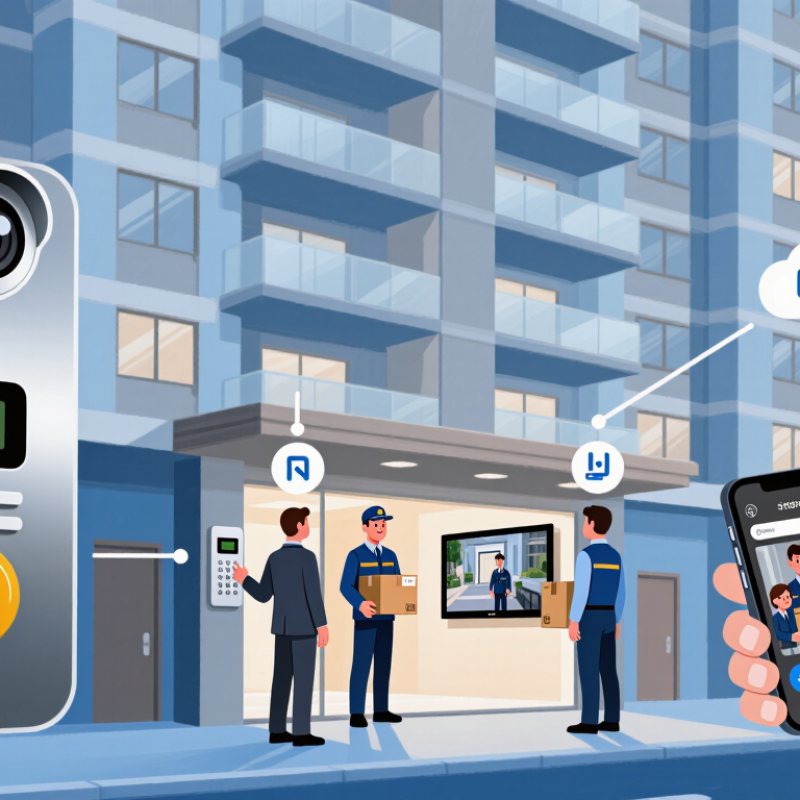
A cloud intercom connects a door station to an indoor screen or mobile app through an internet service. When a visitor presses the button, the station sends an alert and live audio or video over the network. The resident can respond remotely and, if the system supports it, release the door. Simple in principle.

The path matters. A camera and microphone capture the visitor; a local device encodes the stream; the cloud service routes it to authorized users. Some systems send calls through a nearby hub, while others connect directly to the router. Ask what happens during an outage: can people inside still communicate locally, or does every function stop? Cloud access is useful, but it is not magic.

Check the practical details before choosing. Stand at the entrance and test the call with the actual Wi-Fi signal, not a router sitting beside you. Listen for echo. Watch for delayed video. Ask how user permissions, software updates, and account recovery are handled, and whether recordings are stored or merely streamed. Strong encryption is important, but it cannot fix a weak password or poor network coverage. I would also question any setup that requires more personal data than the building genuinely needs. A small test installation can reveal awkward app controls that a specification sheet misses.

Identifying Site Needs and User Requirements

Before comparing cloud intercom systems, map how people actually move through the site. Note each entrance, gate, reception desk, and delivery point. Record indoor and outdoor conditions, too. A door exposed to wind or traffic needs clearer audio than a quiet lobby. Walk the route during a busy period. Small details matter.

List the people who will use the system and what they need to do. A receptionist may answer several entry calls, while a facilities manager may need to reach a specific floor. Visitors need simple instructions and a clear way to request access. Keep controls easy to understand. Test them with people who do not know the site; assumptions can be surprisingly wrong. Consider hearing, vision, language, and mobility needs, rather than designing for one typical user.

Then check the site’s network, power, and existing door hardware. Cloud services depend on dependable connectivity, so identify weak Wi-Fi areas and ask what happens during an outage. Clarify who can view call records, change permissions, and receive alerts. These are practical security questions, not just technical ones. A spreadsheet helps, but it rarely captures every awkward handoff or rushed delivery. Leave room to revise requirements after observing real use.

How to Choose a Cloud Intercom System in 2026?

Identifying Site Needs and User Requirements

How to use this chart: The 1–5 scores are illustrative planning priorities, not measured survey results. Score each requirement for your site, then verify network capacity, power, environmental conditions, integrations, and accessibility before comparing systems.

Evaluating Security, Reliability, and Core Features

A cloud intercom should protect more than the front door. Check whether audio and video are encrypted in transit and at rest, and whether administrators can use multi-factor authentication. Ask how quickly security updates arrive and how long access logs are retained. Clear answers matter more than a long feature list.

Reliability shows up on an ordinary Tuesday, not just in a sales demo. Review uptime records, support response times, and what happens during an internet outage. Test the intercom with a weak Wi-Fi signal, a noisy lobby, and an unanswered call. A local fallback can keep essential entry functions available, though it may not preserve every cloud feature. No system is perfect.

Core features should match the building’s daily routines. Look for clear two-way audio, usable video in dim entrances, flexible access permissions, and integrations with existing door hardware. Check whether staff can revoke access quickly when roles change. Ask for a live trial, then test it from an older phone and a shared reception desk. Easy to miss. I would also inspect privacy settings myself; default options are not always the right options for every site. A short, documented checklist makes comparisons fairer and helps teams spot trade-offs before installation.

Comparing Integrations, Costs, and Service Providers

A cloud intercom should fit the way a building actually operates, not just its floor plan. Check whether it connects cleanly with existing access controls, tenant directories, visitor tools, and mobile devices. Ask providers to demonstrate common tasks, such as updating a resident’s phone number or granting a courier temporary entry. Watch for duplicate data entry. Small details matter.

Integration claims can sound effortless, but older entry panels or inconsistent network coverage may complicate installation. Request a site assessment and a written list of supported devices before comparing proposals. Then examine the full cost: equipment, installation, subscriptions, support, and future changes to user counts. A low monthly fee may exclude setup work or advanced reporting. Not always. Compare costs over several years, not just the first invoice.

Service quality is harder to judge from a feature sheet. Ask who handles urgent faults, how quickly support responds, and whether help is available outside office hours. Request references from buildings with a similar number of doors and residents. Review the contract’s renewal terms and data-export options, too. One awkward question is worth asking: what happens if the internet fails? Battery backup, local operation, and a clear recovery process can reduce disruption. Providers should explain these limits plainly, even when the answer is inconvenient.

Planning Deployment and Measuring Long-Term Performance

A cloud intercom rollout depends on more than clear audio. Map each entrance, call flow, network connection, and fallback procedure before installation. Test peak traffic, weak Wi-Fi, and power interruptions at a real entry point. Small trials help.

Flexera’s 2024 State of the Cloud Report found that 89% of respondents had a multicloud strategy. That makes network handoffs and support ownership worth checking, even for a small deployment. Uptime Institute’s 2024 Annual Outage Analysis reported that 54% of respondents said their latest significant outage cost more than $100,000. Downtime has a practical price.

Set a baseline before launch: call connection time, missed-call rate, audio clarity, and service availability. Review those measures monthly, and compare busy periods with quieter ones. Track support tickets too; a dashboard can look healthy while staff repeat the same workaround. I would not treat one clean test as proof. Ask on-site users to test door-to-door calls, then revisit results after network changes or building renovations. Keep the targets realistic, and record exceptions rather than smoothing them away.