

News

Miro: A New Standard in Responsible Innovation

Miro: A New Standard in Responsible Innovation The Miro monitor arm is setting new benchmarks in sustainability. It offers a high-performance solution without compromising on environmental responsibility. Designed with careful material selection, local sourcing, and longevity in mind, Miro’s responsible approach to design and unique manoeuvrability set it apart from the competition. Sustainable Choices Miro is crafted from energy-efficient materials with a lower carbon impact....

Read more
HSE Advisor

Role Purpose Support in the development, implementation and maintenance of the company’s Health, Safety & Environmental policies, processes, operational procedures, and standards.  Ensuring best practice and championing a continually improving HSE culture within the business. Key Responsibilities Liaise with and provide support to all areas of the business to eliminate, mitigate or reduce identified HSE exposures. Partner with the production management team and team leaders,...

Read more
CMD Ltd LAUNCHES 48-HOUR TURNAROUND ON BETATRAK® RAPID ORDERING SERVICE

CMD Ltd, the specialist in power distribution systems, workstation power and monitor arms, has launched a rapid ordering service for its Betatrak® underfloor powertrack distribution systems and accessories, with a commitment to delivering within 48-hours of an approved purchase order*. The service enables customers to order up to 50 lengths of Standard or Clean Earth (C/E) low noise Betatrak, along with up to 25 feed...

Read more

CMD INVESTS £1/4 MILLION IN NEW MACHINE AS PART OF FACTORY UPGRADE

We have invested in a new £1/4m TRUMPF CNC metal punch as part of an asset renewal strategy for our UK manufacturing capability. The new machine will be used in the production of a wide variety of our power distribution systems and workstation power products at our Rotherham factory. Suitable for handling sheet metal between 0.9mm and 3.0mm thick, the new machine will replace one...

Read more

CMD CATALOGUE PROVIDES TECHNICAL POWER DISTRIBUTION GUIDE

CMD Ltd has released a new catalogue, providing an easy to follow technical guide to our power distribution systems and plug and play desk modules. Detailing CMD’s full range of UK-manufactured power distribution systems and plug and play desk modules, the catalogue will be a helpful source of information to M&E engineers and contractors alike to understand how our power distribution systems connect together and...

Read more

Power Distribution Catalogue
CMD Ltd PLAYS ESSENTIAL ROLE IN ELECTRICAL FIT OUT AT LONDON’S PRESTIGIOUS OFFICE DEVELOPMENT

CMD Ltd, specialist in workplace connectivity and ergonomic solutions, has provided a flexible and high-quality power distribution network for The Ray, a prestigious office development in London’s Farringdon. Well-known for being the former site of The Guardian newspaper, The Ray now stands as an 83,000ft² office development characterised by a modernised warehouse aesthetic, with level two now occupied by a global social media company. The...

Read more

The Ray
CMD plugs in to european opportunity with Schuko Capsule unit launch

CMD Ltd, the specialist in power and connectivity solutions for commercial environments, has launched a Schuko version of its popular fixed format Capsule workstation power module for export to mainland Europe and beyond. A popular on desk power module comprising two sockets and dual USB (type A and C) chargers, CMD’s Capsule unit is already widely specified in the UK as an off-the-shelf workstation power...

Read more

CMD White Schuko Capsule Desk Power Module
CMD LTD EXTENDS MONITOR ARM RANGE WITH THE LAUNCH OF REACH PLUS

CMD Ltd, the specialist in ergonomic and connectivity solutions for commercial interiors, has completed its Reach monitor arm range with the launch of the Reach Plus. Available in single or dual screen options, the Reach Plus has been designed to provide an ideal solution for both single and dual screen workstation configurations, or can be used with next generation of large format curved screens. Suitable...

Read more

CMD Ltd DEMONSTRATES THE ART OF POWER DISTRIBUTION AT THE UNIVERSITY OF WARWICK

CMD Ltd, the specialist in workplace connectivity and ergonomic solutions, has provided Betatrak busbar power distribution and a range of electrical accessories for two major capital investment projects at the University of Warwick. Designed by Fielden Clegg Bradley Studios, the £33 million Faculty of Arts building is a showpiece development comprising four interconnected structures set around a central atrium, which will enable inter-disciplinary collaboration across...

Read more

University of Warwick
CMD BRINGS HARMONY TO COVENTRY UNIVERSITY RESEARCH FACILITIES

CMD Ltd, the specialist in power distribution solutions and workstation power and ergonomics, has provided under desk and on desk power modules for the refurbishment of three Coventry University research buildings. Located on Coventry University Technology Park, a business park designed to encourage collaboration between the university and knowledge-based businesses, the three buildings are being repurposed as office accommodation for university research teams. The refurbishment...

Read more

Coventry University

How to Choose the Best Mini PC Fans for Optimal Cooling?

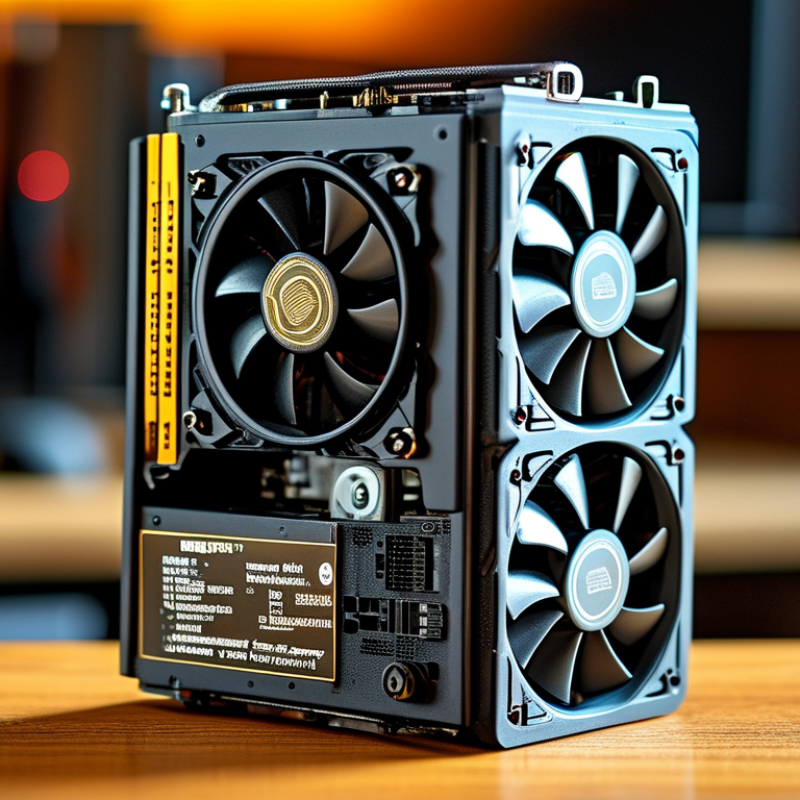
Choosing the right Mini Pc Fans is essential for achieving optimal cooling. Overheating can lead to hardware damage and decreased performance. Effective cooling relies on high-quality fans designed for mini PC setups. Various factors influence fan selections, including size, airflow, and noise levels.

When selecting Mini PC fans, one must consider both the technical specifications and the specific needs of their system. Not all fans perform adequately in every environment. Understanding your mini PC's layout and thermal requirements is vital. For instance, a compact design may restrict airflow, necessitating more powerful fans.

Additionally, be mindful of fan noise. A quiet operation can enhance your computing experience, especially for home or office use. Exploring options may lead to discovering fans that balance performance and acoustics. Not every fan on the market meets ideal standards, and some may fall short. Researching reliable reviews and user experiences can guide informed decisions.

How to Choose the Best Mini PC Fans for Optimal Cooling?

Understanding the Importance of Cooling in Mini PCs

Cooling plays a vital role in the performance of mini PCs. These compact systems are susceptible to heat, which can lead to throttling. Overheating can reduce performance and damage components. According to a report by TechInsights, mini PCs can experience temperature spikes of up to 80°C without adequate cooling. Consistent thermal management helps maintain optimal operation.


Proper fan selection is essential for cooling efficiency. The airflow rate is a crucial metric. Effective fans can shift 30-100 CFM (cubic feet per minute) of air. A balance between noise and cooling power is also necessary. Interestingly, many users overlook the airflow direction. Improper positioning can trap hot air inside, leading to more heat-related issues.


Regular maintenance is often neglected. Dust can accumulate and clog fan blades, reducing airflow. Studies show that a clean filter can improve airflow by 20%. Users should assess their setups periodically. This reflection can reveal overlooked cooling needs and potential upgrades.

Types of Mini PC Fans: Airflow vs. Static Pressure

When selecting mini PC fans, understanding the difference between airflow and static pressure is essential. Airflow fans excel at moving air across large distances, making them ideal for open cases or setups without significant resistance. They often produce lower static pressure, which means they struggle to push air through tight spaces or dense components. Research shows that high airflow fans typically deliver between 50 to 100 CFM (Cubic Feet per Minute), providing efficient cooling in such environments.

On the other hand, static pressure fans are designed to push air through obstacles. They are better suited for cooling scenarios with restricted airflow, like radiators or heatsinks. According to industry reports, these fans can generate static pressure ratings ranging from 1.0 to 5.0 mmH2O. The higher the rating, the more effective they are at overcoming resistance. In tightly packed systems where heat generation is significant, choosing static pressure fans can make a notable difference in maintaining optimal temperatures.

When selecting a fan type, consider your mini PC's specific needs. It isn't always clear which type will work best. Sometimes, a mix of both fan types can be beneficial. Balancing airflow and static pressure can lead to improved overall performance. Evaluating your cooling requirements may involve some trial and error. Ultimately, taking these factors into account is crucial for achieving effective thermal management in mini PC configurations.

Key Features to Consider When Choosing Mini PC Fans

When selecting mini PC fans, consider several key features for optimal cooling. Noise levels are crucial. Many users favor fans that operate quietly, especially in compact spaces. Look for specifications that indicate lower decibel ratings. A fan that makes excessive noise can be disruptive, particularly in home or office environments.

The fan's airflow rating is another significant aspect. Measured in cubic feet per minute (CFM), this number indicates how much air the fan can move. More airflow typically translates to better cooling efficiency. However, you should also evaluate the pressure rating. Higher static pressure is vital for fans that need to push air through tight spaces or dense components.

Durability is essential too. Consider materials and build quality. Plastic fans may be lighter but could wear out faster. Metal fans often ensure longevity but may add weight. Check the bearing types as well. Fluid dynamic bearings tend to last longer and operate more quietly than sleeve bearings. Always reflect on your specific cooling needs before making a decision.

Sizing and Compatibility: Ensuring a Perfect Fit

Choosing the right mini PC fans involves careful consideration of sizing and compatibility. A report from Cooling Solutions Inc. indicates that nearly 40% of cooling inefficiencies stem from improper fan sizes. Selecting a fan that fits your specific mini PC model is crucial. A fan that is too large might obstruct other components, while a smaller fan could underperform, leading to overheating.


Moreover, compatibility extends beyond just size. Fan mounting options and power requirements play vital roles. Reports show that mismatched specifications can reduce cooling efficiency by up to 25%. Always check specifications before purchasing. Fans with lower RPM ratings can still offer effective cooling if they match the airflow needs of the system.


Many users overlook noise levels, often leading to unwanted distractions. A balance between cooling performance and sound is essential. Some fans advertise high airflow but generate excessive noise, which can be problematic in quiet environments. It's important to weigh these factors carefully. Regular monitoring of temperature and fan performance can provide insights into whether your selection meets your needs.

Installing Mini PC Fans: Best Practices for Optimal Performance

When installing mini PC fans, consider the placement carefully. Fans should be positioned to create optimal airflow. This means placing intake fans at the front and exhaust fans at the back. Such arrangement encourages a continuous flow of cool air over the system's components. It’s essential to ensure that no cables obstruct these paths. A cluttered setup can lead to hot spots, reducing cooling efficiency.

Check the fan specifications for the correct size and RPM. Choosing fans that are too small may not provide adequate cooling. On the other hand, oversized fans can create excessive noise. Experimenting with different fan speeds can enhance performance. Some systems benefit from a balance between quiet operation and sufficient airflow. Remember to periodically clean dust from fans to maintain efficiency. Dust buildup can significantly impact performance, leading to overheating issues.

Using rubber mounts can help reduce vibrations, enhancing overall acoustic performance. However, ensure they are installed securely; a loose fan might rattle excessively. Don’t overlook the importance of having a fan controller. This allows adjustment based on thermal conditions, optimizing cooling when needed. Reflect on your setup after installation. Small adjustments can lead to notable improvements in the system's cooling efficiency.

Article Source: