

News

Miro: A New Standard in Responsible Innovation

Miro: A New Standard in Responsible Innovation The Miro monitor arm is setting new benchmarks in sustainability. It offers a high-performance solution without compromising on environmental responsibility. Designed with careful material selection, local sourcing, and longevity in mind, Miro’s responsible approach to design and unique manoeuvrability set it apart from the competition. Sustainable Choices Miro is crafted from energy-efficient materials with a lower carbon impact....

Read more
HSE Advisor

Role Purpose Support in the development, implementation and maintenance of the company’s Health, Safety & Environmental policies, processes, operational procedures, and standards.  Ensuring best practice and championing a continually improving HSE culture within the business. Key Responsibilities Liaise with and provide support to all areas of the business to eliminate, mitigate or reduce identified HSE exposures. Partner with the production management team and team leaders,...

Read more
CMD Ltd LAUNCHES 48-HOUR TURNAROUND ON BETATRAK® RAPID ORDERING SERVICE

CMD Ltd, the specialist in power distribution systems, workstation power and monitor arms, has launched a rapid ordering service for its Betatrak® underfloor powertrack distribution systems and accessories, with a commitment to delivering within 48-hours of an approved purchase order*. The service enables customers to order up to 50 lengths of Standard or Clean Earth (C/E) low noise Betatrak, along with up to 25 feed...

Read more

CMD INVESTS £1/4 MILLION IN NEW MACHINE AS PART OF FACTORY UPGRADE

We have invested in a new £1/4m TRUMPF CNC metal punch as part of an asset renewal strategy for our UK manufacturing capability. The new machine will be used in the production of a wide variety of our power distribution systems and workstation power products at our Rotherham factory. Suitable for handling sheet metal between 0.9mm and 3.0mm thick, the new machine will replace one...

Read more

CMD CATALOGUE PROVIDES TECHNICAL POWER DISTRIBUTION GUIDE

CMD Ltd has released a new catalogue, providing an easy to follow technical guide to our power distribution systems and plug and play desk modules. Detailing CMD’s full range of UK-manufactured power distribution systems and plug and play desk modules, the catalogue will be a helpful source of information to M&E engineers and contractors alike to understand how our power distribution systems connect together and...

Read more

Power Distribution Catalogue
CMD Ltd PLAYS ESSENTIAL ROLE IN ELECTRICAL FIT OUT AT LONDON’S PRESTIGIOUS OFFICE DEVELOPMENT

CMD Ltd, specialist in workplace connectivity and ergonomic solutions, has provided a flexible and high-quality power distribution network for The Ray, a prestigious office development in London’s Farringdon. Well-known for being the former site of The Guardian newspaper, The Ray now stands as an 83,000ft² office development characterised by a modernised warehouse aesthetic, with level two now occupied by a global social media company. The...

Read more

The Ray
CMD plugs in to european opportunity with Schuko Capsule unit launch

CMD Ltd, the specialist in power and connectivity solutions for commercial environments, has launched a Schuko version of its popular fixed format Capsule workstation power module for export to mainland Europe and beyond. A popular on desk power module comprising two sockets and dual USB (type A and C) chargers, CMD’s Capsule unit is already widely specified in the UK as an off-the-shelf workstation power...

Read more

CMD White Schuko Capsule Desk Power Module
CMD LTD EXTENDS MONITOR ARM RANGE WITH THE LAUNCH OF REACH PLUS

CMD Ltd, the specialist in ergonomic and connectivity solutions for commercial interiors, has completed its Reach monitor arm range with the launch of the Reach Plus. Available in single or dual screen options, the Reach Plus has been designed to provide an ideal solution for both single and dual screen workstation configurations, or can be used with next generation of large format curved screens. Suitable...

Read more

CMD Ltd DEMONSTRATES THE ART OF POWER DISTRIBUTION AT THE UNIVERSITY OF WARWICK

CMD Ltd, the specialist in workplace connectivity and ergonomic solutions, has provided Betatrak busbar power distribution and a range of electrical accessories for two major capital investment projects at the University of Warwick. Designed by Fielden Clegg Bradley Studios, the £33 million Faculty of Arts building is a showpiece development comprising four interconnected structures set around a central atrium, which will enable inter-disciplinary collaboration across...

Read more

University of Warwick
CMD BRINGS HARMONY TO COVENTRY UNIVERSITY RESEARCH FACILITIES

CMD Ltd, the specialist in power distribution solutions and workstation power and ergonomics, has provided under desk and on desk power modules for the refurbishment of three Coventry University research buildings. Located on Coventry University Technology Park, a business park designed to encourage collaboration between the university and knowledge-based businesses, the three buildings are being repurposed as office accommodation for university research teams. The refurbishment...

Read more

Coventry University

What is the Best Rf Cable for Your Needs?

In today's rapidly evolving technology landscape, selecting the right RF cable is crucial. RF cables play a key role in telecommunications, broadcasting, and various electronic applications. According to industry reports, improper cable selection can result in signal loss and degraded performance, significantly affecting data transmission.

Understanding the types of RF cables available is essential. For instance, the choice between coaxial and twin-lead cables can drastically influence the efficiency of your system. Data shows that coaxial cables are widely preferred for their durability and lower attenuation rates, making them suitable for long-distance applications. Yet, many users often overlook these details, leading to suboptimal performance.

Moreover, environmental factors and specific applications dictate the most effective RF cable choice. With various materials and connectors available, it's easy to feel overwhelmed. It's important to consult with industry professionals and conduct thorough research. This will ensure you make informed decisions that align with your needs and maximize performance.

What is the Best Rf Cable for Your Needs?

Understanding RF Cable Types and Their Applications

When selecting RF cables, understanding the different types is crucial. Coaxial cables, known for their solid shielding, are widely used in television and internet connections. Their design minimizes signal loss, making them reliable for various applications. It’s important to consider the frequency range needed for your setup. Cables like RG-6 serve well in residential areas, while RG-11 is better suited for longer distances.

Another option is flat cables, which are easy to run along walls and ceilings. These are beneficial in tight spaces and can simplify installations. However, they may not provide the same shielding effectiveness as traditional coaxial cables. Consider the environment where you’ll use the cables. Indoor applications may have different requirements than outdoor ones. Weather-resistant cables are essential for outdoor use.

RF cables should fit the specific needs of your project. Evaluate factors such as length, flexibility, and durability. Remember that the lower the quality, the more susceptible the cable is to interference. If you're unsure, seeking advice from professionals can help. It's okay to ask questions and seek opinions based on experiences. Choosing the right RF cable means balancing performance with budget considerations.

Factors to Consider When Choosing RF Cables

Choosing the right RF cable can greatly impact your signal quality. When selecting an RF cable, consider factors such as frequency range, cable length, and connector types. The frequency range ensures that the cable can handle the specific signals you need. For instance, a cable designed for low frequencies may not perform well with high-frequency signals.

Cable length also plays a critical role. Longer cables can lead to signal loss, so it’s vital to find a balance. Sometimes, shorter cables can be more effective, saving you from unnecessary signal degradation. Connector types must match your equipment. Mismatched connectors can create issues and hinder performance.

Don’t forget about the construction quality. A well-constructed cable reduces interference and enhances reliability. Look for materials that resist wear. At the same time, be cautious about over-investing in high-end cables that might not suit your needs. Reflect on how often you use RF cables. For occasional use, a modest option might suffice. Choosing the right RF cable involves weighing multiple factors to ensure optimal performance tailored to your requirements.

Comparing RF Cable Performance and Specifications

When selecting the right RF cable, performance and specifications are crucial. RF cables play a vital role in signal transmission. They connect devices like antennas and receivers, making their quality essential. Poor cable quality can lead to signal loss. Studies show that even a slight increase in loss can decrease the overall system performance significantly.

The specifications of RF cables include impedance, frequency range, and shielding effectiveness. For example, a typical 50-ohm cable has less signal loss at higher frequencies, making it suitable for most communication applications. According to industry data, cables with better shielding can reduce interference by up to 90%. This is critical in environments with multiple signal sources.

However, it's important to note that not all applications require the highest quality cable. Sometimes, a basic cable may suffice, especially in low-interference areas. Evaluating your specific needs is essential. Not every situation demands optimal performance. Understanding these nuances can help in making an informed choice.

What is the Best Rf Cable for Your Needs? - Comparing RF Cable Performance and Specifications

Cable Type Frequency Range (GHz) Impedance (Ohms) Loss per 100ft (dB) Max Power (Watts)
RG-6 0.1 - 1.5 75 3.0 60
RG-58 0.1 - 6.0 50 3.5 100
LMR-400 0.1 - 6.0 50 2.5 200
RG-11 0.1 - 2.0 75 2.0 75
RG-213 0.1 - 10.0 50 1.0 500

Identifying the Right Connector Types for Your RF Cables

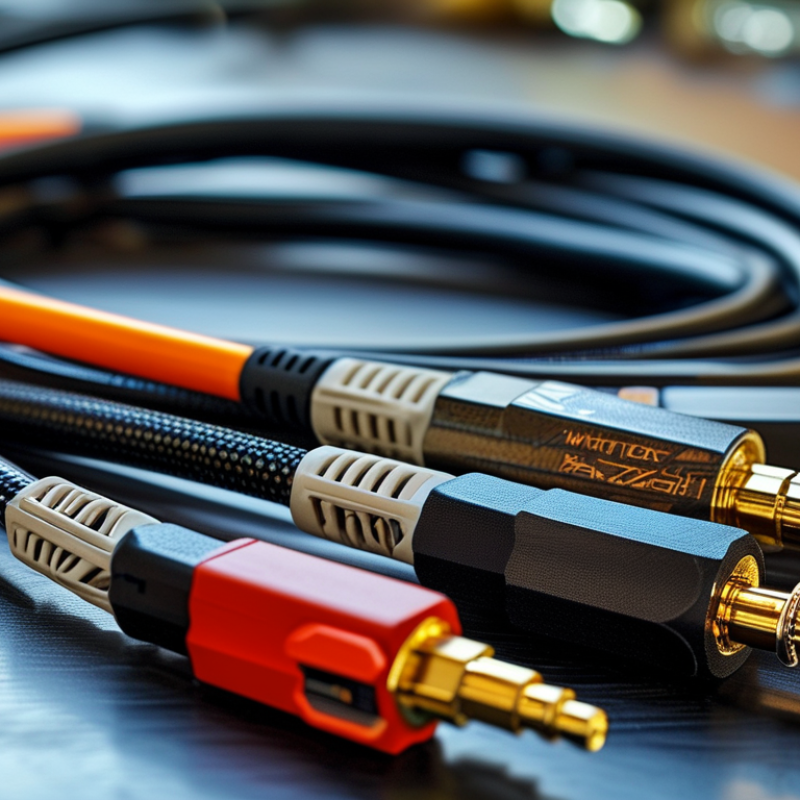
When choosing RF cables, the connector types play a critical role in performance. Understanding the range of connector types can significantly impact your setup. Common connectors include SMA, N-type, and BNC. Each type serves different purposes. For example, SMA connectors are compact yet robust, making them suitable for applications like microwave systems.

Data from industry reports indicate that the choice of connector can affect signal loss by as much as 20%. This highlights the importance of selecting the right type. N-type connectors, though larger, are preferred for high-frequency applications due to their superior performance. However, they can be more challenging to install. This trade-off must be carefully considered based on your technical skill.

Additionally, improper connector choices can lead to reflections that degrade signal integrity. A study from a telecom industry group found that 30% of system failures can be traced back to faulty connectors. Users should focus on the specific requirements of their systems. Evaluating factors such as frequency range and environmental conditions is crucial. Each connector type has its strengths and weaknesses, which can shape your overall performance.

Best Practices for RF Cable Installation and Maintenance

Proper installation and maintenance of RF cables are essential for optimal performance. When laying out your cables, ensure they are not bent sharply or placed near sources of interference. Sharp bends can lead to signal loss. Use cable ties or clips to secure them neatly. Avoid excessive force while handling cables to prevent internal damage. This might seem trivial, but neglect can result in significant issues later.


Routine maintenance checks are crucial. Inspect cables for visible wear and tear. Look for cracks, frays, or exposed wires. Any signs of damage mean it’s time for replacement. Ensure connections are tight, as loose connections can create noise or signal degradation. Remember to test the cable with appropriate tools. This helps diagnose issues early on, saving time and resources down the line.


Documentation is another often overlooked aspect. Keep records of installation dates, locations, and any maintenance performed. This not only aids in tracking performance over time but also facilitates quicker troubleshooting. Reflect on the installation process and take notes on what worked well and what could improve. Learning from past experiences cultivates a more reliable setup in the future.