

News

Miro: A New Standard in Responsible Innovation

Miro: A New Standard in Responsible Innovation The Miro monitor arm is setting new benchmarks in sustainability. It offers a high-performance solution without compromising on environmental responsibility. Designed with careful material selection, local sourcing, and longevity in mind, Miro’s responsible approach to design and unique manoeuvrability set it apart from the competition. Sustainable Choices Miro is crafted from energy-efficient materials with a lower carbon impact....

Read more
HSE Advisor

Role Purpose Support in the development, implementation and maintenance of the company’s Health, Safety & Environmental policies, processes, operational procedures, and standards.  Ensuring best practice and championing a continually improving HSE culture within the business. Key Responsibilities Liaise with and provide support to all areas of the business to eliminate, mitigate or reduce identified HSE exposures. Partner with the production management team and team leaders,...

Read more
CMD Ltd LAUNCHES 48-HOUR TURNAROUND ON BETATRAK® RAPID ORDERING SERVICE

CMD Ltd, the specialist in power distribution systems, workstation power and monitor arms, has launched a rapid ordering service for its Betatrak® underfloor powertrack distribution systems and accessories, with a commitment to delivering within 48-hours of an approved purchase order*. The service enables customers to order up to 50 lengths of Standard or Clean Earth (C/E) low noise Betatrak, along with up to 25 feed...

Read more

CMD INVESTS £1/4 MILLION IN NEW MACHINE AS PART OF FACTORY UPGRADE

We have invested in a new £1/4m TRUMPF CNC metal punch as part of an asset renewal strategy for our UK manufacturing capability. The new machine will be used in the production of a wide variety of our power distribution systems and workstation power products at our Rotherham factory. Suitable for handling sheet metal between 0.9mm and 3.0mm thick, the new machine will replace one...

Read more

CMD CATALOGUE PROVIDES TECHNICAL POWER DISTRIBUTION GUIDE

CMD Ltd has released a new catalogue, providing an easy to follow technical guide to our power distribution systems and plug and play desk modules. Detailing CMD’s full range of UK-manufactured power distribution systems and plug and play desk modules, the catalogue will be a helpful source of information to M&E engineers and contractors alike to understand how our power distribution systems connect together and...

Read more

Power Distribution Catalogue
CMD Ltd PLAYS ESSENTIAL ROLE IN ELECTRICAL FIT OUT AT LONDON’S PRESTIGIOUS OFFICE DEVELOPMENT

CMD Ltd, specialist in workplace connectivity and ergonomic solutions, has provided a flexible and high-quality power distribution network for The Ray, a prestigious office development in London’s Farringdon. Well-known for being the former site of The Guardian newspaper, The Ray now stands as an 83,000ft² office development characterised by a modernised warehouse aesthetic, with level two now occupied by a global social media company. The...

Read more

The Ray
CMD plugs in to european opportunity with Schuko Capsule unit launch

CMD Ltd, the specialist in power and connectivity solutions for commercial environments, has launched a Schuko version of its popular fixed format Capsule workstation power module for export to mainland Europe and beyond. A popular on desk power module comprising two sockets and dual USB (type A and C) chargers, CMD’s Capsule unit is already widely specified in the UK as an off-the-shelf workstation power...

Read more

CMD White Schuko Capsule Desk Power Module
CMD LTD EXTENDS MONITOR ARM RANGE WITH THE LAUNCH OF REACH PLUS

CMD Ltd, the specialist in ergonomic and connectivity solutions for commercial interiors, has completed its Reach monitor arm range with the launch of the Reach Plus. Available in single or dual screen options, the Reach Plus has been designed to provide an ideal solution for both single and dual screen workstation configurations, or can be used with next generation of large format curved screens. Suitable...

Read more

CMD Ltd DEMONSTRATES THE ART OF POWER DISTRIBUTION AT THE UNIVERSITY OF WARWICK

CMD Ltd, the specialist in workplace connectivity and ergonomic solutions, has provided Betatrak busbar power distribution and a range of electrical accessories for two major capital investment projects at the University of Warwick. Designed by Fielden Clegg Bradley Studios, the £33 million Faculty of Arts building is a showpiece development comprising four interconnected structures set around a central atrium, which will enable inter-disciplinary collaboration across...

Read more

University of Warwick
CMD BRINGS HARMONY TO COVENTRY UNIVERSITY RESEARCH FACILITIES

CMD Ltd, the specialist in power distribution solutions and workstation power and ergonomics, has provided under desk and on desk power modules for the refurbishment of three Coventry University research buildings. Located on Coventry University Technology Park, a business park designed to encourage collaboration between the university and knowledge-based businesses, the three buildings are being repurposed as office accommodation for university research teams. The refurbishment...

Read more

Coventry University

How to Choose the Best Mini PC Under $500 in 2026

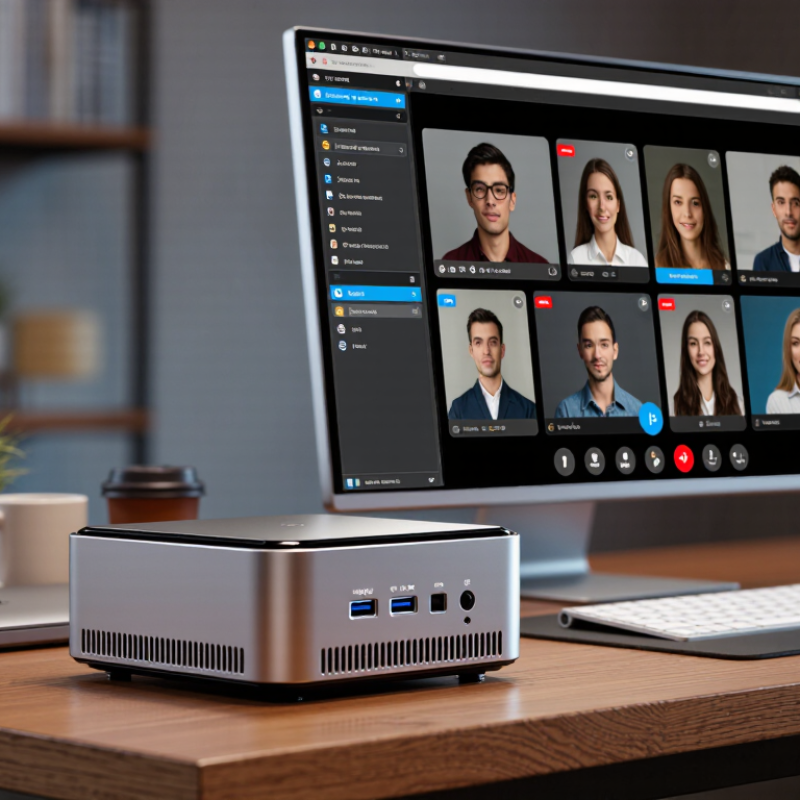
A Mini PC under $500 can look impressive on a product page: a compact metal case, a Ryzen or Intel processor, and “up to” 32GB of memory. The real test is less glamorous. Can it keep a dozen browser tabs open, handle a video call, and stay quiet beside your monitor? Those details matter.

IDC reported 262.7 million PC shipments worldwide in 2024, showing that personal computers remain a substantial, evolving market. That figure covers PCs broadly, not mini PCs alone. Grand View Research’s mini PC market analysis also tracks growth in the category, but market growth does not guarantee that a particular budget model is reliable. Check independent thermal tests, port selection, upgrade options, and warranty terms. Tiny systems have limits.

Steve Jobs, a prominent computer-industry leader, offered a useful design principle: “Design is not just what it looks like and feels like. Design is how it works.” For shoppers, that means looking beyond a tidy chassis and headline specifications. A low-cost mini PC may feel fast at first, then throttle under sustained workloads or leave too little storage. I would treat advertised performance as a starting point, not a promise. That may sound cautious. It is. Prices and configurations change quickly, and one overlooked detail—such as memory that cannot be upgraded—can matter more than a small benchmark advantage. This guide compares the practical trade-offs that help identify the best Mini PC under $500 in 2026.

How to Choose the Best Mini PC Under $500 in 2026

Identify Your Main Uses and Performance Requirements

Start with the jobs your mini PC must handle, not the processor name on the box. For web browsing, email, and documents, a responsive modern processor, 16 GB of memory, and a solid-state drive are sensible targets. If you keep many browser tabs open or edit large spreadsheets, extra memory can matter more than a small jump in processor speed. Keep it simple.

For photo editing, coding, or light gaming, check sustained performance, not just peak specifications. A tiny case can limit cooling, so a system may slow down during longer workloads. Look for independent tests that match your tasks, and check whether memory or storage can be upgraded later. That detail is easy to miss.

Think about your actual desk, too. Count the displays you use, check the available video and USB ports, and confirm wireless connectivity meets your needs. For a living-room setup, quiet operation and a compact power adapter may matter more than extra processing power. I tend to overestimate how much power I need, so a week of noting slowdowns can be more useful than guessing. Leave part of the $500 budget for a monitor, hub, or other accessory if your setup needs one. Don’t pay for features you will not use.

Compare Processors, Memory, and Storage Within the $500 Budget

Under $500, judge the processor by sustained performance, not its advertised boost speed. A small case can throttle after several minutes of video calls or spreadsheet work. IDC reported 262.7 million PC shipments in 2024, up 1.0% year over year, in its Worldwide Quarterly Personal Computing Device Tracker. A growing market does not make every budget chip a good buy. Check independent tests for your actual workload, and favor a newer, efficient processor over an older high-tier model when prices are close.

Memory affects daily smoothness. For a 2026 mini PC, 16 GB is a sensible floor for browser tabs, office apps, and light photo work; 8 GB can feel cramped. Gartner forecast AI PCs would represent 43% of PC shipments in 2025 and 55% in 2026. That trend is worth noting, but an AI label alone does not guarantee faster everyday use. Pay for more memory only when your software needs it, and check whether it is upgradeable. Small detail. It matters later.

For storage, target a 512 GB solid-state drive if the price allows. It leaves room for applications and local files without immediately relying on external storage. A 256 GB drive can work, but updates and cached media consume space quietly. Check whether the drive can be replaced, and read tests for sustained transfer speeds, not just peak figures. I would not treat this as perfect advice: workloads vary, and a cheap model’s cooling can matter more than one extra processor tier.

Check Connectivity, Ports, and Upgrade Options

Under $500, a mini PC can look capable on a product page and still frustrate you at a desk. Count the ports you will actually use: a keyboard, mouse, external drive, and webcam can quickly fill several USB sockets. Check whether the front has an easy-to-reach port for a flash drive, and whether the rear has enough connections for permanent gear. USB-C is useful, but its presence alone does not guarantee charging, video output, or fast data transfer. Read the specifications for each port.

For two monitors, confirm the exact display outputs and supported resolutions, rather than assuming two HDMI-shaped sockets mean two matching displays. A wired Ethernet port can matter for video calls or large file transfers, especially where Wi-Fi is unreliable. Check the wireless standard too, but remember that your router and room layout affect real-world speeds. Small detail, big annoyance: ports placed too close together may not fit bulky plugs side by side.

Upgrade options deserve the same scrutiny as connectivity. Look for clear information on whether memory and storage can be replaced, and how many slots are available. Some compact systems use soldered memory, which limits future changes. A removable bottom panel is encouraging, but it does not prove access will be simple; check the service guide and warranty terms. It is easy to overvalue a high memory figure today and overlook a full storage drive later. Ask yourself what you might add in two years.

Mini PC Connectivity: Nominal Interface Speeds

Compare advertised interface speeds when checking a mini PC’s ports. These are nominal maximum link or signaling rates, not guaranteed file-transfer speeds; real performance depends on the device, cable, network, and workload. Check the specifications for the exact ports and upgrade options before buying.

Evaluate Cooling, Power Use, and Build Quality

A sub-$500 mini PC can look efficient on a spec sheet, yet heat and noise reveal its real limits. The U.S. EPA’s ENERGY STAR Version 8.0 computer specification evaluates typical energy use across operating modes, not just peak power. As a practical estimate, a 30-watt system used eight hours daily consumes about 88 kWh yearly (30 × 8 × 365 ÷ 1,000). Check idle and workload power, then compare them with your actual hours of use.

Cooling matters. During a sustained video call or file export, listen for rising fan noise and watch for performance dips. Vents should stay clear on a desk, not pressed against a wall or buried in a cabinet. A metal case may feel reassuring, but it cannot prove good internal airflow. I’d inspect port fit, case seams, and the power adapter too. Small details count.

Tips: Run a 20-minute workload before buying, if returns allow. Check the ENERGY STAR listing and published power figures. Feel the case near the exhaust; warm is normal, scorching is not. One caveat: short tests can miss heat buildup, so don’t treat a quiet first minute as proof.

Compare Warranty, Software Support, and Overall Value

When comparing mini PCs under $500, look beyond processor speed and memory. Warranty terms can matter more after a year of daily use. Check how long coverage lasts, which parts are included, and whether shipping costs fall to you. A repair that requires packing up your desktop can interrupt work for days. Ask whether support offers clear troubleshooting steps or only a basic return form. Small details matter.

Software support deserves the same attention. Confirm the operating system’s update policy and check whether firmware and drivers are still maintained. These updates can affect security, device compatibility, and stability. If the computer will run beside a television or handle family documents, predictable updates are more useful than a slightly faster benchmark score. I still find this easy to overlook.

Overall value includes the cost of keeping the mini PC usable. A low purchase price may look less appealing if support is difficult to reach or essential updates end soon. Compare included memory and storage with your actual needs, then leave room in the budget for a monitor or backup drive. Read the warranty exclusions carefully; they can be dull, but they are worth the time. A slightly imperfect choice is possible, especially when listings omit support details, so save the seller’s written warranty and software information before buying.

Article Source: