

News

Miro: A New Standard in Responsible Innovation

Miro: A New Standard in Responsible Innovation The Miro monitor arm is setting new benchmarks in sustainability. It offers a high-performance solution without compromising on environmental responsibility. Designed with careful material selection, local sourcing, and longevity in mind, Miro’s responsible approach to design and unique manoeuvrability set it apart from the competition. Sustainable Choices Miro is crafted from energy-efficient materials with a lower carbon impact....

Read more
HSE Advisor

Role Purpose Support in the development, implementation and maintenance of the company’s Health, Safety & Environmental policies, processes, operational procedures, and standards.  Ensuring best practice and championing a continually improving HSE culture within the business. Key Responsibilities Liaise with and provide support to all areas of the business to eliminate, mitigate or reduce identified HSE exposures. Partner with the production management team and team leaders,...

Read more
CMD Ltd LAUNCHES 48-HOUR TURNAROUND ON BETATRAK® RAPID ORDERING SERVICE

CMD Ltd, the specialist in power distribution systems, workstation power and monitor arms, has launched a rapid ordering service for its Betatrak® underfloor powertrack distribution systems and accessories, with a commitment to delivering within 48-hours of an approved purchase order*. The service enables customers to order up to 50 lengths of Standard or Clean Earth (C/E) low noise Betatrak, along with up to 25 feed...

Read more

CMD INVESTS £1/4 MILLION IN NEW MACHINE AS PART OF FACTORY UPGRADE

We have invested in a new £1/4m TRUMPF CNC metal punch as part of an asset renewal strategy for our UK manufacturing capability. The new machine will be used in the production of a wide variety of our power distribution systems and workstation power products at our Rotherham factory. Suitable for handling sheet metal between 0.9mm and 3.0mm thick, the new machine will replace one...

Read more

CMD CATALOGUE PROVIDES TECHNICAL POWER DISTRIBUTION GUIDE

CMD Ltd has released a new catalogue, providing an easy to follow technical guide to our power distribution systems and plug and play desk modules. Detailing CMD’s full range of UK-manufactured power distribution systems and plug and play desk modules, the catalogue will be a helpful source of information to M&E engineers and contractors alike to understand how our power distribution systems connect together and...

Read more

Power Distribution Catalogue
CMD Ltd PLAYS ESSENTIAL ROLE IN ELECTRICAL FIT OUT AT LONDON’S PRESTIGIOUS OFFICE DEVELOPMENT

CMD Ltd, specialist in workplace connectivity and ergonomic solutions, has provided a flexible and high-quality power distribution network for The Ray, a prestigious office development in London’s Farringdon. Well-known for being the former site of The Guardian newspaper, The Ray now stands as an 83,000ft² office development characterised by a modernised warehouse aesthetic, with level two now occupied by a global social media company. The...

Read more

The Ray
CMD plugs in to european opportunity with Schuko Capsule unit launch

CMD Ltd, the specialist in power and connectivity solutions for commercial environments, has launched a Schuko version of its popular fixed format Capsule workstation power module for export to mainland Europe and beyond. A popular on desk power module comprising two sockets and dual USB (type A and C) chargers, CMD’s Capsule unit is already widely specified in the UK as an off-the-shelf workstation power...

Read more

CMD White Schuko Capsule Desk Power Module
CMD LTD EXTENDS MONITOR ARM RANGE WITH THE LAUNCH OF REACH PLUS

CMD Ltd, the specialist in ergonomic and connectivity solutions for commercial interiors, has completed its Reach monitor arm range with the launch of the Reach Plus. Available in single or dual screen options, the Reach Plus has been designed to provide an ideal solution for both single and dual screen workstation configurations, or can be used with next generation of large format curved screens. Suitable...

Read more

CMD Ltd DEMONSTRATES THE ART OF POWER DISTRIBUTION AT THE UNIVERSITY OF WARWICK

CMD Ltd, the specialist in workplace connectivity and ergonomic solutions, has provided Betatrak busbar power distribution and a range of electrical accessories for two major capital investment projects at the University of Warwick. Designed by Fielden Clegg Bradley Studios, the £33 million Faculty of Arts building is a showpiece development comprising four interconnected structures set around a central atrium, which will enable inter-disciplinary collaboration across...

Read more

University of Warwick
CMD BRINGS HARMONY TO COVENTRY UNIVERSITY RESEARCH FACILITIES

CMD Ltd, the specialist in power distribution solutions and workstation power and ergonomics, has provided under desk and on desk power modules for the refurbishment of three Coventry University research buildings. Located on Coventry University Technology Park, a business park designed to encourage collaboration between the university and knowledge-based businesses, the three buildings are being repurposed as office accommodation for university research teams. The refurbishment...

Read more

Coventry University

10 Best Interactive Screens for Business Buyers in 2026

Choosing an interactive display is less about buying the largest screen and more about making everyday work easier. In 2026, business buyers must weigh image clarity, touch accuracy, software support, and the room’s layout. Human-centered design researcher Don Norman offers a useful principle: “Attractive things work better.” It applies here, though appearance alone cannot rescue a laggy touch interface.

Small details matter. Can a presenter connect quickly through USB-C? Does the screen respond smoothly when several people annotate a floor plan? Can meeting notes be exported without extra steps? A bright 4K panel may look impressive in a showroom, yet perform poorly beside a sunlit window. Check microphone and camera compatibility, device management tools, warranty terms, and the total cost of installation. The spec sheet rarely tells the whole story.

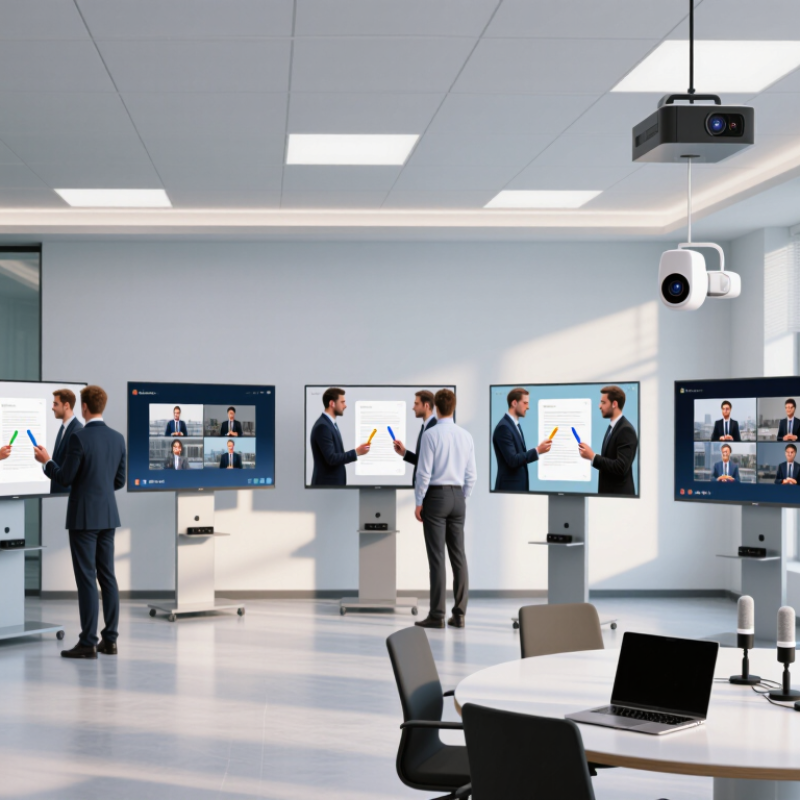
This guide compares ten Interactive Screens for business buyers, with attention to meeting rooms, classrooms, training spaces, and shared work areas. Some models prioritize familiar collaboration software; others offer flexible connectivity or lower ownership costs. There is no universal winner. A screen that suits a six-person huddle room may frustrate a large training group. And a feature-rich platform can add complexity. Treat the shortlist as a starting point, then test your leading options with the devices and workflows your team actually uses. A live demo can reveal awkward menus, glare, or touch delay that product pages leave out.

10 Best Interactive Screens for Business Buyers in 2026

AVIXA’s 2024 Forecast: The Pro AV Market Reaches $325 Billion

10 Best Interactive Screens for Business Buyers in 2026

AVIXA’s 2024 forecast puts the global professional audiovisual market at $325 billion. That figure describes a broad industry, not interactive screens alone. It reflects demand across collaboration spaces, digital signage, education, and other AV applications. Treat it as market context, not a promise that every display category will grow equally. For business buyers, the useful signal is scale: AV is a major part of how organizations equip shared spaces.

Tips: Test a screen in the actual room. Check glare near windows, touch response with a few users, and whether notes can be shared easily afterward. Ask how software updates and support are handled. Small details matter.

When comparing interactive screens in 2026, start with the work they must support. A training room may need precise annotation, while a huddle space may depend more on simple connection and readable text. Check screen size, operating compatibility, accessibility, and ongoing costs against that use case. A showroom demo can feel convincing, but it may not reveal poor visibility under office lighting. Even a careful pilot can miss something; gather feedback from the people who will use the screen every week.

Global Pro AV Market Revenue: 2023–2029

A market-wide snapshot for business buyers evaluating interactive display investments.

The global Pro AV industry was estimated at $306 billion in 2023. The 2024 forecast projected $325 billion, rising to $402 billion by 2029. These figures describe the entire Pro AV market, not interactive screens alone.
Source: AVIXA 2024 Industry Outlook and Trends Analysis.

Interactive Display Basics: 4K UHD’s 3,840 × 2,160-Pixel Standard

For business buyers, 4K UHD means a resolution of 3,840 × 2,160 pixels, or more than eight million pixels on screen. That density can make small spreadsheet text, fine chart lines, and detailed product images appear clearer. The benefit is easiest to notice when viewers sit close enough to read content without leaning forward. Details matter.

Resolution alone does not guarantee a good meeting-room experience. A 4K screen still needs suitable brightness, viewing angles, and text scaling for the room. Check the actual content employees use: a dense dashboard may reveal sharp edges, while a simple slide may look much the same at a lower resolution. Touch response and writing accuracy also depend on the display’s interactive system, not pixel count.

Before buying, test the screen at its intended distance with a laptop and familiar presentation files. Look for tiny labels, cursor movement, and handwriting near the display’s edges. Confirm that connected computers can send a 3,840 × 2,160 signal at a usable refresh rate. A mismatch can soften text or make movement feel sluggish. I would not treat 4K as an automatic upgrade; room size and everyday workflows sometimes matter more.

Business Buyer Criteria: Touch, Connectivity, Software, and Total Cost

A business touchscreen should make meetings easier, not add another device to troubleshoot. Test writing with a dry-erase-like stylus, then check whether palm contact creates stray marks. Confirm that the panel supports the number of simultaneous touchpoints your team actually needs. AVIXA’s 2024 Industry Outlook and Trends Analysis projects global professional audiovisual revenue will reach $325 billion by 2029. That forecast describes the wider AV market, not interactive screens alone, but it highlights the importance of planning for connected workplace technology.

Connectivity can make or break daily use. Check USB-C for charging and video, HDMI for older laptops, and reliable wireless sharing for visitors. Ask how updates are managed, whether meeting software requires recurring licenses, and who handles support. A polished demo is not a deployment plan. I’ve seen feature lists distract buyers from a basic question: will staff use the screen without help?

Tips: Test with your own laptop and network. Compare five-year costs, including installation, mounting, software, energy, training, and service. Record how long common tasks take. A lower purchase price may still mean more setup time or extra licensing. The estimate will not be perfect; write down what remains uncertain before comparing bids.

10 Best Interactive Screens for Business Buyers in 2026: A Feature Comparison

A useful 2026 comparison starts with the room, not the screen’s advertised feature count. AVIXA’s 2024 Industry Outlook and Trends Analysis estimated global professional audiovisual revenue at $306 billion in 2024, with growth projected to $402 billion by 2029. That broad market forecast is not an interactive-screen sales figure, but it signals sustained investment in workplace AV. Compare screen size, resolution, touch response, and writing accuracy during a real meeting, not only in a showroom. Small details matter: Can someone read a spreadsheet from the back row? Does a palm resting on the glass create stray marks? These tests are easy to overlook.

Collaboration tools deserve equal scrutiny. Microsoft’s 2023 Work Trend Index found that 73% of employees wanted a better reason to come into the office than company expectations alone. A screen that supports clear remote participation, simple content sharing, and legible handwriting may help make meetings more useful. Check camera placement, microphone pickup, wireless sharing, and compatibility with existing room systems. Also compare setup time, software support, and service terms; a polished demo cannot guarantee smooth daily use. There is a trade-off. Bigger displays improve visibility but can complicate installation, while advanced touch features may add cost without helping every team. Test with your own files and users. One awkward workflow can change the ranking.

Deployment Fit: Matching Screen Size and Features to Business Use Cases

Choosing an interactive screen is less about buying the largest panel and more about fitting the room. In a compact meeting room, a 55-inch display can keep charts readable without drawing people toward the wall. Training spaces may need 75 inches or more so participants can follow small labels from the back row. Measure viewing distance, wall space, and table placement before comparing features. A screen that looks impressive in a showroom may feel oversized beside a narrow table.

Tips: Test the screen from the farthest seat. Check glare near windows. Confirm that cables can reach the planned installation point.

Match features to daily tasks. Teams reviewing floor plans may benefit from precise touch input and easy annotation. For hybrid meetings, prioritize clear camera placement, microphone pickup, and simple screen sharing. A built-in whiteboard can reduce setup time, but only if staff will actually use it. That detail is easy to overlook.

Also consider who will manage the system. A busy reception area needs durable glass and straightforward controls; a small office may value flexible mounting more. Ask several employees to try common tasks before purchase. Their feedback may expose awkward menus or hard-to-reach controls. No specification sheet captures every room’s quirks, and my first estimate of needed screen size can be wrong. Keep installation and support needs in the decision, not as afterthoughts.