News

Miro: A New Standard in Responsible Innovation

Miro: A New Standard in Responsible Innovation The Miro monitor arm is setting new benchmarks in sustainability. It offers a high-performance solution without compromising on environmental responsibility. Designed with careful material selection, local sourcing, and longevity in mind, Miro’s responsible approach to design and unique manoeuvrability set it apart from the competition. Sustainable Choices Miro is crafted from energy-efficient materials with a lower carbon impact....

Read more
HSE Advisor

Role Purpose Support in the development, implementation and maintenance of the company’s Health, Safety & Environmental policies, processes, operational procedures, and standards.  Ensuring best practice and championing a continually improving HSE culture within the business. Key Responsibilities Liaise with and provide support to all areas of the business to eliminate, mitigate or reduce identified HSE exposures. Partner with the production management team and team leaders,...

Read more
CMD Ltd LAUNCHES 48-HOUR TURNAROUND ON BETATRAK® RAPID ORDERING SERVICE

CMD Ltd, the specialist in power distribution systems, workstation power and monitor arms, has launched a rapid ordering service for its Betatrak® underfloor powertrack distribution systems and accessories, with a commitment to delivering within 48-hours of an approved purchase order*. The service enables customers to order up to 50 lengths of Standard or Clean Earth (C/E) low noise Betatrak, along with up to 25 feed...

Read more

CMD INVESTS £1/4 MILLION IN NEW MACHINE AS PART OF FACTORY UPGRADE

We have invested in a new £1/4m TRUMPF CNC metal punch as part of an asset renewal strategy for our UK manufacturing capability. The new machine will be used in the production of a wide variety of our power distribution systems and workstation power products at our Rotherham factory. Suitable for handling sheet metal between 0.9mm and 3.0mm thick, the new machine will replace one...

Read more

CMD CATALOGUE PROVIDES TECHNICAL POWER DISTRIBUTION GUIDE

CMD Ltd has released a new catalogue, providing an easy to follow technical guide to our power distribution systems and plug and play desk modules. Detailing CMD’s full range of UK-manufactured power distribution systems and plug and play desk modules, the catalogue will be a helpful source of information to M&E engineers and contractors alike to understand how our power distribution systems connect together and...

Read more

Power Distribution Catalogue
CMD Ltd PLAYS ESSENTIAL ROLE IN ELECTRICAL FIT OUT AT LONDON’S PRESTIGIOUS OFFICE DEVELOPMENT

CMD Ltd, specialist in workplace connectivity and ergonomic solutions, has provided a flexible and high-quality power distribution network for The Ray, a prestigious office development in London’s Farringdon. Well-known for being the former site of The Guardian newspaper, The Ray now stands as an 83,000ft² office development characterised by a modernised warehouse aesthetic, with level two now occupied by a global social media company. The...

Read more

The Ray
CMD plugs in to european opportunity with Schuko Capsule unit launch

CMD Ltd, the specialist in power and connectivity solutions for commercial environments, has launched a Schuko version of its popular fixed format Capsule workstation power module for export to mainland Europe and beyond. A popular on desk power module comprising two sockets and dual USB (type A and C) chargers, CMD’s Capsule unit is already widely specified in the UK as an off-the-shelf workstation power...

Read more

CMD White Schuko Capsule Desk Power Module
CMD LTD EXTENDS MONITOR ARM RANGE WITH THE LAUNCH OF REACH PLUS

CMD Ltd, the specialist in ergonomic and connectivity solutions for commercial interiors, has completed its Reach monitor arm range with the launch of the Reach Plus. Available in single or dual screen options, the Reach Plus has been designed to provide an ideal solution for both single and dual screen workstation configurations, or can be used with next generation of large format curved screens. Suitable...

Read more

CMD Ltd DEMONSTRATES THE ART OF POWER DISTRIBUTION AT THE UNIVERSITY OF WARWICK

CMD Ltd, the specialist in workplace connectivity and ergonomic solutions, has provided Betatrak busbar power distribution and a range of electrical accessories for two major capital investment projects at the University of Warwick. Designed by Fielden Clegg Bradley Studios, the £33 million Faculty of Arts building is a showpiece development comprising four interconnected structures set around a central atrium, which will enable inter-disciplinary collaboration across...

Read more

University of Warwick
CMD BRINGS HARMONY TO COVENTRY UNIVERSITY RESEARCH FACILITIES

CMD Ltd, the specialist in power distribution solutions and workstation power and ergonomics, has provided under desk and on desk power modules for the refurbishment of three Coventry University research buildings. Located on Coventry University Technology Park, a business park designed to encourage collaboration between the university and knowledge-based businesses, the three buildings are being repurposed as office accommodation for university research teams. The refurbishment...

Read more

Coventry University

What Is the Best Extension Socket in 2026?

Choosing the best extension socket in 2026 is not just about counting outlets. It is about matching the socket to your devices, room, and everyday habits. A desk setup may need USB charging and a short cord. A workshop corner may need a longer lead, spaced outlets, and clear overload protection. Small details matter. So does the rating printed on the product.

Safety researcher James Reason wrote, “We cannot change the human condition, but we can change the conditions under which humans work.” His principle is not specific to extension sockets, but it offers a useful lens: good design should make safe use easier. Look for a clearly stated electrical rating, suitable grounding, a sturdy plug, and safety certification relevant to your market. Surge protection can help protect sensitive electronics, but it does not replace correct ratings or careful use. And a crowded strip is still a crowded strip.

There is no perfect choice for every home. A compact model can leave bulky adapters blocking neighboring outlets. A long cord can reach farther, yet create a trip hazard across a doorway. We will compare these practical trade-offs, along with build quality, protection features, and value, to help identify the best extension socket for your needs in 2026. Check the fine print. Then consider where it will actually sit.

What Is the Best Extension Socket in 2026?

What an Extension Socket Is and How It Works

An extension socket is a portable electrical unit with a cable and one or more outlets. It lets several appliances reach power from a single wall receptacle. It does not produce electricity or increase the circuit’s capacity. The wall outlet supplies current through the cable to conductive strips inside the housing. When a plug is inserted, its pins connect with those strips, completing a path to the appliance. The appliance then uses the electricity it needs, within its design limits. Simple, but important.

Some models have an individual switch, a master switch, or overload protection. These features vary, so check the product markings rather than assuming every socket has them. A surge-protective model may help reduce voltage spikes, but it is not a guarantee against every electrical fault. Add the wattage of connected devices and keep the total below the stated rating. A warm plug, damaged cable, or loose connection is a reason to stop using the unit. Keep it dry and uncovered, especially when appliances draw substantial power. I find the rating label easy to overlook; that small habit deserves more attention.

What Is an Extension Socket and How Does It Work?

In a 230 V, 50 Hz electrical system, an extension socket carries mains power through its cable and distributes it to multiple outlets wired in parallel. This chart shows two cycles of an ideal AC waveform: 230 V is the RMS voltage, while the waveform reaches approximately +325 V and −325 V at its peaks. Actual voltage can vary.

Which Extension Socket Types Suit Different Needs

What Is the Best Extension Socket in 2026?
Which Extension Socket Types Suit Different Needs

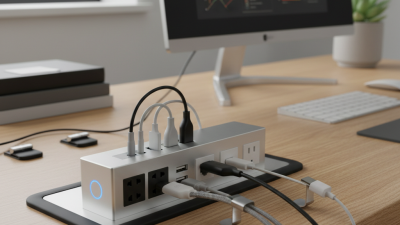
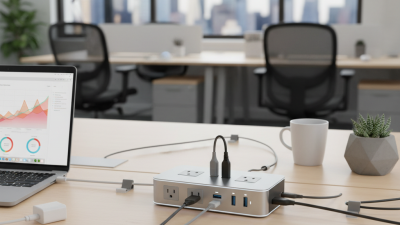
The best extension socket depends on the device, room, and distance to the outlet. For a desk, choose a compact power strip with spaced outlets and USB-C ports. A low-profile plug can sit behind furniture without bending the cable sharply. For sensitive electronics, select a surge-protecting model with a clear protection indicator. For outdoor tools, use a socket and cable specifically rated for outdoor conditions, with a secure cover. Check the product’s wattage and current limits before plugging in heaters or other high-load appliances.

Safety matters as much as convenience. The Electrical Safety Foundation International reports that extension cords are linked to about 3,300 residential fires each year in the United States. That figure is a useful reminder: extra outlets do not increase a circuit’s capacity. A long cable may also be the wrong fix for a permanent setup. It is easy to overlook.

Tips: Match the socket type to the job, inspect the cable for damage, and keep connections away from water. Never connect one power strip to another. When several high-powered devices share a socket, rethink the layout rather than trusting a longer strip. A neat cable bundle can still hide heat buildup.

What Is the Best Extension Socket in 2026? — Which Extension Socket Types Suit Different Needs

Extension Socket Type Best Suited For Typical Features Key Checks Before Buying Main Limitation
Basic multi-outlet strip Everyday indoor use with several low- or moderate-power devices, such as chargers, lamps, and a computer setup. Multiple outlets, a power cord, and sometimes an on/off switch. Check the maximum current or wattage printed on the product, cord condition, plug compatibility, and whether the outlets fit your plugs securely. It does not automatically provide surge protection or make an outlet safe for high-power appliances.
Surge-protected strip Electronics that may be vulnerable to voltage surges, such as computers, televisions, and network equipment. Surge-protection components; some models include a protection-status indicator or a resettable breaker. Look for clearly stated surge-protection specifications, applicable safety certification, and an indicator or guidance showing when protection is no longer active. Protection has limits and can wear out. It is not a substitute for a correctly installed whole-building surge-protection system.
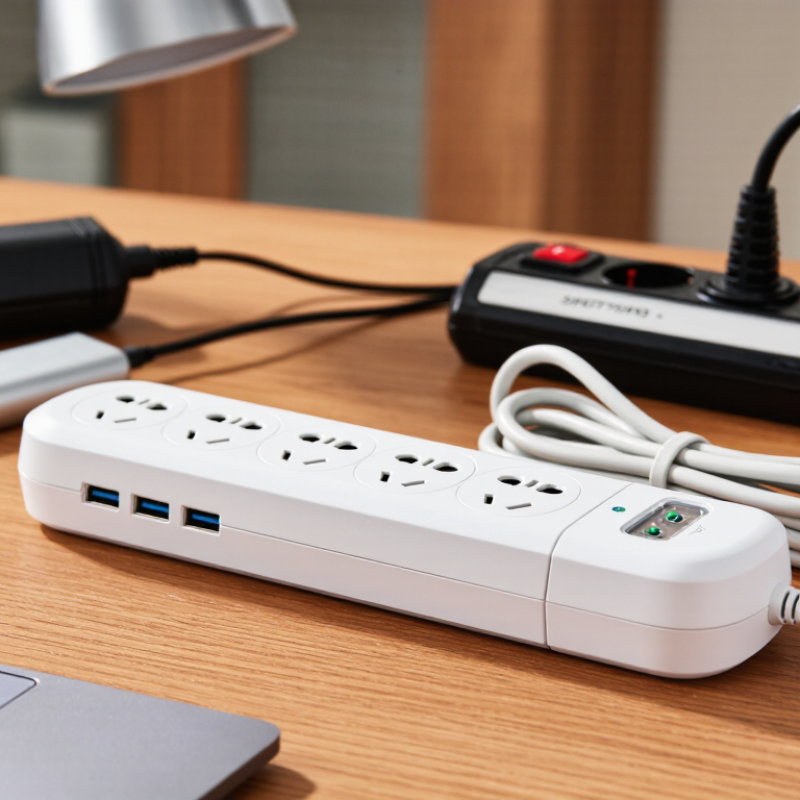
USB charging strip Desks and bedside areas where phones, tablets, and other USB-powered devices are charged alongside plug-in equipment. AC outlets plus USB-A and/or USB-C charging ports; some models support USB Power Delivery. Check the total USB output, per-port output, supported charging standard, and whether the advertised output is shared across ports. USB ports may charge more slowly when several devices share the available output; they do not replace AC outlets for mains-powered equipment.
Retractable or reel extension Workshops, garages, and temporary setups where the cable needs to be stored neatly between uses. A wound cable stored in a reel or housing, often with a handle or wall-mounting option. Follow the maker’s stated load limit, especially when the cable is wound. Fully unwind it when required by the product instructions or when using higher loads. A coiled cable can retain heat under load; the reel’s rating and instructions matter as much as the socket count.
Outdoor-rated extension socket Temporary outdoor tasks such as garden maintenance or outdoor lighting, when the product is specifically designed for the environment. Weather-resistant housing, protective covers, and a stated ingress-protection rating on suitable models. Check the IP rating and its meaning, the product’s outdoor-use instructions, cable condition, and protection required by local electrical rules. Keep connections away from standing water. “Weather-resistant” does not mean waterproof in every situation. Avoid use beyond the stated conditions or in damaged, wet, or submerged connections.
Smart extension strip Home setups where compatible devices need scheduled switching, remote control, or energy monitoring. Network-connected controls, app-based scheduling, and sometimes individually switched outlets or energy-use readings. Check network and platform compatibility, the rating for each outlet and the overall unit, privacy settings, and whether essential devices need to stay powered. Smart features depend on power, connectivity, and software support; switching functions do not increase the electrical capacity of the strip.
Heavy-duty workshop strip Work areas using compatible tools or equipment within the extension’s stated electrical rating. Robust housing, widely spaced outlets on some models, and sometimes overload protection or a mounting option. Match the product’s voltage, current, plug type, and load rating to the tool and local supply. Inspect the cord and housing regularly. “Heavy-duty” is not a universal rating. Do not exceed the marked limit or connect multiple extension strips in series.

Buying rule: The best extension socket is the one suited to the location and devices, with the correct plug type and a clearly stated electrical rating. Ratings and plug standards vary by country; follow the product instructions and local electrical-safety guidance. Avoid overloading, daisy-chaining extension strips, or using indoor products outdoors.

How to Compare Safety, Capacity, and Useful Features

What Is the Best Extension Socket in 2026?

A good extension socket should match the equipment you actually use. Check its rated voltage, maximum current, and total power capacity before plugging in several devices. Add the wattage of your appliances, and keep the combined load below the socket’s stated limit. A kettle and heater can use far more power than chargers or a desk lamp. Don’t judge capacity by the number of outlets. More sockets do not mean more available power.

Safety details matter. Look for overload protection, a sturdy casing, and a cable thick enough for the stated load. A grounded plug is important when your equipment requires grounding. For higher-power devices, follow the manufacturer’s instructions; some extension sockets are not suitable. Keep the unit uncovered, away from damp areas, and check the cable for cuts or warm spots. Small warning signs matter.

Tips: Choose a cable length that reaches without stretching across a walkway. If the cable is wound on a reel, follow its instructions about unwinding it under load. Compare useful extras, such as spaced outlets for bulky plugs and a clear power switch. USB ports can be handy, but check their output if you plan to charge larger devices. It is easy to overbuy features and miss the basic rating. I would check the load twice.

How to Choose the Best Extension Socket for Your Setup

Choosing the best extension socket for your setup starts with the devices you actually use. Count them, then check each device’s power rating on its label or manual. A desk with a monitor, laptop charger, and lamp needs different capacity from a media cabinet with several larger appliances. Leave spare outlets, but do not treat every socket as permission to plug in more. Keep it close.

Check the extension socket’s maximum load and cable length before buying. Its rating must suit the combined demand of connected devices; never exceed the limit printed on the product. Choose a grounded model when your equipment has grounded plugs, and look for shutters if children may reach the outlets. Surge protection can help protect sensitive electronics from some voltage spikes, but it is not a substitute for safe wiring or a suitable load rating. A longer cable feels convenient, until it crosses a doorway or becomes a trip hazard.

Think about placement, too. For a home office, spaced outlets can fit bulky adapters without blocking neighboring sockets. In a workshop, a sturdy casing and clear load markings may matter more than extra USB ports. Avoid connecting one extension socket to another. If a plug feels loose, the casing is cracked, or the unit becomes unusually warm, stop using it and replace it. It is easy to focus on features and overlook the basics; that is often where choosing gets less reliable.

What to Check Before Using an Extension Socket

Before using an extension socket, inspect the casing, cable, and plug for cracks, cuts, bent pins, or scorch marks. Look closely. A loose socket or damaged insulation can create heat and increase shock risk. Do not use it if anything looks worn, smells burnt, or feels unusually warm. Replace it rather than attempting a home repair. It is tempting to judge safety by appearance alone, but that is not enough.

Check the printed voltage and maximum load, then compare them with the combined wattage of the devices you plan to connect. High-power appliances can overload a socket even when it has several outlets. Avoid plugging one extension socket into another, and keep the unit away from sinks, damp floors, and trapped spaces such as under rugs. If it has a cable reel, unwind the cable fully when using high-power equipment. Make sure each plug fits firmly. No guesswork. If the rating is unreadable or you are unsure about the load, choose a suitable socket or ask a qualified electrician. A few seconds of checking can prevent a serious problem.