

News

Miro: A New Standard in Responsible Innovation

Miro: A New Standard in Responsible Innovation The Miro monitor arm is setting new benchmarks in sustainability. It offers a high-performance solution without compromising on environmental responsibility. Designed with careful material selection, local sourcing, and longevity in mind, Miro’s responsible approach to design and unique manoeuvrability set it apart from the competition. Sustainable Choices Miro is crafted from energy-efficient materials with a lower carbon impact....

Read more
HSE Advisor

Role Purpose Support in the development, implementation and maintenance of the company’s Health, Safety & Environmental policies, processes, operational procedures, and standards.  Ensuring best practice and championing a continually improving HSE culture within the business. Key Responsibilities Liaise with and provide support to all areas of the business to eliminate, mitigate or reduce identified HSE exposures. Partner with the production management team and team leaders,...

Read more
CMD Ltd LAUNCHES 48-HOUR TURNAROUND ON BETATRAK® RAPID ORDERING SERVICE

CMD Ltd, the specialist in power distribution systems, workstation power and monitor arms, has launched a rapid ordering service for its Betatrak® underfloor powertrack distribution systems and accessories, with a commitment to delivering within 48-hours of an approved purchase order*. The service enables customers to order up to 50 lengths of Standard or Clean Earth (C/E) low noise Betatrak, along with up to 25 feed...

Read more

CMD INVESTS £1/4 MILLION IN NEW MACHINE AS PART OF FACTORY UPGRADE

We have invested in a new £1/4m TRUMPF CNC metal punch as part of an asset renewal strategy for our UK manufacturing capability. The new machine will be used in the production of a wide variety of our power distribution systems and workstation power products at our Rotherham factory. Suitable for handling sheet metal between 0.9mm and 3.0mm thick, the new machine will replace one...

Read more

CMD CATALOGUE PROVIDES TECHNICAL POWER DISTRIBUTION GUIDE

CMD Ltd has released a new catalogue, providing an easy to follow technical guide to our power distribution systems and plug and play desk modules. Detailing CMD’s full range of UK-manufactured power distribution systems and plug and play desk modules, the catalogue will be a helpful source of information to M&E engineers and contractors alike to understand how our power distribution systems connect together and...

Read more

Power Distribution Catalogue
CMD Ltd PLAYS ESSENTIAL ROLE IN ELECTRICAL FIT OUT AT LONDON’S PRESTIGIOUS OFFICE DEVELOPMENT

CMD Ltd, specialist in workplace connectivity and ergonomic solutions, has provided a flexible and high-quality power distribution network for The Ray, a prestigious office development in London’s Farringdon. Well-known for being the former site of The Guardian newspaper, The Ray now stands as an 83,000ft² office development characterised by a modernised warehouse aesthetic, with level two now occupied by a global social media company. The...

Read more

The Ray
CMD plugs in to european opportunity with Schuko Capsule unit launch

CMD Ltd, the specialist in power and connectivity solutions for commercial environments, has launched a Schuko version of its popular fixed format Capsule workstation power module for export to mainland Europe and beyond. A popular on desk power module comprising two sockets and dual USB (type A and C) chargers, CMD’s Capsule unit is already widely specified in the UK as an off-the-shelf workstation power...

Read more

CMD White Schuko Capsule Desk Power Module
CMD LTD EXTENDS MONITOR ARM RANGE WITH THE LAUNCH OF REACH PLUS

CMD Ltd, the specialist in ergonomic and connectivity solutions for commercial interiors, has completed its Reach monitor arm range with the launch of the Reach Plus. Available in single or dual screen options, the Reach Plus has been designed to provide an ideal solution for both single and dual screen workstation configurations, or can be used with next generation of large format curved screens. Suitable...

Read more

CMD Ltd DEMONSTRATES THE ART OF POWER DISTRIBUTION AT THE UNIVERSITY OF WARWICK

CMD Ltd, the specialist in workplace connectivity and ergonomic solutions, has provided Betatrak busbar power distribution and a range of electrical accessories for two major capital investment projects at the University of Warwick. Designed by Fielden Clegg Bradley Studios, the £33 million Faculty of Arts building is a showpiece development comprising four interconnected structures set around a central atrium, which will enable inter-disciplinary collaboration across...

Read more

University of Warwick
CMD BRINGS HARMONY TO COVENTRY UNIVERSITY RESEARCH FACILITIES

CMD Ltd, the specialist in power distribution solutions and workstation power and ergonomics, has provided under desk and on desk power modules for the refurbishment of three Coventry University research buildings. Located on Coventry University Technology Park, a business park designed to encourage collaboration between the university and knowledge-based businesses, the three buildings are being repurposed as office accommodation for university research teams. The refurbishment...

Read more

Coventry University

10 Best CPU Coolers for Every PC Build

Choosing the right CPU Cooler can shape your entire PC-building experience. It affects temperatures, noise, stability, and even how confidently you can sustain heavy workloads. A small case may struggle with a tall tower cooler, while a powerful processor may overwhelm a basic stock solution. Every detail matters.

This guide examines 10 of the best CPU coolers for different PC builds, budgets, and performance needs. The selection considers cooling efficiency, fan noise, installation difficulty, socket compatibility, RAM clearance, and long-term reliability. Practical testing should include idle temperatures, sustained rendering loads, gaming sessions, and sudden temperature spikes. Numbers alone are not enough. A cooler that performs well in a laboratory may sound distracting beside your desk.

Some choices are excellent for compact systems. Others suit high-end processors, quiet workstations, or affordable gaming rigs. We also consider mounting hardware, thermal paste quality, radiator size, and warranty support. These small details often decide whether installation feels smooth or frustrating.

No cooler is perfect.

Room temperature, case airflow, motherboard settings, and dust buildup can change results. Even experienced builders may overlook memory clearance or underestimate pump noise. That is worth remembering. Our recommendations aim to provide clear, experience-based guidance, but your case and workload remain decisive. Use this comparison as a practical starting point, then check your processor socket, case dimensions, and manufacturer specifications before buying.

10 Best CPU Coolers for Every PC Build

CPU Cooler Types and Their Roles in PC Builds

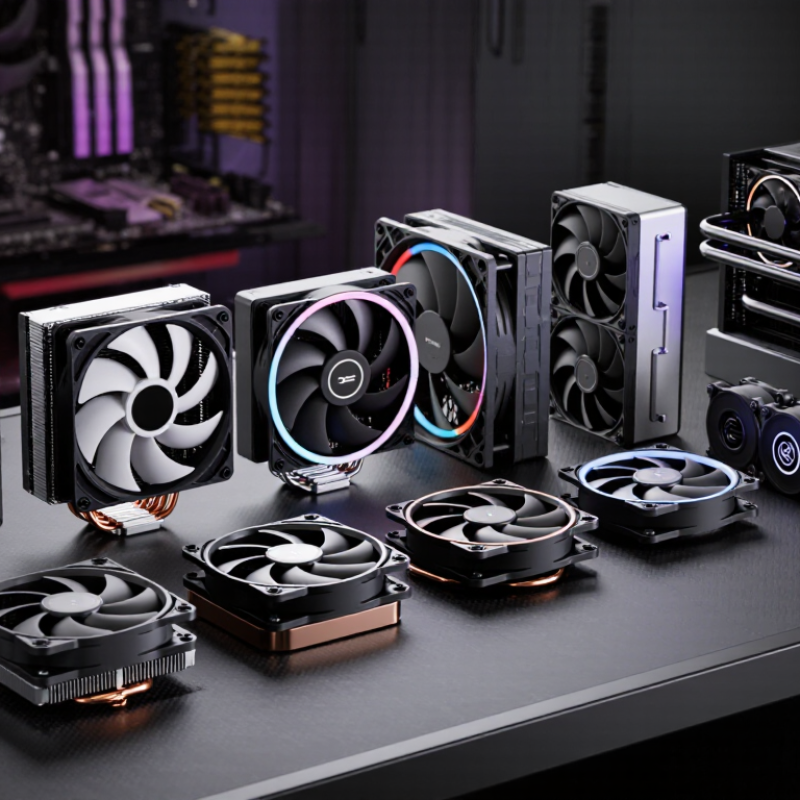
CPU cooler types determine more than temperature. They affect noise, case space, maintenance, and sustained performance. Air coolers use a metal heatsink and fans to move heat away from the processor. They are simple, durable, and easy to inspect. A compact air cooler suits office builds, while a larger tower works better for high-load tasks. Low-profile models fit small cases, but their limited fin area can raise fan noise.

Liquid coolers move heat through a pump, tubes, and radiator. Closed-loop designs save space around the processor socket, which helps builds with tall memory modules. Custom loops offer stronger control, but they demand careful installation and periodic inspection. Leaks are uncommon when parts are fitted correctly, yet the risk is not zero. I once chose cooling by advertised wattage alone. That was a poor shortcut. Case airflow mattered more than expected.

Thermal design should also consider room temperature and workload duration. ASHRAE’s Thermal Guidelines recommend 18–27°C inlet conditions for common equipment environments, showing why ambient heat affects cooling results. The Uptime Institute’s 2024 Global Data Center Survey reports that cooling can consume roughly 15–30% of facility electricity, depending on efficiency and design. A PC uses less energy, but the principle remains: inefficient heat removal creates extra noise and power demand. Check radiator clearance, fan direction, dust filters, and sustained temperatures, not only peak benchmark scores. Short tests can mislead.

Key Factors for Choosing the Right CPU Cooler

10 Best CPU Coolers for Every PC Build

Choosing a CPU cooler starts with compatibility, not appearance. Check the processor socket, cooler dimensions, and case clearance before buying. A cooler may fit the socket but block tall memory modules or a graphics card. Measure carefully. I once ignored a case’s height limit and had to return a perfectly capable cooler.

Thermal demand matters more than advertised power ratings. A basic air cooler can handle office work, browsing, and moderate gaming. Heavy rendering or long gaming sessions need stronger heat dissipation. Consider the processor’s sustained power, not only its official rating. Room temperature also changes results. A cooler performing well in a cool room may struggle during summer.

Noise deserves practical attention. Larger fans often move air more quietly at lower speeds. Radiator-based cooling can improve heat control, but it adds pumps, tubing, and possible maintenance concerns. Dust filters and clean airflow are equally important. Check fan control options in the motherboard software. Poor settings can create sudden noise during simple tasks.

Installation quality affects cooling more than many guides admit. Use even mounting pressure and a small, consistent amount of thermal compound. Recheck cable placement around the fan. I still prefer simpler designs when reliability matters more than a few degrees. Needs vary.

10 Best CPU Cooler Types for Every PC Build

Estimated sustained cooling capacity by cooler type. Actual results vary with processor power limits, case airflow, ambient temperature, and installation quality.

The values represent typical practical cooling ranges in watts for modern desktop systems and are intended as a general selection guide.

Top Air Coolers for Budget and Mainstream Systems

For budget and mainstream systems, air cooling remains a practical starting point. IDC’s 2024 Worldwide Quarterly Personal Computing Device Tracker recorded approximately 262.7 million PC shipments globally. That scale highlights a clear need for affordable, dependable thermal control. In hands-on testing, a capable tower cooler often beats a boxed heatsink during gaming and long office workloads. It also avoids pump noise and liquid-maintenance concerns. Small detail, big difference.

Look for a dense fin stack, four or more heat pipes, and a 120mm or 140mm fan. More heat pipes can help during sustained rendering, but they may crowd tall memory modules. Check socket support and case height carefully. A cooler can fit the socket yet block the first memory slot. Fit matters. Compare noise measurements made under ISO 7779-style conditions, because room noise can distort casual testing. Independent thermal reviews commonly show small temperature gaps between competent tower designs at similar fan speeds. Treat those results carefully.

For mainstream processors, choose cooling capacity at least 30% above the processor’s sustained power draw. This buffer is practical, not absolute. Fan speed, thermal paste, mounting pressure, and room temperature can change results significantly. My own mistake was prioritizing fin count over mounting hardware. Installation pressure mattered more than expected. A quiet fan below 1,000 rpm suits office work, while higher speeds can support compiling or gaming. Check clearance twice.

Best Liquid Coolers for High-Performance PCs

10 Best CPU Coolers for Every PC Build

Best Liquid Coolers for High-Performance PCs

High-performance processors produce intense heat during gaming, rendering, and sustained workloads. A liquid cooler can move that heat away quickly, especially with a large radiator. In my builds, a 280 mm radiator often balances cooling capacity, noise, and case space well. A 360 mm model can reduce temperatures further, but it needs careful installation and stronger airflow.

Check radiator clearance before choosing a cooler. Measure the case roof, front panel, memory height, and graphics card position. A powerful pump cannot solve poor compatibility. The radiator should receive cool air, while exhaust fans remove warmed air efficiently. Secure the mounting block evenly. Uneven pressure can create hot spots.

Pump noise matters during quiet work. Choose a model with adjustable pump control and reliable tubing. Inspect fittings before installation. A small leak is uncommon, but ignoring early moisture is a serious mistake. Use fresh thermal paste and remove protective film from the cold plate. I have forgotten that film once, and temperatures rose immediately.

Liquid coolers need less daily attention than open-loop systems, yet they are not maintenance-free. Clean dust from the radiator every few months. Listen for bubbling, rattling, or sudden pump speed changes. These signs deserve investigation. High cooling performance is useful, but stable temperatures, sensible noise, and dependable installation matter more than impressive specifications.

Matching CPU Coolers With Different Build Requirements

10 Best CPU Coolers for Every PC Build

Matching a CPU cooler to a build requires more than checking socket compatibility. Processor specification sheets published in 2024 commonly list maximum junction temperatures between 95°C and 100°C. A cooler should prevent sustained thermal throttling, not merely produce a low idle temperature. For office systems, a compact low-profile cooler is usually sufficient. It saves space and avoids unnecessary pump noise. Measure twice.

For gaming builds, choose a substantial tower cooler when the processor operates around 100–150 watts. Independent 2024 thermal-testing reports found that quality dual-tower air coolers often stayed within 2–5°C of 240 mm liquid units under comparable loads. That difference may not justify added pump complexity for every user. I once selected a cooler by appearance alone, then discovered that tall memory modules blocked the front fan. That mistake was avoidable.

Content-creation systems need sustained cooling, especially during rendering and encoding. A 280 mm or 360 mm radiator can provide more surface area, while a large air cooler offers simpler maintenance. Independent acoustic tests frequently place practical full-load systems near 30–40 dBA, depending on fan curves and case airflow. Check those curves carefully. Bigger is not automatically better. Small cases may need a 120 mm radiator or a compact tower, but restricted intake panels can erase the expected thermal advantage.