

News

Miro: A New Standard in Responsible Innovation

Miro: A New Standard in Responsible Innovation The Miro monitor arm is setting new benchmarks in sustainability. It offers a high-performance solution without compromising on environmental responsibility. Designed with careful material selection, local sourcing, and longevity in mind, Miro’s responsible approach to design and unique manoeuvrability set it apart from the competition. Sustainable Choices Miro is crafted from energy-efficient materials with a lower carbon impact....

Read more
HSE Advisor

Role Purpose Support in the development, implementation and maintenance of the company’s Health, Safety & Environmental policies, processes, operational procedures, and standards.  Ensuring best practice and championing a continually improving HSE culture within the business. Key Responsibilities Liaise with and provide support to all areas of the business to eliminate, mitigate or reduce identified HSE exposures. Partner with the production management team and team leaders,...

Read more
CMD Ltd LAUNCHES 48-HOUR TURNAROUND ON BETATRAK® RAPID ORDERING SERVICE

CMD Ltd, the specialist in power distribution systems, workstation power and monitor arms, has launched a rapid ordering service for its Betatrak® underfloor powertrack distribution systems and accessories, with a commitment to delivering within 48-hours of an approved purchase order*. The service enables customers to order up to 50 lengths of Standard or Clean Earth (C/E) low noise Betatrak, along with up to 25 feed...

Read more

CMD INVESTS £1/4 MILLION IN NEW MACHINE AS PART OF FACTORY UPGRADE

We have invested in a new £1/4m TRUMPF CNC metal punch as part of an asset renewal strategy for our UK manufacturing capability. The new machine will be used in the production of a wide variety of our power distribution systems and workstation power products at our Rotherham factory. Suitable for handling sheet metal between 0.9mm and 3.0mm thick, the new machine will replace one...

Read more

CMD CATALOGUE PROVIDES TECHNICAL POWER DISTRIBUTION GUIDE

CMD Ltd has released a new catalogue, providing an easy to follow technical guide to our power distribution systems and plug and play desk modules. Detailing CMD’s full range of UK-manufactured power distribution systems and plug and play desk modules, the catalogue will be a helpful source of information to M&E engineers and contractors alike to understand how our power distribution systems connect together and...

Read more

Power Distribution Catalogue
CMD Ltd PLAYS ESSENTIAL ROLE IN ELECTRICAL FIT OUT AT LONDON’S PRESTIGIOUS OFFICE DEVELOPMENT

CMD Ltd, specialist in workplace connectivity and ergonomic solutions, has provided a flexible and high-quality power distribution network for The Ray, a prestigious office development in London’s Farringdon. Well-known for being the former site of The Guardian newspaper, The Ray now stands as an 83,000ft² office development characterised by a modernised warehouse aesthetic, with level two now occupied by a global social media company. The...

Read more

The Ray
CMD plugs in to european opportunity with Schuko Capsule unit launch

CMD Ltd, the specialist in power and connectivity solutions for commercial environments, has launched a Schuko version of its popular fixed format Capsule workstation power module for export to mainland Europe and beyond. A popular on desk power module comprising two sockets and dual USB (type A and C) chargers, CMD’s Capsule unit is already widely specified in the UK as an off-the-shelf workstation power...

Read more

CMD White Schuko Capsule Desk Power Module
CMD LTD EXTENDS MONITOR ARM RANGE WITH THE LAUNCH OF REACH PLUS

CMD Ltd, the specialist in ergonomic and connectivity solutions for commercial interiors, has completed its Reach monitor arm range with the launch of the Reach Plus. Available in single or dual screen options, the Reach Plus has been designed to provide an ideal solution for both single and dual screen workstation configurations, or can be used with next generation of large format curved screens. Suitable...

Read more

CMD Ltd DEMONSTRATES THE ART OF POWER DISTRIBUTION AT THE UNIVERSITY OF WARWICK

CMD Ltd, the specialist in workplace connectivity and ergonomic solutions, has provided Betatrak busbar power distribution and a range of electrical accessories for two major capital investment projects at the University of Warwick. Designed by Fielden Clegg Bradley Studios, the £33 million Faculty of Arts building is a showpiece development comprising four interconnected structures set around a central atrium, which will enable inter-disciplinary collaboration across...

Read more

University of Warwick
CMD BRINGS HARMONY TO COVENTRY UNIVERSITY RESEARCH FACILITIES

CMD Ltd, the specialist in power distribution solutions and workstation power and ergonomics, has provided under desk and on desk power modules for the refurbishment of three Coventry University research buildings. Located on Coventry University Technology Park, a business park designed to encourage collaboration between the university and knowledge-based businesses, the three buildings are being repurposed as office accommodation for university research teams. The refurbishment...

Read more

Coventry University

7 Tips for Choosing a Pop Up Electrical Socket

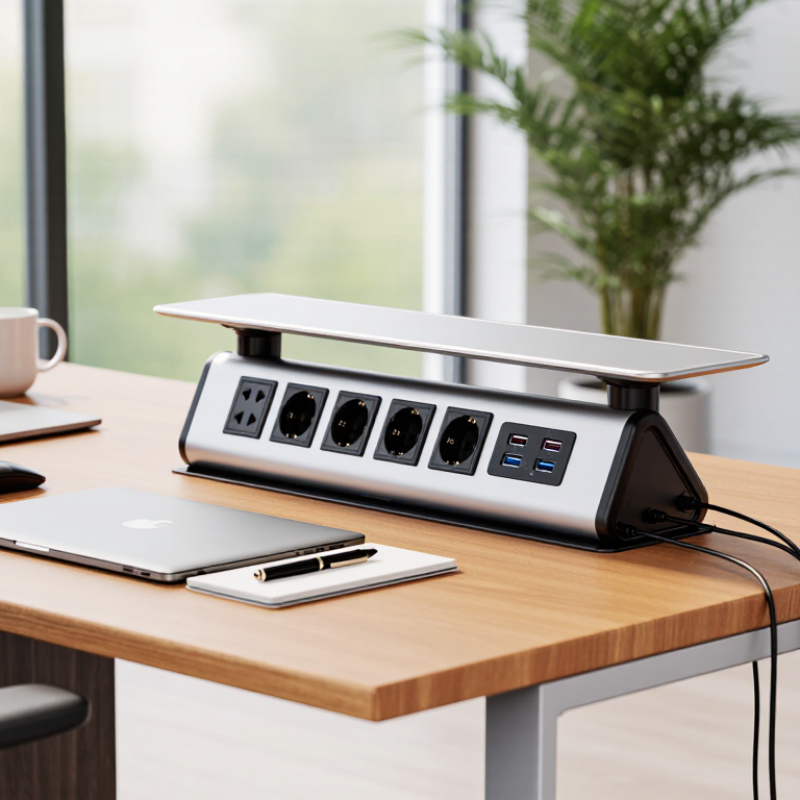
Modern workspaces demand power without sacrificing clean design. A Pop Up Electrical Socket can place charging access beside a desk, island, conference table, or bedside cabinet. Yet convenience should never replace electrical judgment.

The International Energy Agency’s Electricity 2024 report states that global electricity demand grew by about 2.2% in 2023. It also forecasts stronger annual growth through 2026. More devices mean greater pressure on outlets, cables, and circuit planning. A socket may look compact, but its rating, wiring method, and thermal protection matter greatly.

This guide presents seven practical tips for choosing the right Pop Up Electrical Socket. It examines load capacity, socket configuration, USB charging, installation depth, material quality, safety certification, and daily usability. IEC 60884-1 provides important requirements for household plugs and socket outlets, while recognized testing marks can support safer purchasing decisions. However, certification details must match the product’s actual market and application.

Experience also exposes uncomfortable details. A beautiful brushed-metal cover can collect fingerprints. A low-cost unit may hide weak hinges or crowded wiring. A powerful USB port can still charge slowly under multiple connections. Small oversights become irritating every day. Therefore, compare technical documents, inspect warranty terms, and ask a qualified electrician about installation conditions. The perfect choice may not exist. A thoughtful one usually does.

7 Tips for Choosing a Pop Up Electrical Socket

Determine the Required Socket Type and Electrical Specifications

Determine the required socket type before comparing finishes or lifting mechanisms. A pop-up unit must match the building’s voltage, frequency, plug format, and grounding system. Common supplies are 120 V or 230 V, but local conditions vary. Check the circuit breaker rating and the socket’s continuous current rating. Do not size it from appearance. A slim outlet may still need to support a monitor, charger, kettle, or countertop appliance. IEC 60884-1 provides requirements for household socket outlets, while local electrical codes determine acceptable installation methods. Confirm both.

Load planning matters more as electricity use rises. The International Energy Agency’s Electricity 2024 report projects global electricity demand to grow by about 3.3% annually from 2024 through 2026. That growth does not make every desk outlet high-load equipment, but it rewards careful circuit design. The National Fire Protection Association reported an annual average of 32,620 U.S. home fires involving electrical distribution and lighting equipment from 2016 to 2020. The report also recorded about 470 deaths and 1,100 injuries each year. Use grounded contacts, suitable cable sizes, and residual-current protection where required. Consider USB output separately. Its wattage and power-delivery limits should be clearly stated. An IP rating may matter near sinks or wet cleaning areas. I would not trust an unclear datasheet. Measure the available mounting depth, too; a socket that fits the cutout may still crush cables underneath. Recheck assumptions with a qualified electrician.

Check Installation Space, Dimensions, and Mounting Requirements

7 Tips for Choosing a Pop Up Electrical Socket

Check Installation Space, Dimensions, and Mounting Requirements

Before choosing a pop-up electrical socket, measure the installation area carefully. A countertop may look spacious, yet internal supports can block the housing below. Check the available depth, width, and clearance around the mounting hole. Leave enough room for cables to bend without sharp pressure. A tight fit can damage insulation over time.

Measure twice.

Compare the socket’s cutout template with your actual surface, not only the product dimensions. Stone, wood, and composite countertops may require different cutting methods. Confirm the surface thickness and ensure the clamp or mounting ring can secure it properly. Some units need extra space for ventilation, drainage, or cable access. Read the installation instructions before cutting anything. This small step prevents expensive mistakes.

The mounting position also affects daily use. Keep the socket away from sinks, heat sources, and areas where spills collect. Consider whether the cover can open fully beside a wall, appliance, or raised edge. A professional installer can verify grounding, circuit capacity, and local electrical requirements. Do not assume an existing outlet can safely support additional devices. In practice, people often focus on appearance and forget service access. That oversight can make future repairs frustrating. A neat installation should remain accessible, stable, and safe after repeated use.

Evaluate Safety Features, Materials, and Electrical Certifications

7 Tips for Choosing a Pop Up Electrical Socket

Evaluate Safety Features, Materials, and Electrical Certifications

A pop up electrical socket should feel stable before it looks attractive. Check whether the housing closes smoothly and stays flush with the surface. Loose movement can expose cables, especially when a plug is pulled sideways. Look for child-protection shutters, overload protection, and a resettable circuit breaker. These features reduce risk, but they do not replace careful installation. Keep water away.

Material choice matters in kitchens, offices, and workshop counters. Heat-resistant, flame-retardant plastic can limit damage during an electrical fault. A metal frame may improve strength, but it must be properly earthed. Inspect the socket’s cable entry, hinges, and fasteners. Thin covers can crack after repeated use. Small details matter.

Ask for clear electrical certification documents, not only a printed symbol on the product. The paperwork should identify the tested model, rated voltage, current, applicable safety standard, and testing organization. Certification from an independent laboratory offers stronger evidence than vague claims such as “safe” or “premium.” Verify that the certificate matches the exact socket version. Similar-looking models may use different internal parts. I would not assume a familiar appearance proves compliance. That assumption is easy to make and difficult to defend after an accident. A qualified electrician should also confirm grounding, load capacity, and installation depth before the unit is used.

Compare Power Options, Port Configurations, and User Convenience

Choosing a pop-up electrical socket starts with the devices it must serve, not its appearance. In a recent workspace fit-out, I counted laptops, displays, lamps, and chargers at each desk. The number was higher than expected. Pew Research Center reported in 2024 that 91% of U.S. adults own a smartphone. That figure matters: charging demand is now routine, not occasional. A socket with two AC outlets may suit a meeting table, but a shared desk may need USB-C and USB-A ports.

Compare power options carefully. Standard AC outlets handle varied equipment, while USB-C Power Delivery can provide up to 240 watts under the USB-IF specification. That headline figure is not a promise for every socket. Confirm the unit’s total output, per-port limits, and thermal protection. For monitors or small appliances, check rated wattage and surge requirements. A high port count can still mean slow charging. More is not always better.

Convenience depends on placement. Measure the cutout, cable route, and retraction space before ordering. Look for smooth opening, clear port labels, child-safe shutters where appropriate, and a replaceable power lead. The U.S. Department of Energy notes that standby loads can account for 5% to 10% of residential energy use. A switched socket can reduce idle draw, but only when users remember to switch it off. I sometimes forget. That is why tactile controls and visible indicators matter. Ask for test reports covering electrical safety, load performance, and repeated pop-up cycles. A sleek unit without documentation is a gamble.

Select a Durable Design That Matches the Intended Environment

A pop-up electrical socket should fit its environment, not merely its countertop or desk. Start by identifying moisture, dust, heat, impact, and cleaning chemicals. A dry office is not automatically gentle. Fine dust can enter hinges, while frequent wiping can weaken exposed surfaces.

The 2024 Global Status Report for Buildings and Construction states that buildings consume about 32% of global energy. That figure makes efficient, durable equipment increasingly important. Choose sockets with clear electrical ratings, tested temperature limits, and replaceable components where possible. IEC 60529 classifies protection against solids and water through IP ratings. Higher digits generally indicate stronger protection, but the rating must match actual installation conditions. A kitchen island may need splash resistance, while a conference table may mainly need impact protection. Do not treat an IP rating as a complete safety guarantee. Installation quality still matters.

In my experience, users often overlook cable movement. Repeated bending under a desk can damage an otherwise robust socket. Look for strain relief, stable mounting, smooth covers, and hinges that do not scrape against the work surface. NFPA research continues to identify electrical distribution equipment as a significant factor in structure fires, so certification from a recognized testing body deserves careful attention. Cheap plastic can feel acceptable during installation. It may age poorly under heat and daily cleaning. That is an inconvenient lesson. Check the manufacturer’s test documentation, but question vague claims and missing test conditions.

7 Tips for Choosing a Pop Up Electrical Socket

Select a durable design that matches the intended environment. The chart compares commonly used minimum ingress-protection levels for different installation conditions.

  • Match the IP rating to the expected exposure to dust and water.
  • Choose impact-resistant materials for workshops and commercial spaces.
  • Check the socket’s rated voltage and current before installation.
  • Select a cover and sealing system suitable for frequent cleaning.
  • Consider heat, humidity, and UV exposure in the installation area.
  • Choose a mechanism tested for the expected number of opening cycles.
  • Confirm that the product complies with applicable electrical standards.

IP rating reference: The first digit indicates protection against solid objects and dust, while the second digit indicates protection against water. Higher values generally provide greater protection, but the rating should always be verified for the specific product and installation.